Directions for Use
102
Operation Manual
2.5.7 Patient's Exit
Removetheheadbandontheheadxatorfor3Dimageacquisition,andinstructthepatient
to step straight back.
* Caution
• When the patient makes his/her exit, make sure to escort and lead the way. Since the
patient needs to move backward when removing him/herself from the equipment, the
patient might trip over or cause similar accidents.
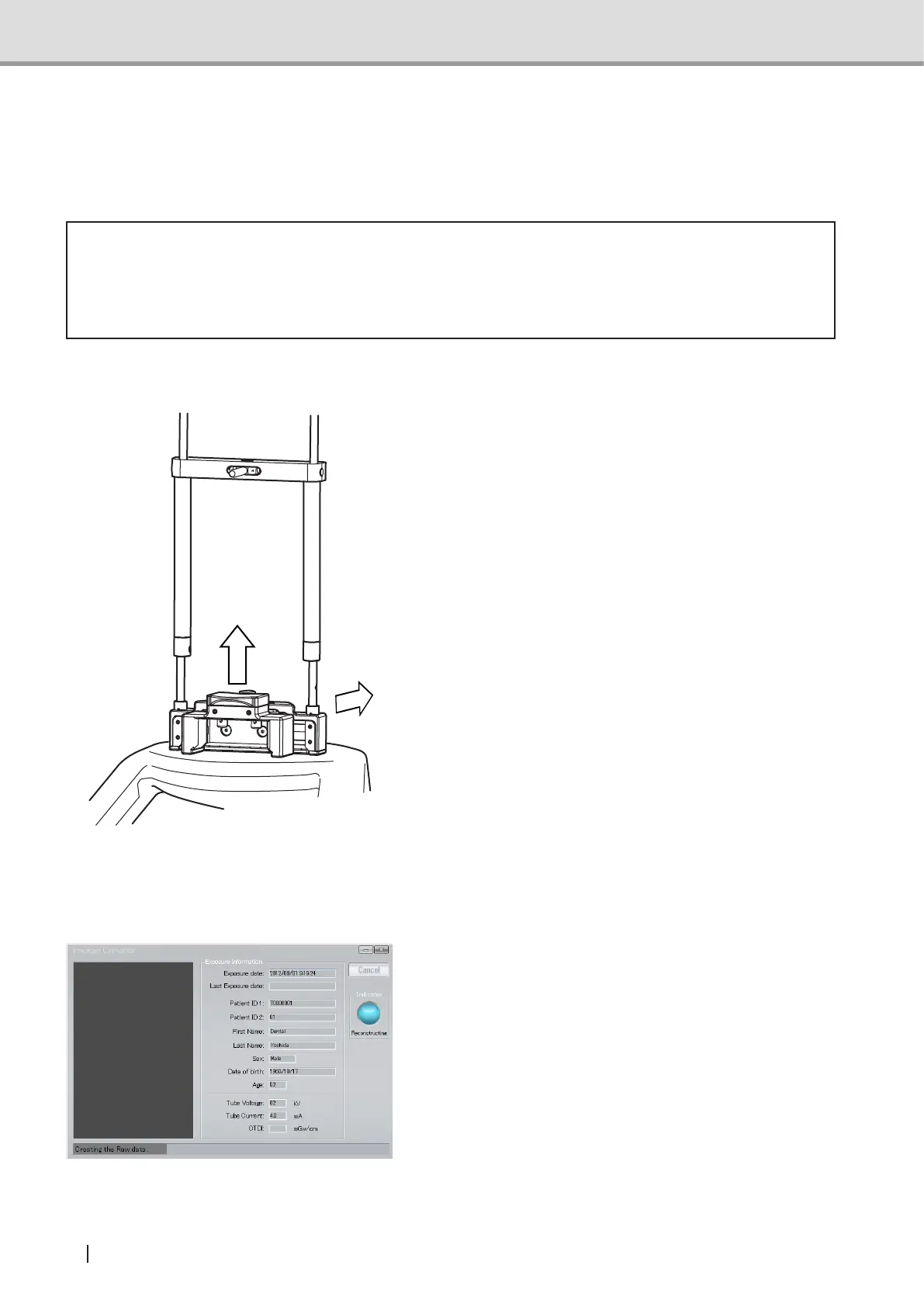
2.5.8 Detachingtheheadxatorfor3Dimageacquisition
Whenyouhavenished3Dimageacquisi-
tion, dismount the
head xator for 3D
image acquisition in the following steps.
1 Raise the head xatorxtureleverof
the
head xator for 3D image acquisi-
tion.
2 Hold the shaft of the head xator for
3D image acquisition with both hands.
Detach it from the chin rest base in the
opposite direction from the column.
2.5.9 Image Transfer
Once X-ray irradiation is complete, reconstruction of acquired image automatically starts.
1 Image Creator's Image Construction
screen changes from "acquisition" to
"3D Image Reconstructing", and data
is reconstructed to be transferred to 3D
viewer.
①
②



 To Next Page