Before Using this Product
35
Operation Manual
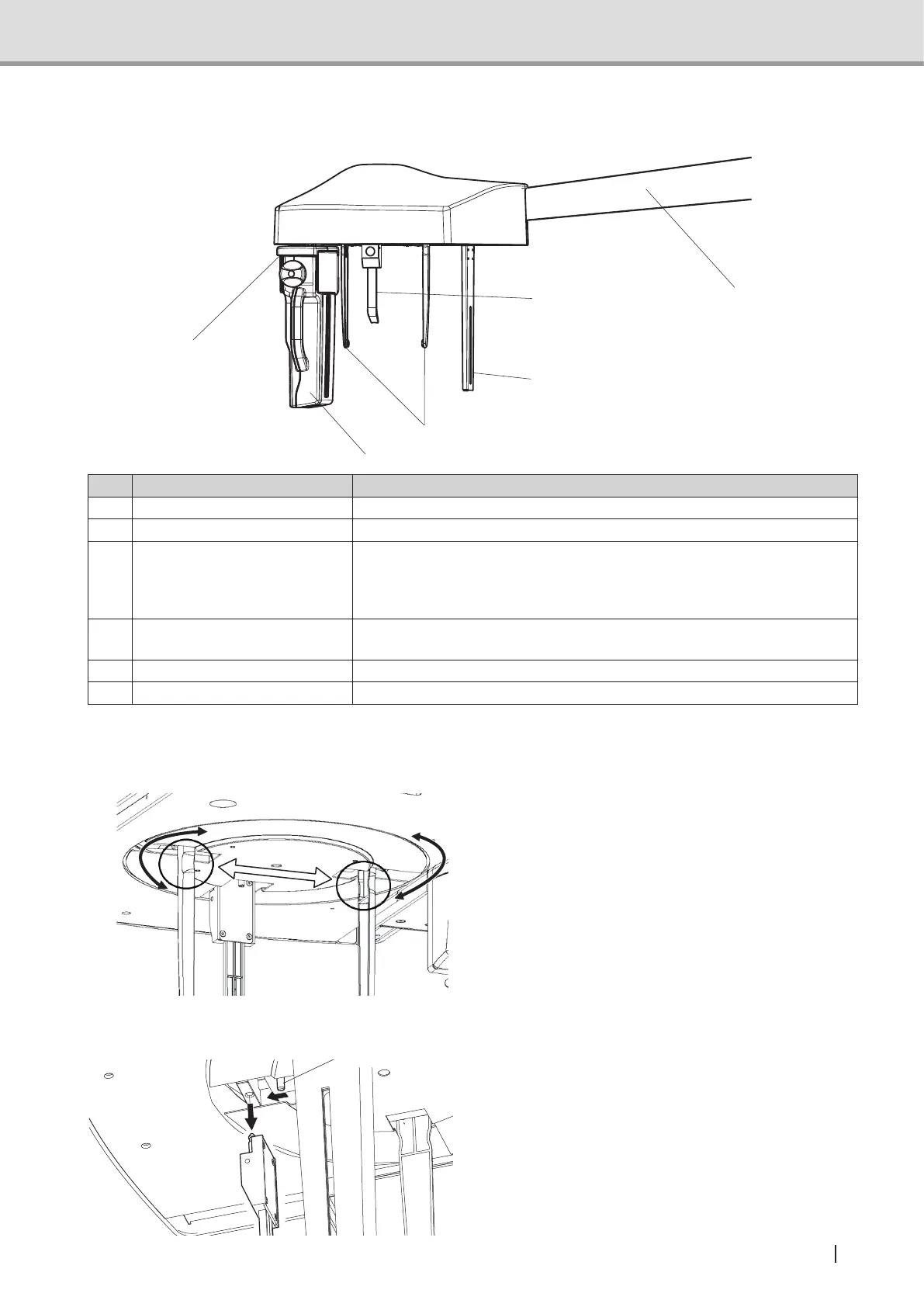
1.3.8 Cephalometric unit (*)
1
2
6
3
4
5
Name Function
1 Ear rod Adjuststothepatient’sporusacusticusandxesthehead.
2 Nose support Adjuststothecenterofpatient’seyebrowsandxesthehead.
3
Cephalometric sensor
(Panoramic/Cephalometric-
combined sensor)
This unit converts the X-ray absorption data into electronic data by the
signal from the control device and exports the image to the computer
unit.
This sensor can be used as Panoramic sensor.
4
Docking station
(Cephalometric)
For Cephalometric image acquisition, attach the Panoramic/
Cephalometric-combined sensor here. Moves during image acquisition.
5 Cephalometric arm Supports Cephalometric sensor.
6 Second slit Reduces the radiation exposure for the patient.
* For equipment with Cephalometric
Methods of Rotating, Opening and Closing of Nose Support and Ear Rods
Hold the indentations pictured left and rotate the
nose support and ear rods.
Hold the same indentations when opening and
closing ear rods.
Detaching nose support
As shown on the picture on the left, pull
the release pin of the nose support for
detachment.
release pin



 To Next Page