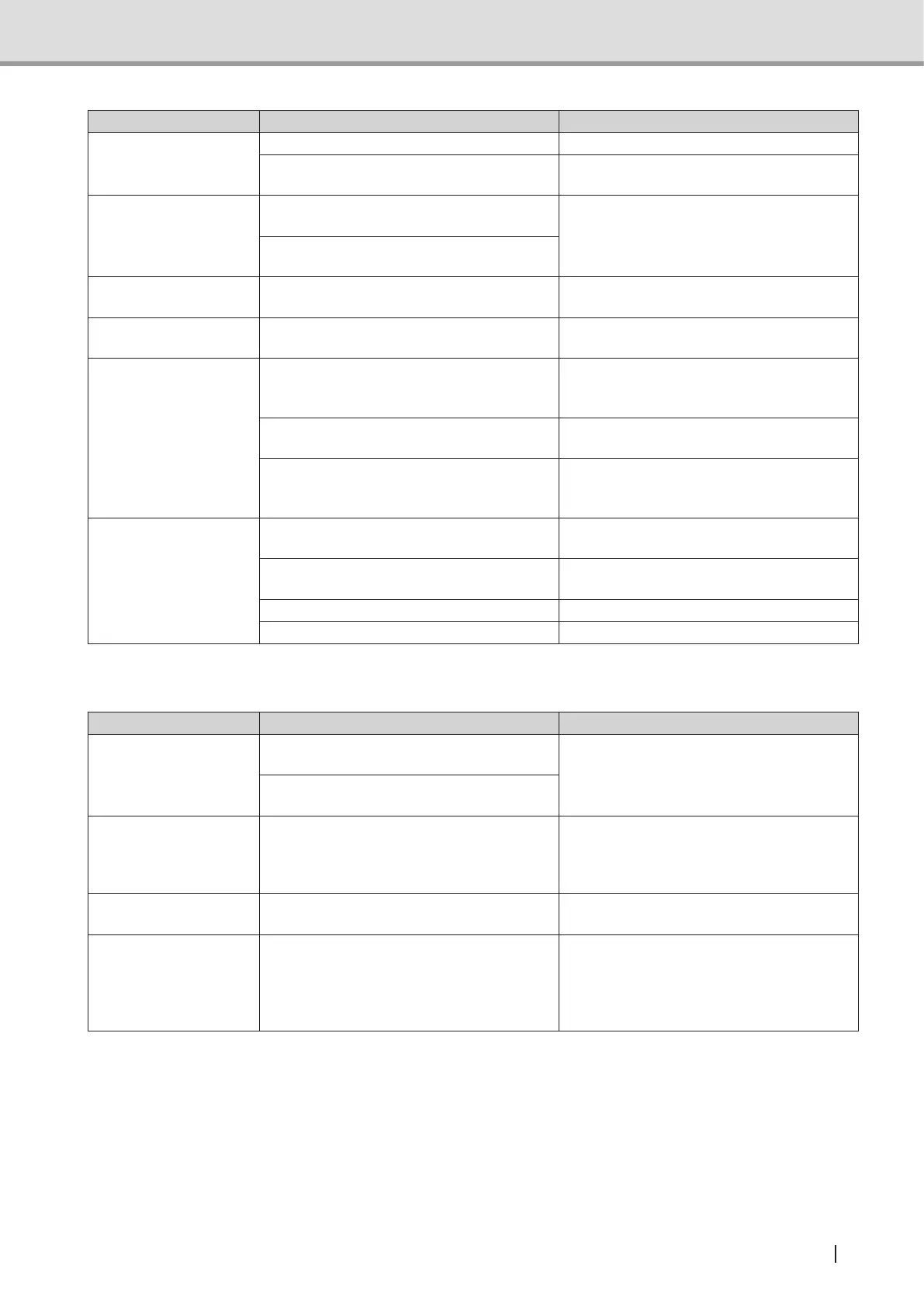
Trouble Shooting
123
Operation Manual
Symptom Possible cause Action
With the power switch
on ( | ), X-ray
cannot be exposure.
Failed unit Contact your dealer.
The emergency stop switch has been
pressed.
Turn the emergency stop switch clockwise
to release the switch.
Abnormal noise sounds
during X-ray exposure.
The X-ray tube has been shorted out or a
gas has been generated in it.
Contact your dealer.
The high-voltage transformer coil has
been shorted out.
No reaction to
operation from the PC
The mouse keyboard has not been
correctly connected to the PC.
Connect the mouse keyboard connector
to the PC.
No power is supplied to
the PC.
The power cable has not been connected
to the PC.
Pluginthepowercablermlyintoboth
the PC and the outlet.
None appears on the
monitor screen.
The cable has not been correctly
connected between the monitor and the
PC.
Connect correctly the cable to the PC.
The power cable has not been connected
to the monitor.
Pluginthepowercablermlyintoboth
the monitor the outlet.
The PC has been activated but the power
switch of the monitor has not been turned
on.
Check that the power button of the
monitor has been pressed and power is
supplied (ON).
"Please check the
proper connection
of the cable and the
power being turned
on." message has
appeared.
The PC connection cable has not been
correctly connected to the PC.
Connect correctly the cable to the PC.
The PC communication port has not been
congured.
Congurethecommunicationport(see"5
User Program Mode" P.119 ).
No power is supplied to the unit. Turn the main switch on ( | ).
Failed unit Contact your dealer.
(For equipment with Cephalometric)
Symptom Possible cause Action
The equipment
does not switch to
Cephalometric image
acquisition mode.
Arm does not move to the Cephalometric
image acquisition position.
Contact your dealer if this happens
frequently.
Sensor unit does not move to
Cephalometric image acquisition position,
Some parts of the
Cephalometric image is
missing(exposureeld
is off).
Slit position or Cephalometric sensor
position is not adjusted properly.
Contact your dealer.
Cephalometric image is
blurred.
Patient may have moved during the image
acquisition.
Fix the patient properly and advise him
not to move during image acquisition.
Right and left ear
rods position for the
Cephalometric lateral
image (LA) is off from
the original position.
Something may have hit the ear rod. Contact your dealer.



 To Next Page