Directions for Use
58
Operation Manual
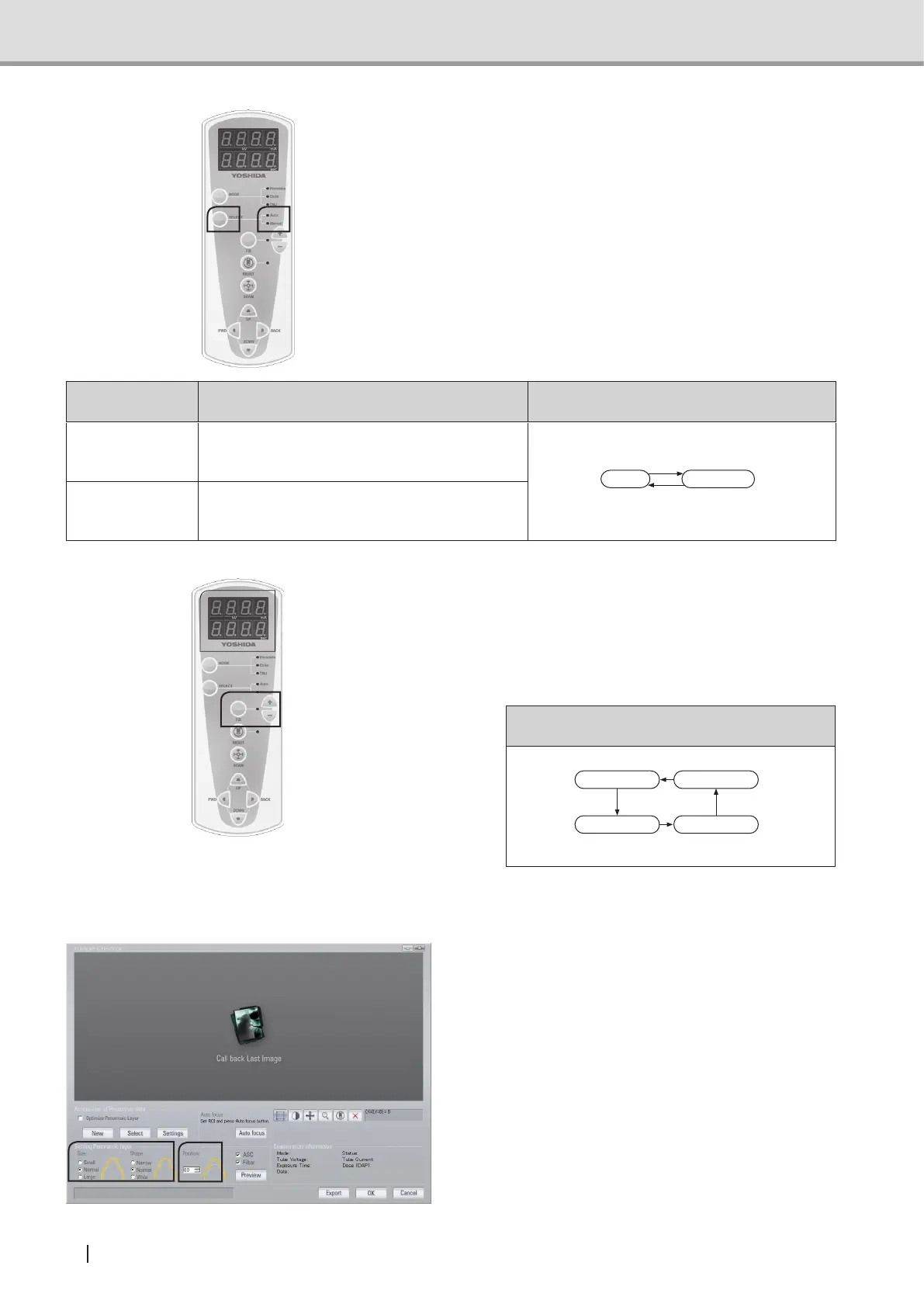
2 Press the Select switch to select
“Auto” or “Manual” switches. The LED
associated with the selected mode will
turn on.
Exposure status Function
To which mode is switched when Select
switch is pressed
AUTO
SpeciesautomaticallythevaluesforTube
voltage and Exposure time appropriate for the
patient's dental arch size.
ManualAuto
MANUAL
Allows the operator to modify arbitrarily the
value for Tube voltage, Tube current, or
Exposure time.
3 In the Manual status, press the Fix
switch, select “Tube voltage”, “Tube
current”, and “exposure time”, and use
the “+” and “-” switches to modify the
settings.
To which mode is switched when Fix switch is
pressed
Shifting to new setting
for tube current
Shifting to new setting
for tube voltage
Settings confirmed
Shifting to new setting
for exposure time
See also : "Parameter settings table"
P.28
4 In the main screen of Image Creator,
set up the dental arch size and dental
arch shape according to the patient. Set
the tomographic position at 0.



 To Next Page