ZCube-21 User Guide
DOC-USR-0253-01
______________________________________________________________________________________
Z3 Technology, LLC ♦ 100 N 8
th
ST, STE 250 ♦ Lincoln, NE 68508-1369 USA ♦ +1.402.323.0702
5.3 Stream RTSP
5.3.1 RTSP Camera Setup
Note: Settings in the user interface cannot be changed if the unit is currently encoding.
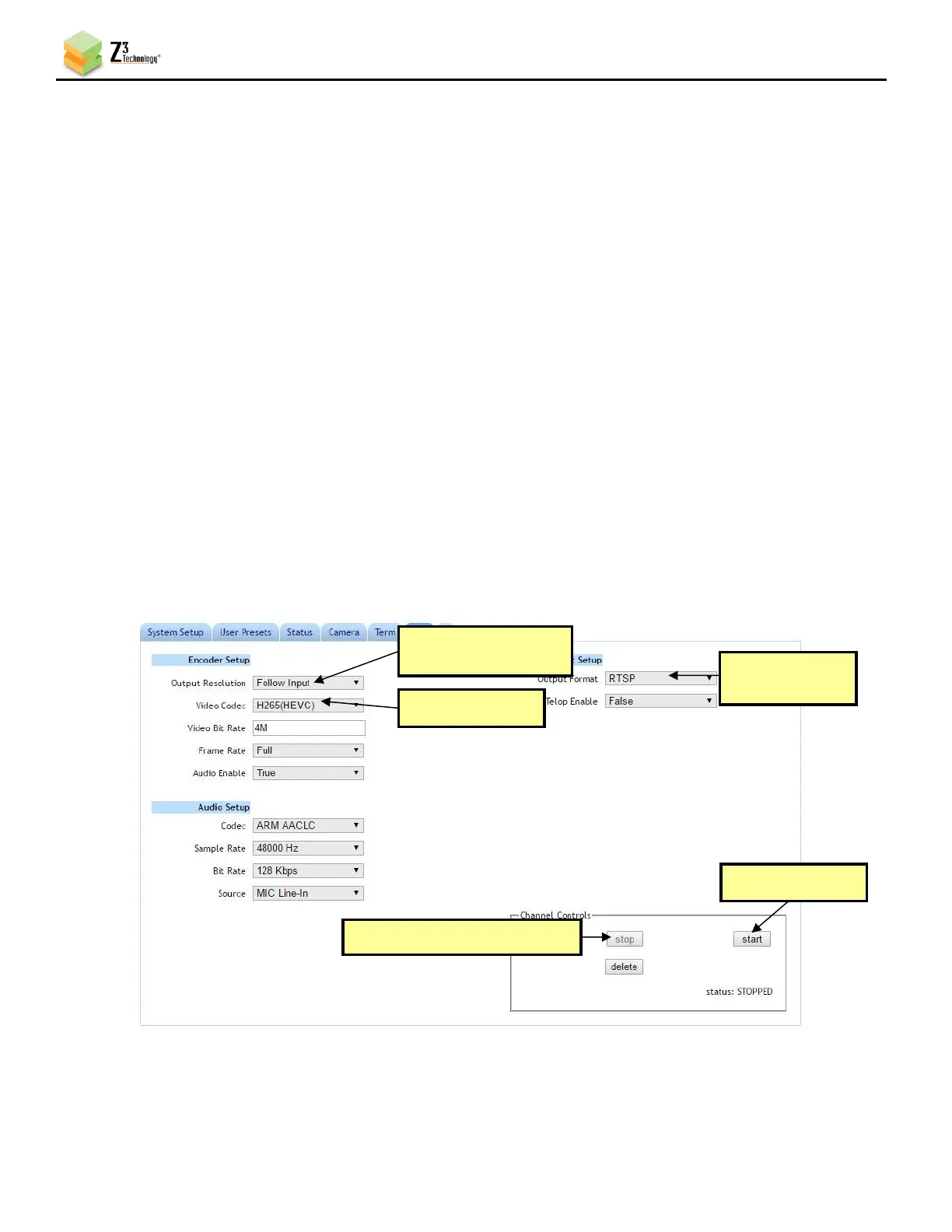
(1) Return to the user interface, and if necessary, click on the Stop button in the Channel Controls
section of the user interface CH1 tab or the Stop All button in the lower right corner of the screen
of any tab.
(2) Verify Output Resolution is set to Follow Input to output a 4K stream. If a lower resolution output
is desired, select this in the dropdown menu and resizing will occur.
(3) Select the codec you would like to use for your video encoding. In the pictured example,
H265(HEVC) is selected.
(4) Under Output Setup, select RTSP in the Output Format dropdown menu.
Note: By default a limited selection of video encoding settings are available in the user interface. See Section
7.2, “Advanced Settings Mode”, for more information on accessing additional settings.
(5) Click on the Start button. After a moment, the encoder status will change to RUNNING and the
fields above will appear in dark grey. The status LED on the unit will blink green when streaming.



 To Next Page