ZCube-21 User Guide
DOC-USR-0253-01
______________________________________________________________________________________
Z3 Technology, LLC ♦ 100 N 8
th
ST, STE 250 ♦ Lincoln, NE 68508-1369 USA ♦ +1.402.323.0702
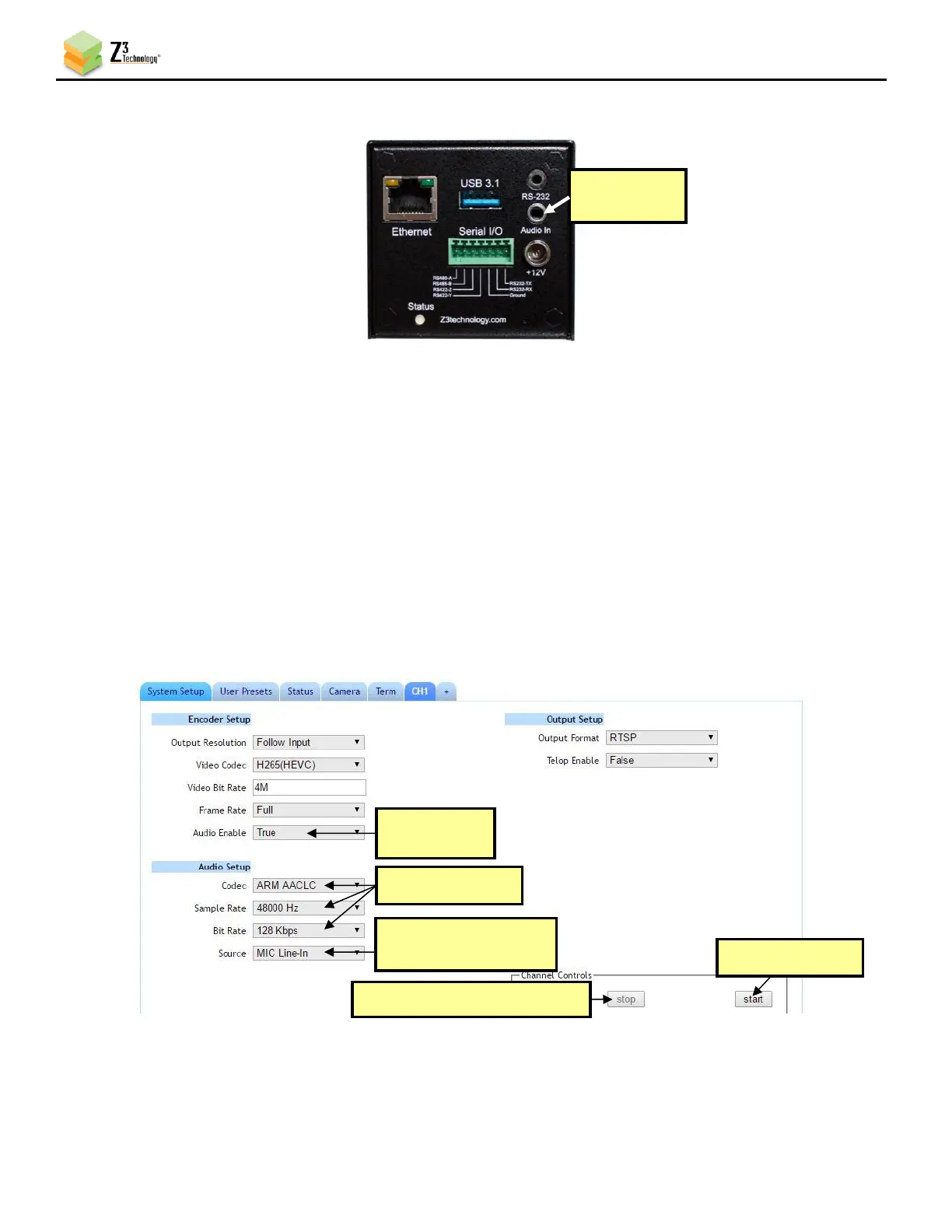
5.7 Microphone Input
(1) Connect a microphone with a 3.5mm cable output to Audio In on the back of the encoder.
(2) Return to the user interface, and if necessary, click on the Stop button in the Channel Controls
section of the user interface CH1 tab or the Stop All button in the lower right corner of the screen
of any tab.
(3) Verify Audio Enable is set to True and set your desired values for Codec, Sample Rate and Bit
Rate.
(4) Select the appropriate option from the Source dropdown menu corresponding to your microphone:
a. MIC Line-In should be used with non-powered/non-amplified microphones.
b. MIC should be used with powered/amplified microphones.
(5) Set Audio Enable to False to disable encode of the audio input.



 To Next Page