ZCube-21 User Guide
DOC-USR-0253-01
______________________________________________________________________________________
Z3 Technology, LLC ♦ 100 N 8
th
ST, STE 250 ♦ Lincoln, NE 68508-1369 USA ♦ +1.402.323.0702
7.0 PERFORMING OTHER OPERATIONS WITH THE ZCube-21
7.1 Save Current Settings
If you have a specific configuration you’d like to preserve, you can save it so that when the ZCube-21 is
powered off and back on, it automatically boots to those settings.
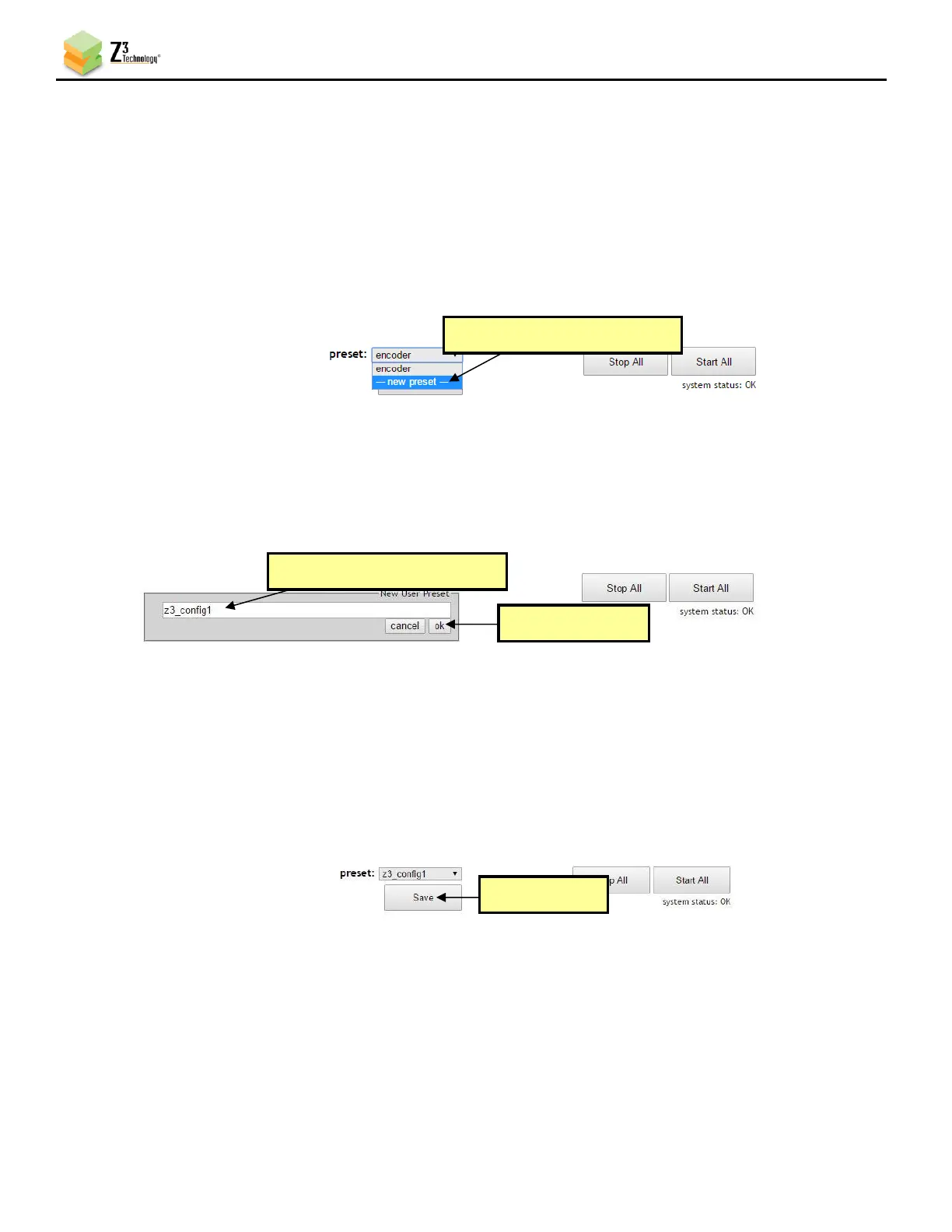
(1) In the preset dropdown menu located at the bottom of any screen, select --- new preset ---.
(2) A textbox will appear. Enter your desired preset name. In the pictured example, z3_config1 is
used.
(3) Click ok.
(4) Select your newly created configuration from the preset dropdown menu at the bottom of the
screen.
(5) As soon as you select z3_config1, the screen will reload.
(6) Change your desired settings.
(7) Once your changes have been set in this configuration, click on the Save button.
(8) A pop-up window appears to confirm the saving of these settings is complete. Click OK.
Note: The very first time settings are saved may take up to 30 seconds. This is due to some flash initialization
which occurs on the very first configuration save.
(9) In order for changes to network settings to take effect, the unit must be re-started. Click the



 To Next Page