ZCube-21 User Guide
DOC-USR-0253-01
______________________________________________________________________________________
Z3 Technology, LLC ♦ 100 N 8
th
ST, STE 250 ♦ Lincoln, NE 68508-1369 USA ♦ +1.402.323.0702
9.4 The Term Tab
This section reflects changes for software version 2.36b or newer.
These are advanced settings and no error correction is in place on these values, so it is expected that
the user which changes these settings is an expert or familiar with the changes being made for
deployment for their organization.
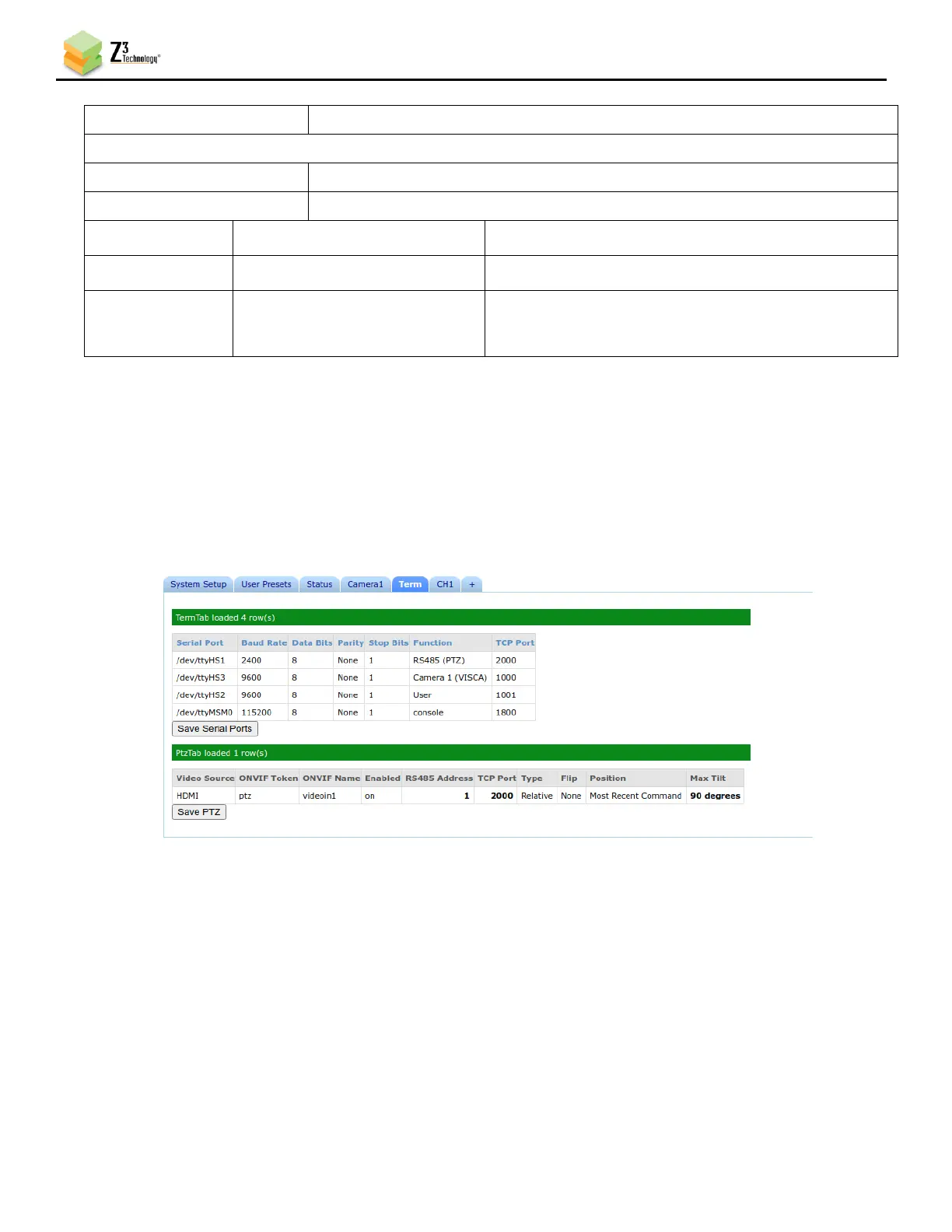
Figure 46 Term Tab Configuration
Within the Term tab there are two sections TermTab and PtzTab
TermTab allows for the functionality change of Serial Port's defined on the Z3 hardware, along with
the default Baud Rate and TCP Port.
PtzTab allows for the ability to enable/disable the PTZ hardware connected via a RS-485 connection
along with defining the device address being used on the RS-485 interface for each PTZ device; both
TCP Ports are required to be defined as the same Serial Port defined in the TermTab section above for



 To Next Page