ZCube-21 User Guide
DOC-USR-0253-01
______________________________________________________________________________________
Z3 Technology, LLC ♦ 100 N 8
th
ST, STE 250 ♦ Lincoln, NE 68508-1369 USA ♦ +1.402.323.0702
APPENDIX B: Configuring the Wowza Server for RTMP
In this section, configuring Wowza Streaming Engine
TM
version 4.1.0 is described.
To configure Wowza to work with RTMP streaming from the ZCube-21, the following steps are needed:
(1) Log in to the Wowza Streaming Engine Manager Home page by typing http://localhost:8088.
(a) localhost is the IP address of the PC with the server.
(b) In this example, the full URL is “http://192.168.0.4:8088”.
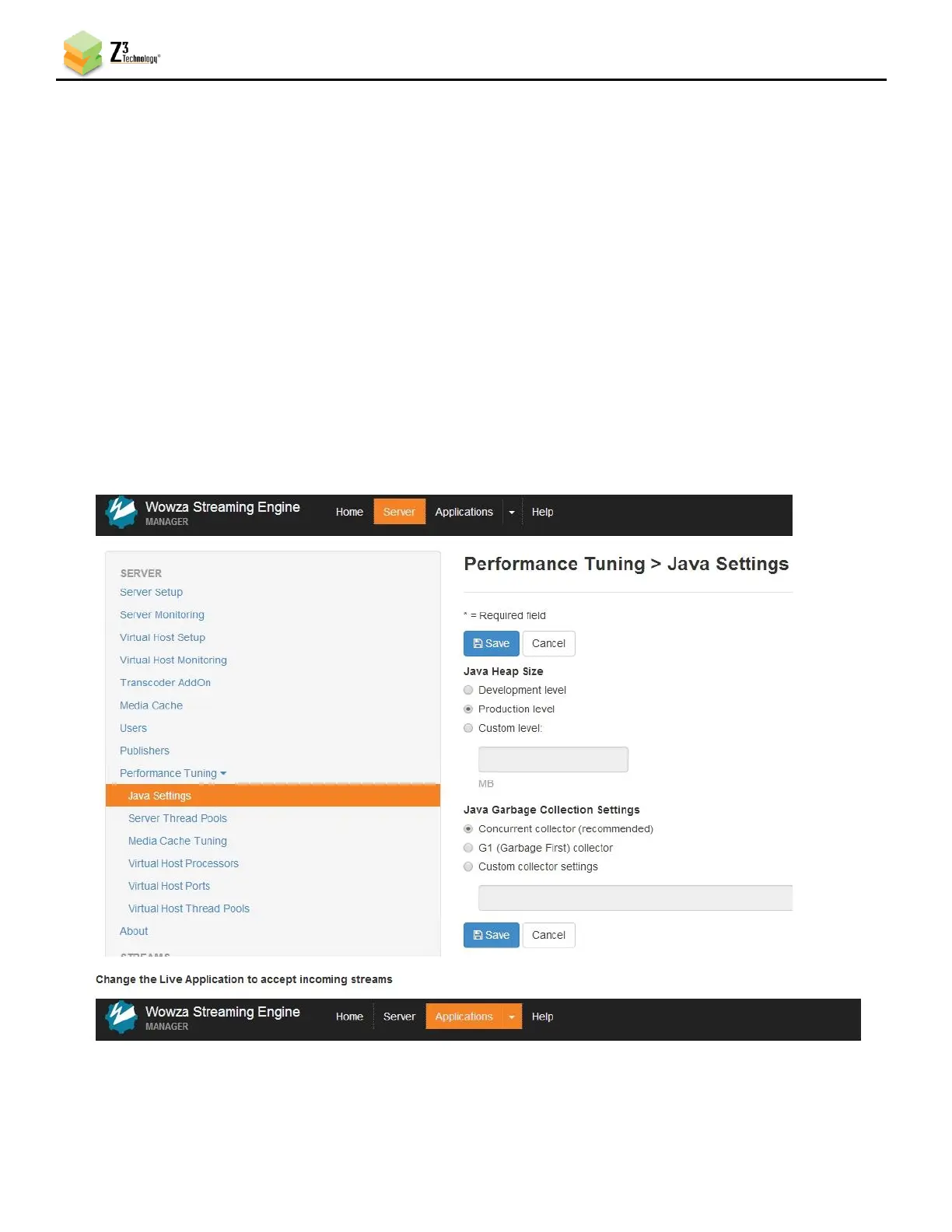
(2) Click on Server in the top band of options.
(3) On the left column, click on Performance Tuning and then Java Settings.
(4) Click Edit and then change Java Heap Size to Production Level and Java Garbage Collection
Settings to Concurrent collector.
(5) Click on Save.
(6) Click on Applications in the top band of options.



 To Next Page