ZCube-21 User Guide
DOC-USR-0253-01
______________________________________________________________________________________
Z3 Technology, LLC ♦ 100 N 8
th
ST, STE 250 ♦ Lincoln, NE 68508-1369 USA ♦ +1.402.323.0702
Reboot button in the System Setup tab, or power the unit off by unplugging the power supply. Then
plug the power supply back in and wait 15-30 seconds for the unit to boot up.
7.2 Advanced Settings Mode
A limited range of encoding settings are available by default. Additional settings can be accessed in
Advanced Settings Mode for greater customization to your specific application.
7.2.1 Setup a Custom Configuration
(1) The first step is to set up a custom configuration so that the advanced settings will remain visible.
To do this, see Section 7.1: Save Current Settings.
(2) Return to the System Setup tab.
(3) Select your newly created configuration from the preset dropdown menu at the bottom of the
screen.
(4) As soon as you select your preset, the screen will reload.
7.2.2 Access Advanced Settings
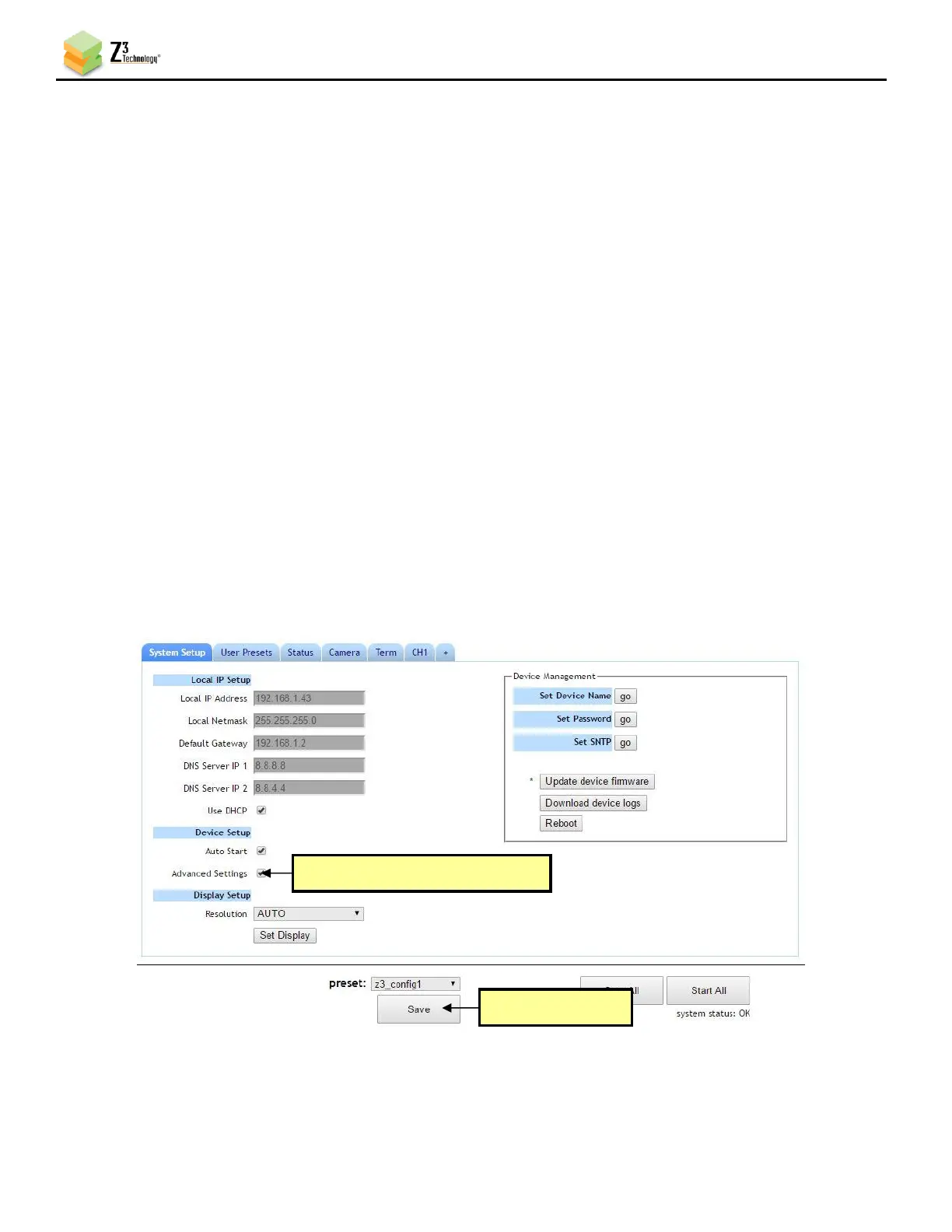
(1) Under Device Setup, check the Advanced Settings box.
(2) Click on the Save button.



 To Next Page