ZCube-21 User Guide
DOC-USR-0253-01
______________________________________________________________________________________
Z3 Technology, LLC ♦ 100 N 8
th
ST, STE 250 ♦ Lincoln, NE 68508-1369 USA ♦ +1.402.323.0702
7.5 Upgrade Firmware
Firmware upgrades for the ZCube-21 are available for download on your Z3 account.
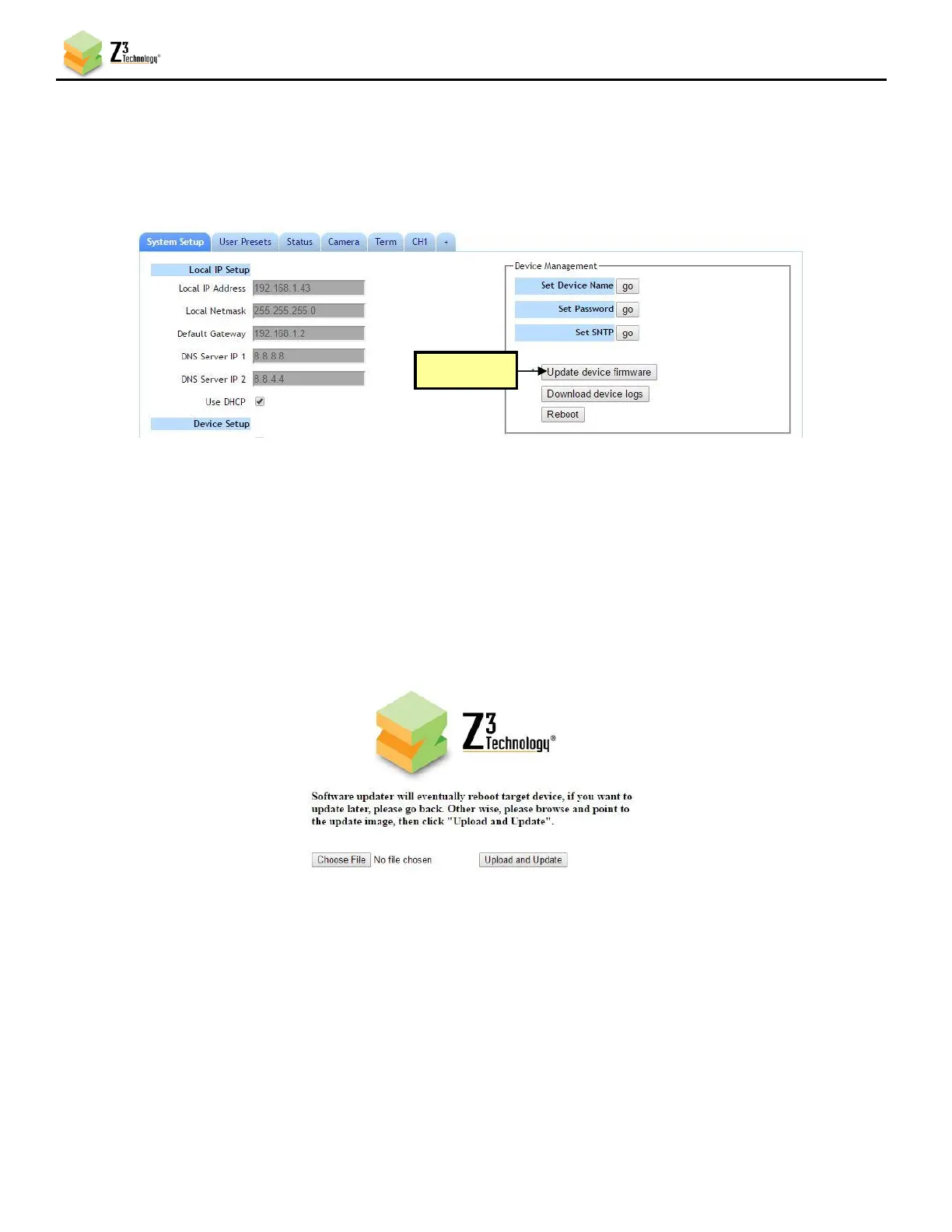
(1) In the System Setup Tab, click the Update device firmware button.
Note: If this button is not selectable, it is because the encoder is running. If you click Stop at the bottom of the
screen, the Update device firmware button will become active.
(2) A Software Updater screen will appear. Click Choose File and navigate to the software image file
on your PC that you wish to update with.
(3) Once your desired image file is selected, click Open.
(4) Click Upload and Update. A progress message will appear. Once update of firmware is completed it
will return to the main menu.



 To Next Page