Section D Graphic Display
D-65
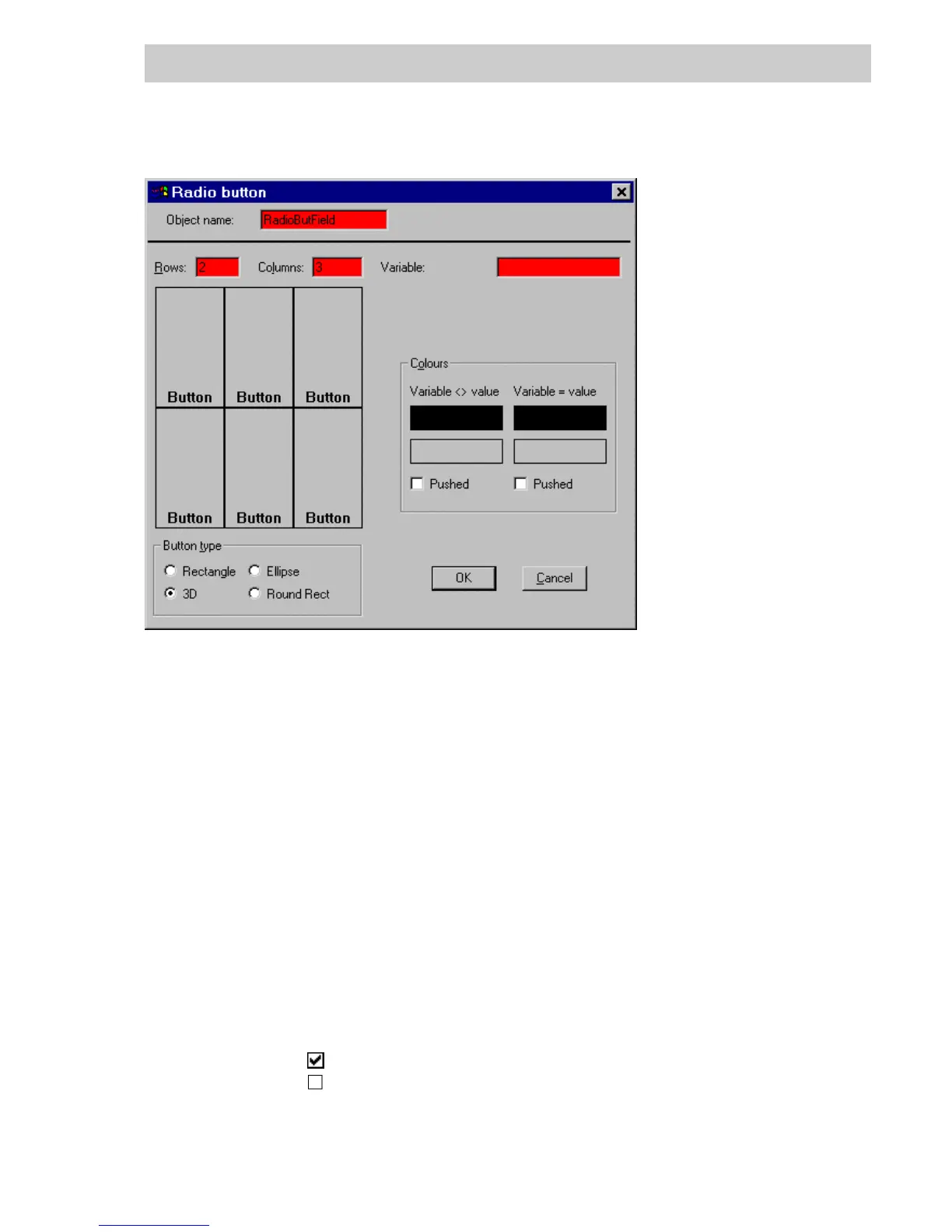
D 5.22.3 Set parameters for radio button fields
Variable The process variable associated with all the buttons in the radio button
field. For details of select fields see page D-38, Configuring an action.
Rows/Columns Number of button rows and columns, max. 5 each.
The button display is modified accordingly.
Button Diagrammatic representation of the buttons. A mouse click on a button
opens the window for defining the button parameters. See page D-66,
Set parameters for individual buttons using the button parameters
window and page D-64, Set parameters for button field.
Colors Color definition is relevant to all button texts and the background of all
buttons.
Variable <>Value/Variable = Value
Respective color settings for the buttons and button texts when the value
of the associated variable is different from or the same as the specified
value. A mouse-click on the upper color field selects text color, while a
click on the lower color field selects the button color, both via the color
selection parameters window (see page D-13).
Pushed
The button is shown as pushed.
The button is shown as not pushed.
Button type Display format of the button in the graphic display.
di0554uk.bmp
Gross Automation, 1725 South Johnson Road, New Berlin, WI 53146, www.ssacsales.com, 800-349-5827



 To Next Page