Section D Graphic Display
D-69
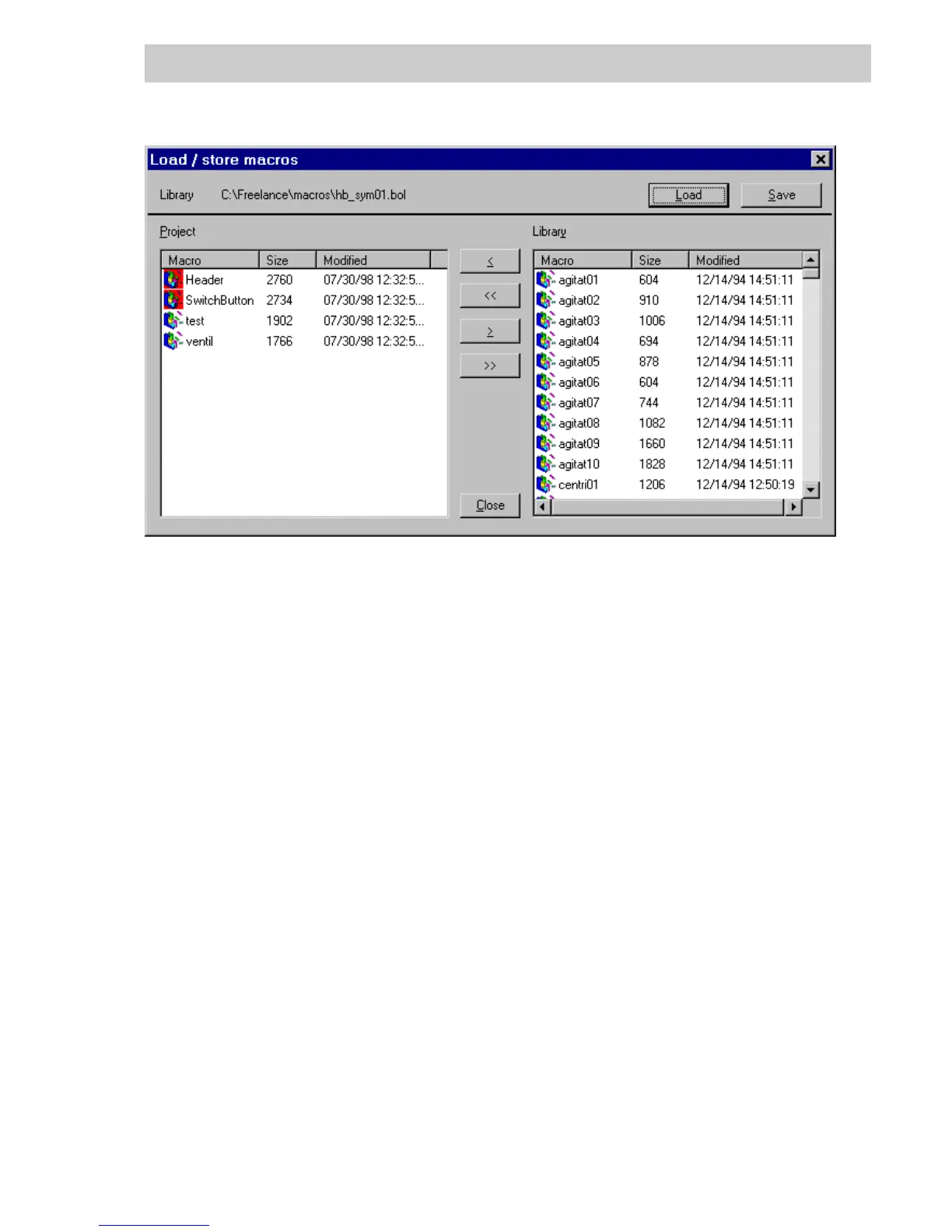
Library: Path and filename of the most recently loaded macro library.
Project: In the left portion of the dialog, the graphic macros available in the project
are listed. An icon with red background displayed on top of a macro name
indicates a macro that was used in the project.
Library In the right portion, the contents of the most recently loaded macro library
are listed.
Load A macro library can be loaded from a data carrier. After loading, the macros
in the library are displayed in the right portion of the dialog.
Save After entering a directory and filename all macros listed in the right portion
of the dialog are saved to the data carrier. The dialog display is not
changed.
> All marked graphic macros of the project (left portion of the dialog) are
copied to the library list (right portion).
>> All graphic macros of the project (left portion of the dialog) are copied to the
library list (right portion).
< All marked graphic macros in the library list (right portion of the dialog) are
copied for use in the project (left portion).
<< All graphic macros in the library list (right portion of the dialog) are copied
for use in the project (left portion).
D
EL All marked graphic macros are deleted from the list. In the project list, only
macros can be deleted which have not been used in the project.
tu0601us.bmp
Gross Automation, 1725 South Johnson Road, New Berlin, WI 53146, www.ssacsales.com, 800-349-5827



 To Next Page