Section D Graphic Display
D-14
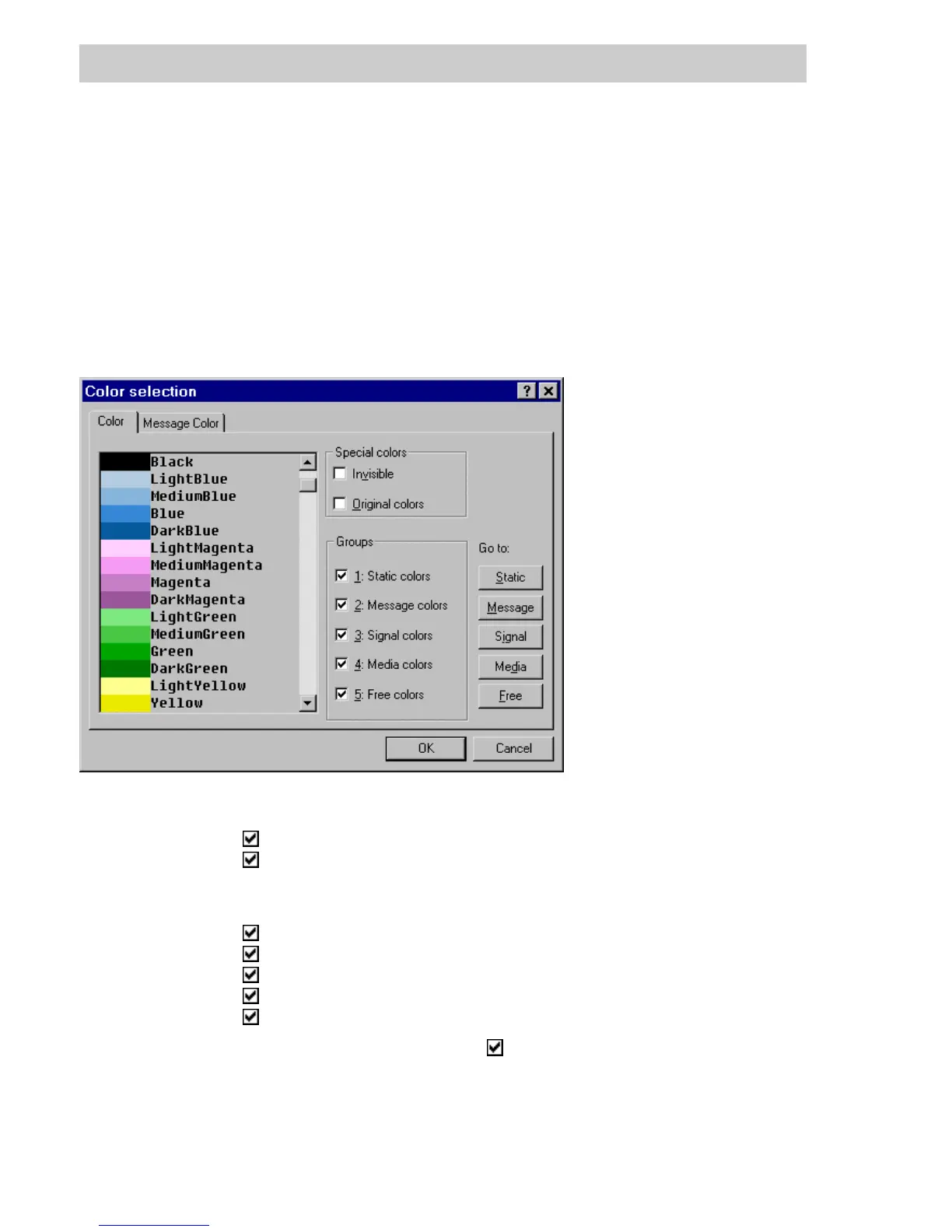
All the available colors are subdivided into various different color groups. The groups can be
shown and hidden separately, and a direct jump to a particular color is also possible.
Each group can be used in any application, except display background.
The special colors group is an exception. The invisible option can only be selected for line
attributes, as a text background and for animation; it has the effect that the lines or graphic
objects are displayed as invisible, i.e. transparent.
The Original colors setting can only be used in animation. Here, the original colors of the graphic
object remain intact and are not altered by any animation color settings.
Special colors
Invisible
no color, but invisible, i.e. transparent.
Original colors
the colors of the static graphic object are used.
Groups Selection of the various color groups displayed in the color selection
window.
Static colors
general colors.
Message colors
colors to display alarms.
Signal colors
colors to display signals.
Media colors
colors that are displayed flashing off and on.
Free colors
colors for display of color graphs.
Go to: After entering the color groups ( ) the buttons STATIC, MESSAGE,SIGNAL,
M
EDIA,FREE are activated and can be selected. Following selection, the
selection is positioned at the start of the selected color group in the color
selection dialog box.
tu0360us.bmp



 To Next Page