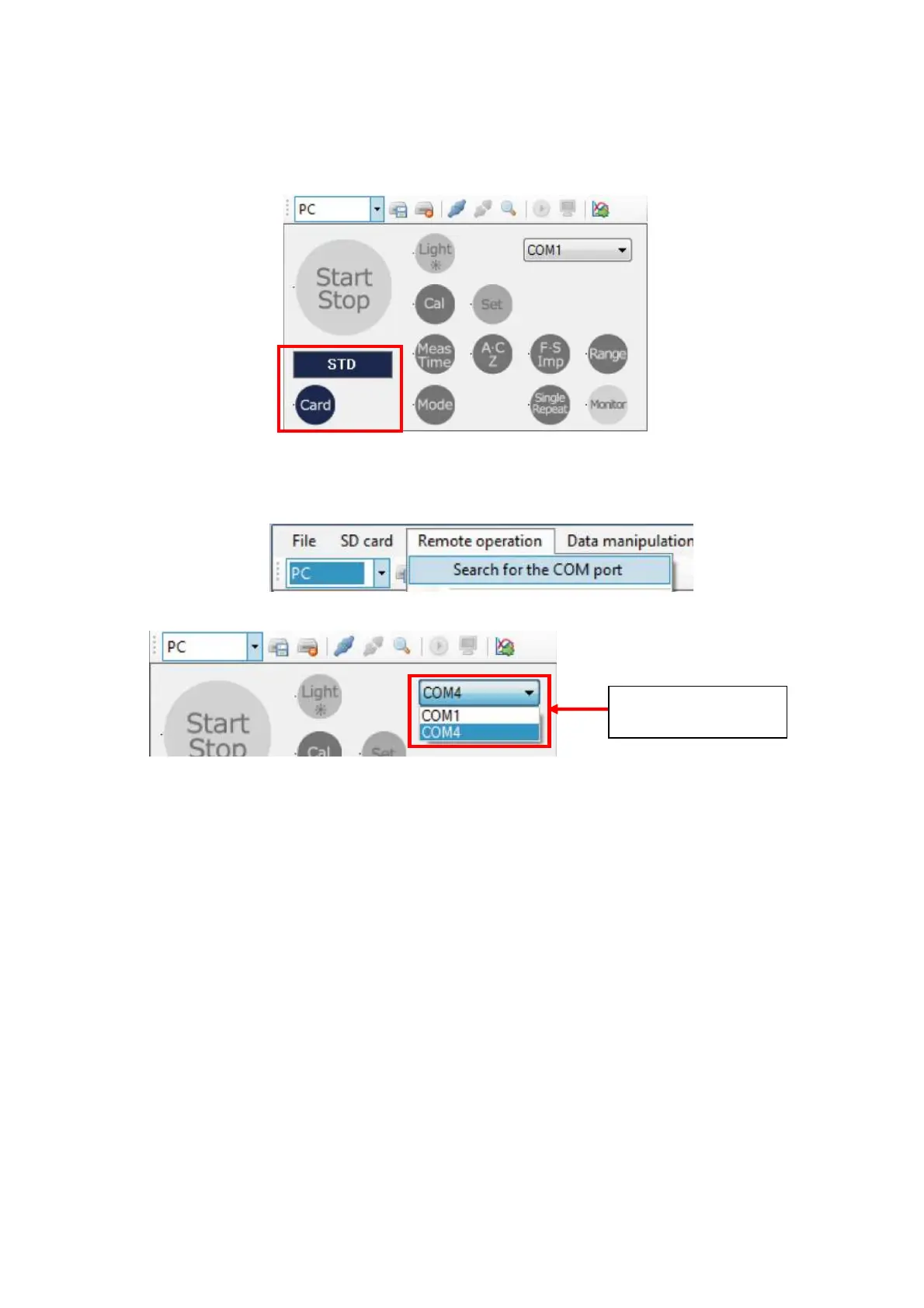
2-4. Select remote control using the [File management / remote control] button to display
Remote Control Panel. By clicking the [Card] button, set the card type display on the
remote control panel to the same card type recognized by the TYPE 6236. If the card is
not inserted yet, set card type to 【STD】
2-5. Select [Remote operation ]→[Search for the COM port] on the Menu Bar, or by clicking
[Search for the COM port] on the Tool Bar, restructure COM port in the PC.
2-6. Select USB COM port number that is connected to the TYPE 6236.
If correct COM port number is unknown, open the device manager from property of the system
and then confirm the COM port number of the “USB Serial Port” by “Port (COM and LPT)” of
the communication port.
【Procedure for confirmation of the COM port】
※Explanation as shown below is for the classic display style. Instruction Manual for Windows
shall be referred to for detailed explanation.
1. Open [Control Panel] from the [Start] button of the Windows menu.
2. Click and open [System and Security].
3. [System] of the menu and then click [Device Manager].
At Port (COM and LPT), confirm the COM port of the connected USB Serial Port.
Select by
pull-down menu.



 To Next Page