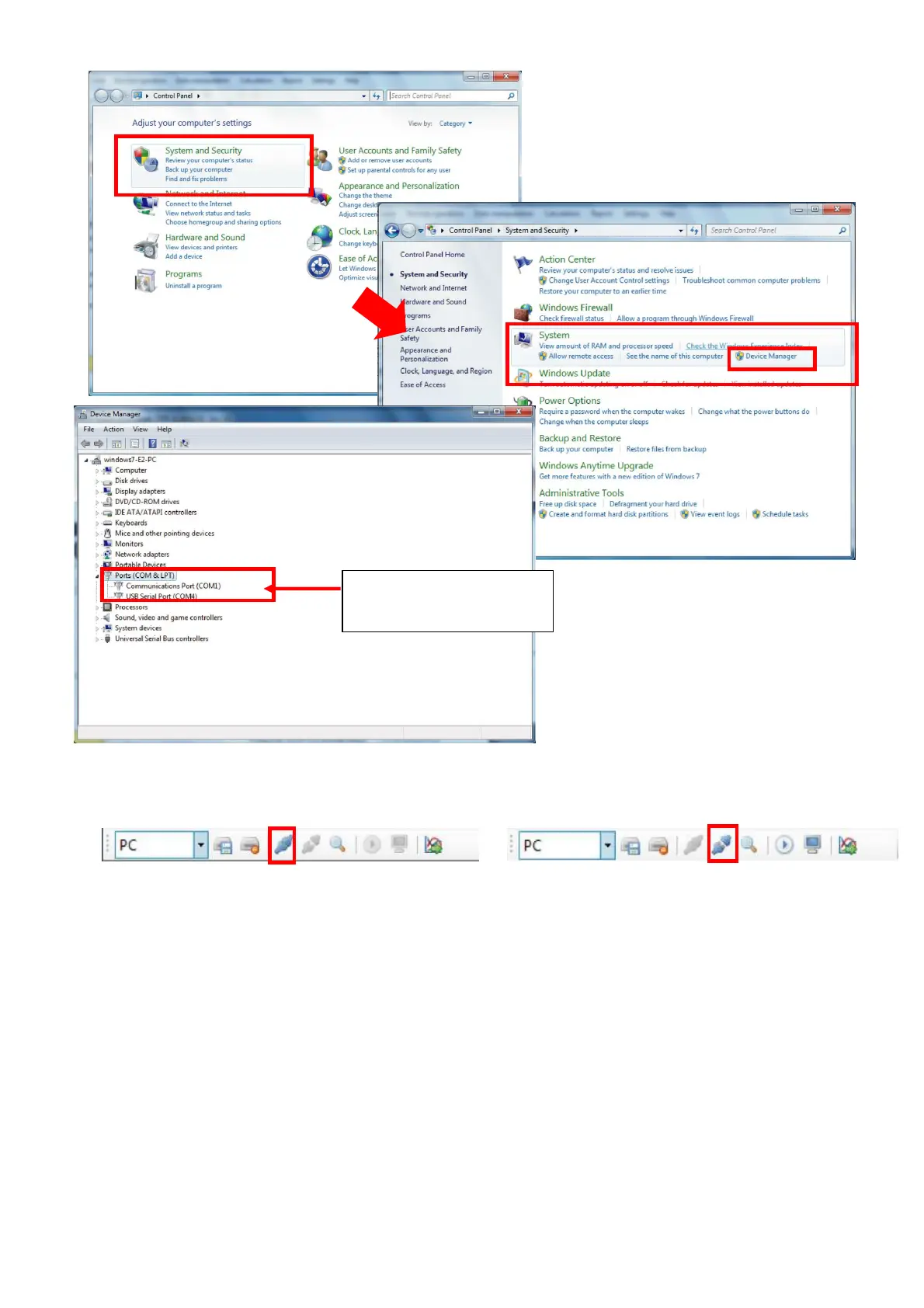
2-7. Click [Connect TYPE 6236] on the Tool Bar and TYPE 6236 and PC will be connected.
【When TYPE 6236 is not connected】 【When TYPE 6236 is connected】
<Note>
a. When the SD card in the TYPE 6236 is changed, card type shall be changed as well using
the [Card] button on the Remote Control Panel.
b. If the TYPE 6236 is connected after the Data Management Software was started, search for
the COM port shall be performed again.
c. If the COM port number of the connected USB Interface Cable is not indicated on the
Remote Control Panel, search for the COM port shall be performed again.
d. If the connection with the TYPE 6236 is broken for some reason, such as disconnection of
the USB Interface Cable, etc., such message will be displayed or there will be no response.
Re-check the connection with the TYPE 6236 and re-start the Data Management Software.
(During remote control operation, or “in connection”, do not connect/disconnect USB Cable.
Disconnection operation with the TYPE 6236 shall be made first and then disconnect the
USB Cable.)
e. Remote control operation while the Real Sound Recording Card inserted to the TYPE 6236 is
not supported.
In this case, COM port
is 【COM3】



 To Next Page