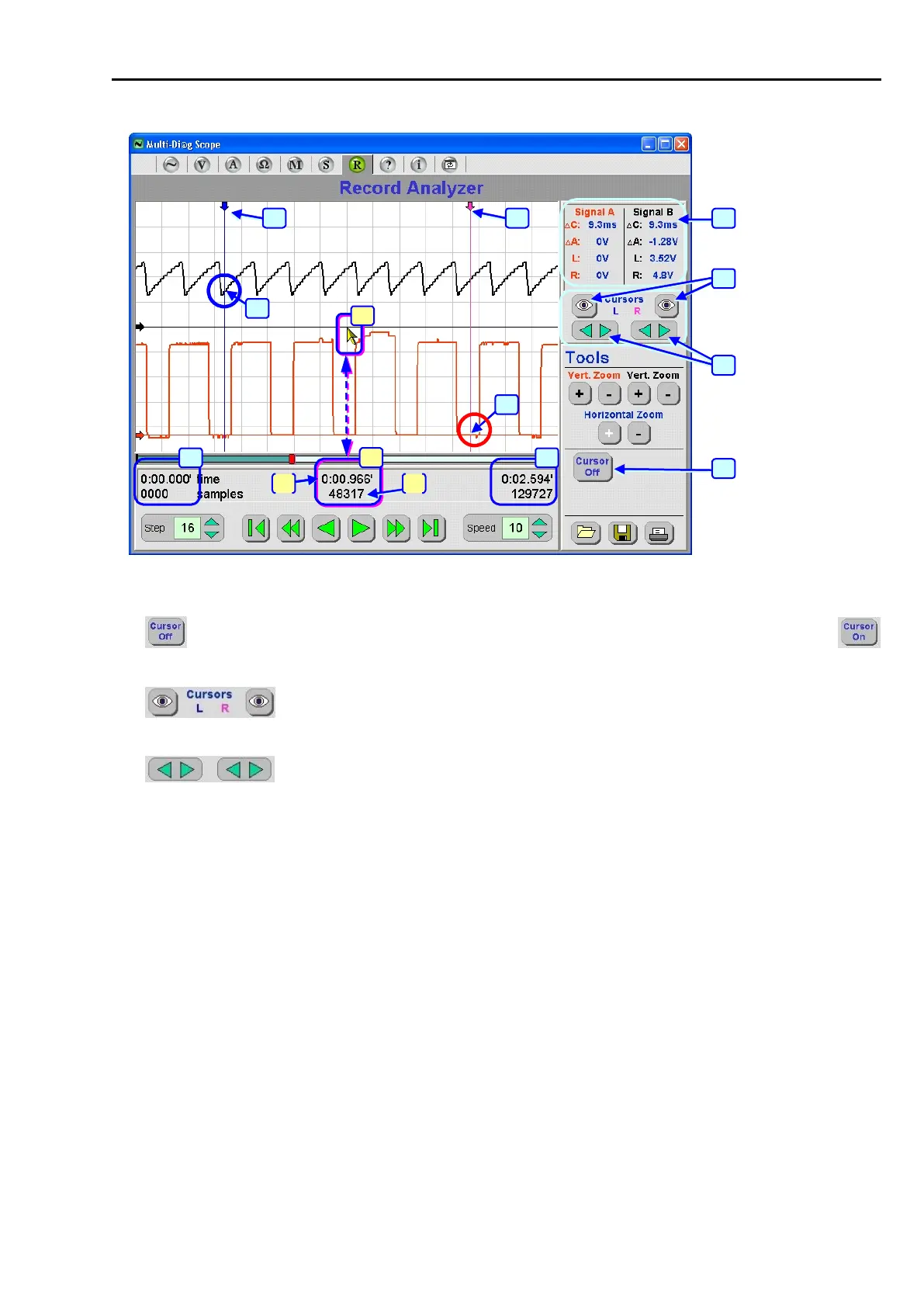
Fig. 187 – Description of the screen when switching the cursors on
16 - ............ Button for switching cursor marks off. When you deactivate the button, it changes into
(see Pos. 12, Fig. 184).
17 - Button for redisplaying the cursors if they are not visible on the screen any more
because of the shift of the registered record (see Chap. I - 2.3.4).
18 - Button for moving the cursors on the screen (see Chap. I - 2.3.3)
19 - Information window displaying the instantaneous value of the cursor & course intersections (see
Information window description in Chap. I - 2.3.3)
20 (21) - Displayed data are always related to the centre of the display raster (see Pos. 21, specifically to the
mouse cursor tip).
a) ......... Time info of the current position of the sample from the record beginning (in minutes).
In this case it is the time of 0:00.966 minutes (966 ms).
b) ......... The current number of the displayed signal sample from the record beginning.
In this case it is sample No. 48317.
22 - Record beginning
23 - Record end (total time in minutes and number of scanned samples)
24 - Left cursor position
25 - Right cursor position
26 - Voltage value of the intersection of the displayed course with the right cursor.
27 - Voltage value of the intersection of the displayed course with the left cursor.



 To Next Page