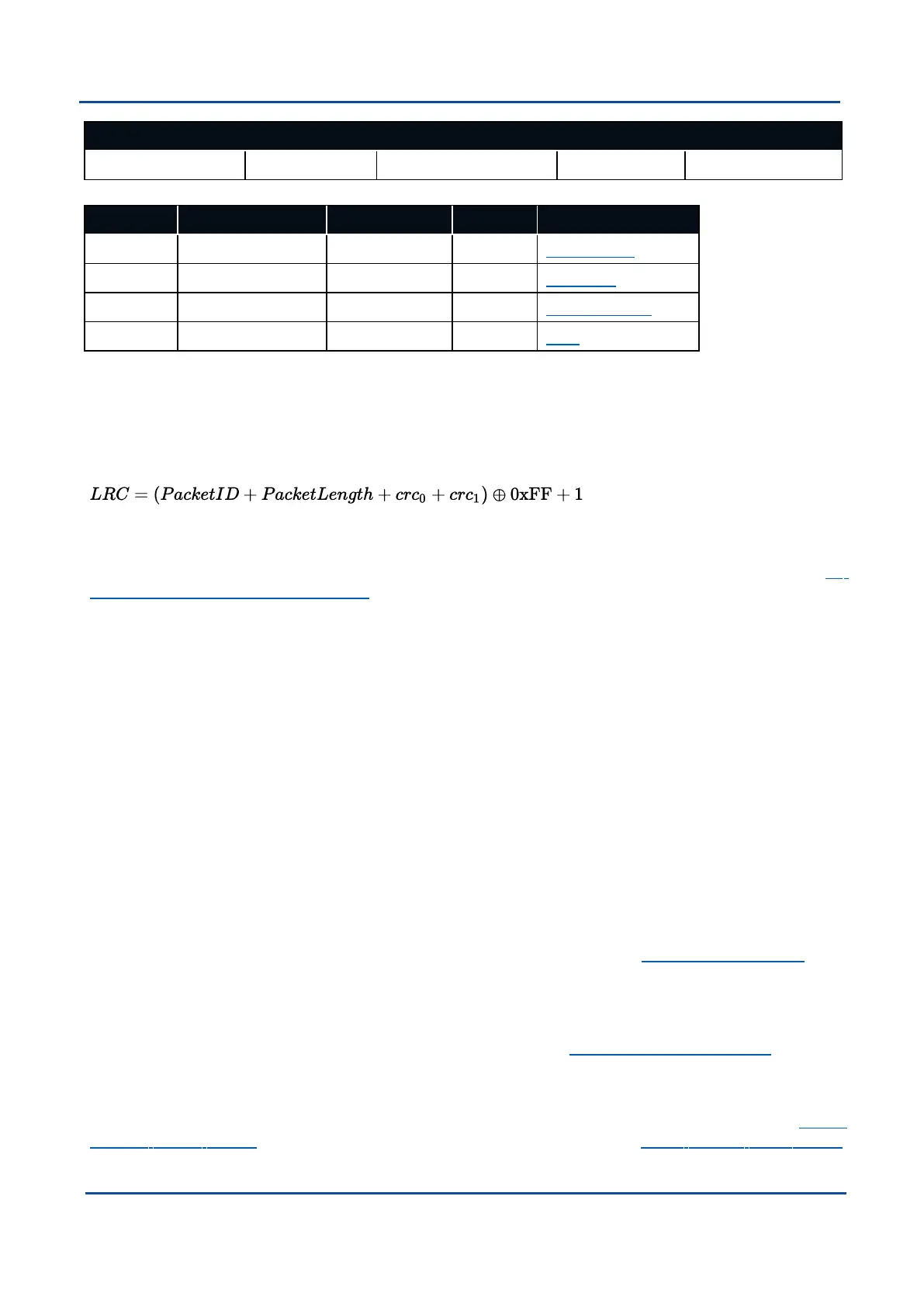
Header
Header LRC Packet ID Packet Length CRC16 Packet Data
Table 26: ANPP Packet Structure
Field # Bytes Offset Data Type Size Description
1 0 u8 1 Header LRC
2 1 u8 1 Packet ID
3 2 u8 1 Packet Length
4 3 u16 2 CRC
Table 27: ANPP Header Format
10.1.1.1 Header LRC
The header LRC (Longitudinal Redundancy Check) provides error checking on the packet header. It also allows
the decoder to find the start of a packet by scanning for a valid LRC. Only the lower 8 bits of the calculation
below are provided in the LRC field of the packet header. The LRC can be found using the following:
10.1.1.2 Packet ID
The packet ID is used to distinguish the contents of the packet. Packet IDs range from 0 to 255. See 10
Advanced Navigation Packet Protocol.
System packets have packet IDs in the range 0 to 19. These packets are implemented the same by every
device using ANPP.
State packets are packets that contain data that changes with time, i.e. temperature. State packets can be set
to output at a certain rate. State packets are packet IDs in the range 20 to 179.
Configuration packets are used for reading and writing device configuration. Configuration packets are packet
IDs in the range 180 to 255.
10.1.1.3 Packet Length
The packet length denotes the length of the packet data, i.e. from byte index 5 onwards inclusive. Packet length
has a range of 0 – 255.
10.1.1.4 CRC
The CRC is a CRC16-CCITT. The starting value is 0xFFFF. The CRC covers only the packet data.
10.1.2 Packet Requests
Any of the state and configuration packets can be requested at any time using the 10.3.2 Request Packet.
10.1.3 Packet Acknowledgement
When configuration packets are sent to GNSS Compass, it will reply with an acknowledgement packet that
indicates whether the configuration change was successful or not. See 10.3.1 Acknowledge Packet.
10.1.4 Packet Rates
The packet rates can be configured either using the web UI, or GNSS Compass Manager or through the 10.5.1
Packets Period Packet. By default GNSS Compass is configured to output the 10.4.1 System State Packet
v2.0 Page 74 04 Nov 2021
GNSS Compass Reference Manual • Advanced Navigation Packet Protocol


 To Next Page