Agilent InfinityLab LC Series Vialsamplers User Manual 272
8Maintenance
Replace the Sample Cooler/Sample Thermostat
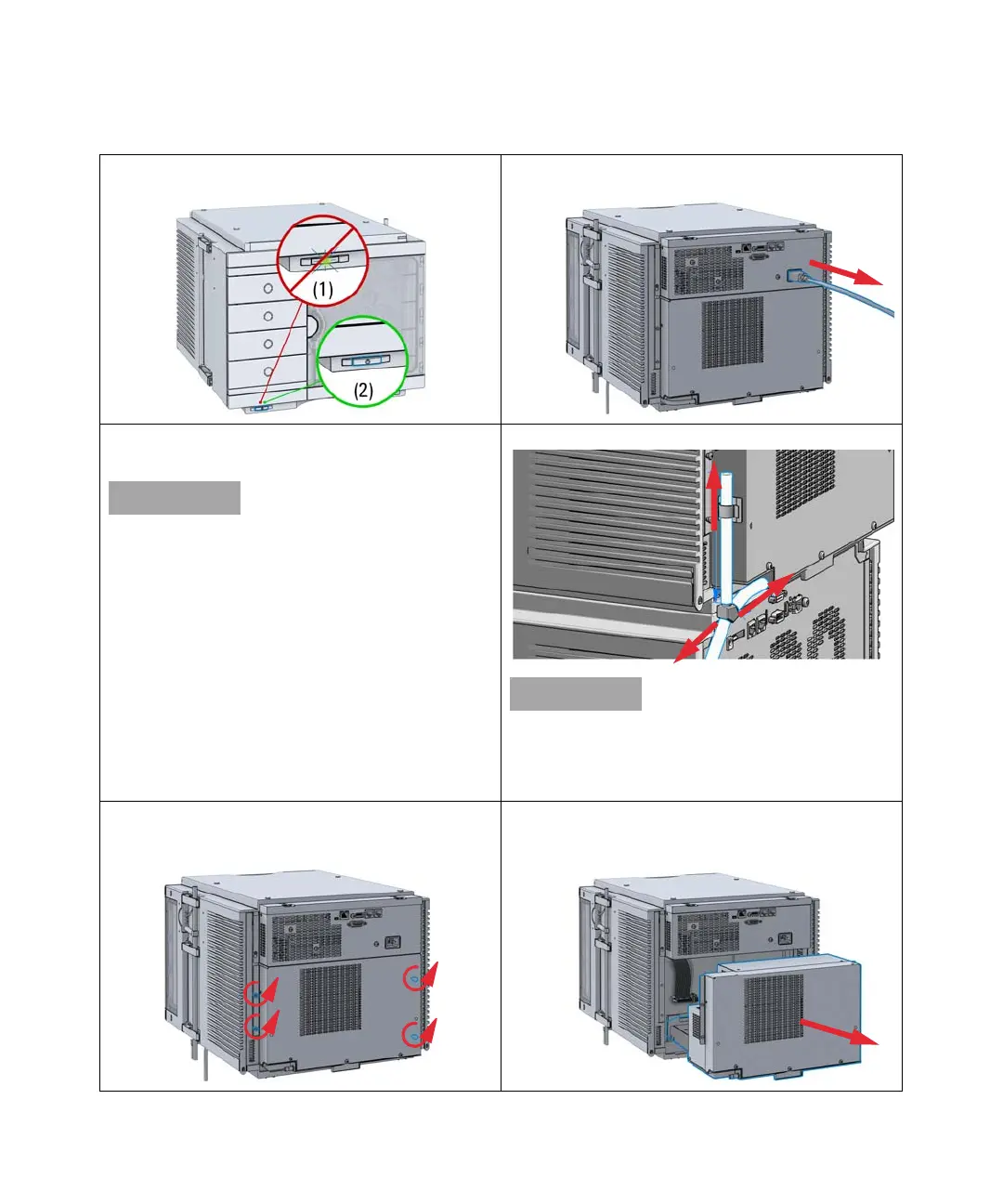
1 Ensure that the power switch on the front of the module
is OFF (switch stands out).
2 Disconnect the power cable from the sampler.
3 Ensure that no condensate remains inside the
cooler/thermostat before proceeding forward.
Gently tapping on the sides of the sampler can help to
remove the last traces of condensate from the system.
4 Remove the condensate tubing.
If there is still some condensate inside the cooler/thermo-
stat, place a suitable container underneath the outlet pipe
and keep tapping on the sides of the sampler until no water
is coming out.
5 Remove the fixation screws on the back of Sample
Cooler/Sample Thermostat.
6 Pull the cooler/thermostat halfway out, disconnect the
power and the data cable and then remove the unit
completely from the sampler.


 To Next Page
 Loading...