SNR Histogram: The histogram will show the numbers of the clients in different SNR
level.
Tx/Rx Rate Histogram: The histogram will show the numbers of the clients in different
Tx/Rx Rate level.
4.2.2. 5G Interface
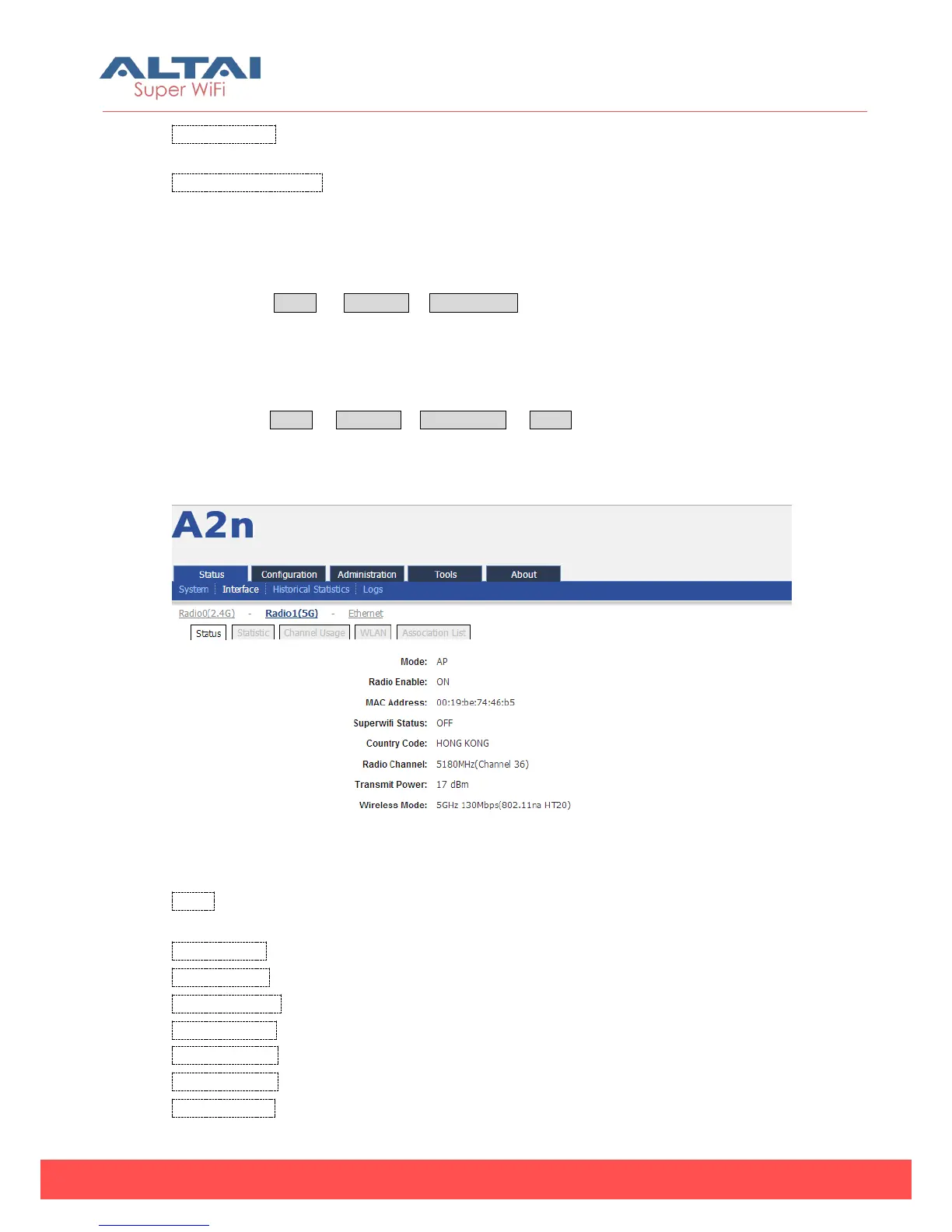
Please select Status -> Interface-> Radio1 (5G) to check 5G Radio state including
Status, Statistic, Channel Usage, WLAN, and Association List.
4.2.2.1. Status
Please select Status -> Interface-> Radio1 (5G) -> status to check Radio1 (5G) status.
In this page, you will find Radio Mode, Radio Enable, MAC Address, Superwifi Status,
Country Code, Radio Channel, Transmit Power, and Wireless Mode.
Figure 4-11 5G interface state
Mode: Radio1 (5G) operation mode including AP mode, Station mode, Bridge
mode and Repeater mode.
Radio Enable: Radio1 (5G) enabled or disabled
MAC Address: Radio1 (5G) MAC address
Superwifi Status: Superwifi ON/OFF Status
Country Code: HongKong is default setting.
Radio Channel: Radio1 (5G) current channel
Transmit Power: Radio1 (5G) transmit power
Wireless Mode: Radio1 (5G) wireless mode



 To Next Page