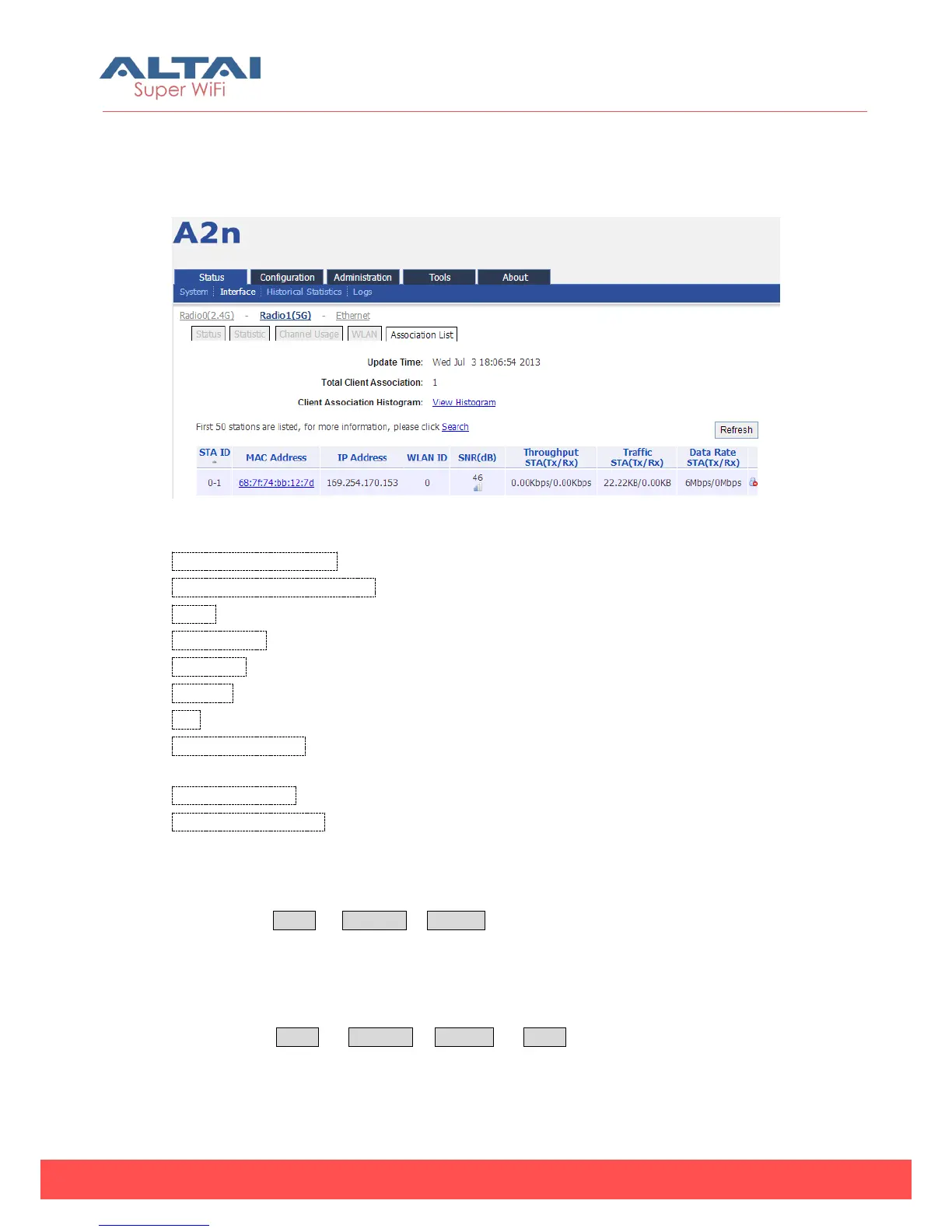
client information including: Total Client Association, Client Association Histogram, STA
ID, Mac Address, WLAN ID, IP Address, SNR (dB), Throughput STA (Tx/Rx), Traffic STA
(Tx/Rx) and Data Rate STA (Tx/Rx).
Figure 4-16 5G interface association list
Total Client Association:Total associated clients
Client Association Histogram:Association client history records
STA ID: Wireless client ID
Mac Address:Wireless client MAC address
IP Address:Client associated IP Address
WLAN ID:Client associated WLAN ID
SNR:Wireless client SNR
Throughput (Tx/Rx) :Wireless client real throughput received and transmitted traffic
(kbps)
Traffic STA (Tx/Rx) :Wireless client download and upload traffic (Bytes)
Data Rate STA (Tx/Rx) :Wireless client download and upload rate (Mbps)
4.2.3. Ethernet Interface
Please select Status -> Interface-> Ethernet to check Ethernet interface information
including Status and Statistic.
4.2.3.1. Status
Please select Status -> Interface-> Ethernet -> Status to check Ethernet interface
status which includes Ethernet MAC Address, Speed, Duplex, Auto-negotiation and
Link Detected.



 To Next Page