Note: Please refer to 6.3.1.2.1. Section about the 2.4G AP Mode WLAN detail setting.
5.3.2.2.1. WLAN X (0-15) Basic Setting
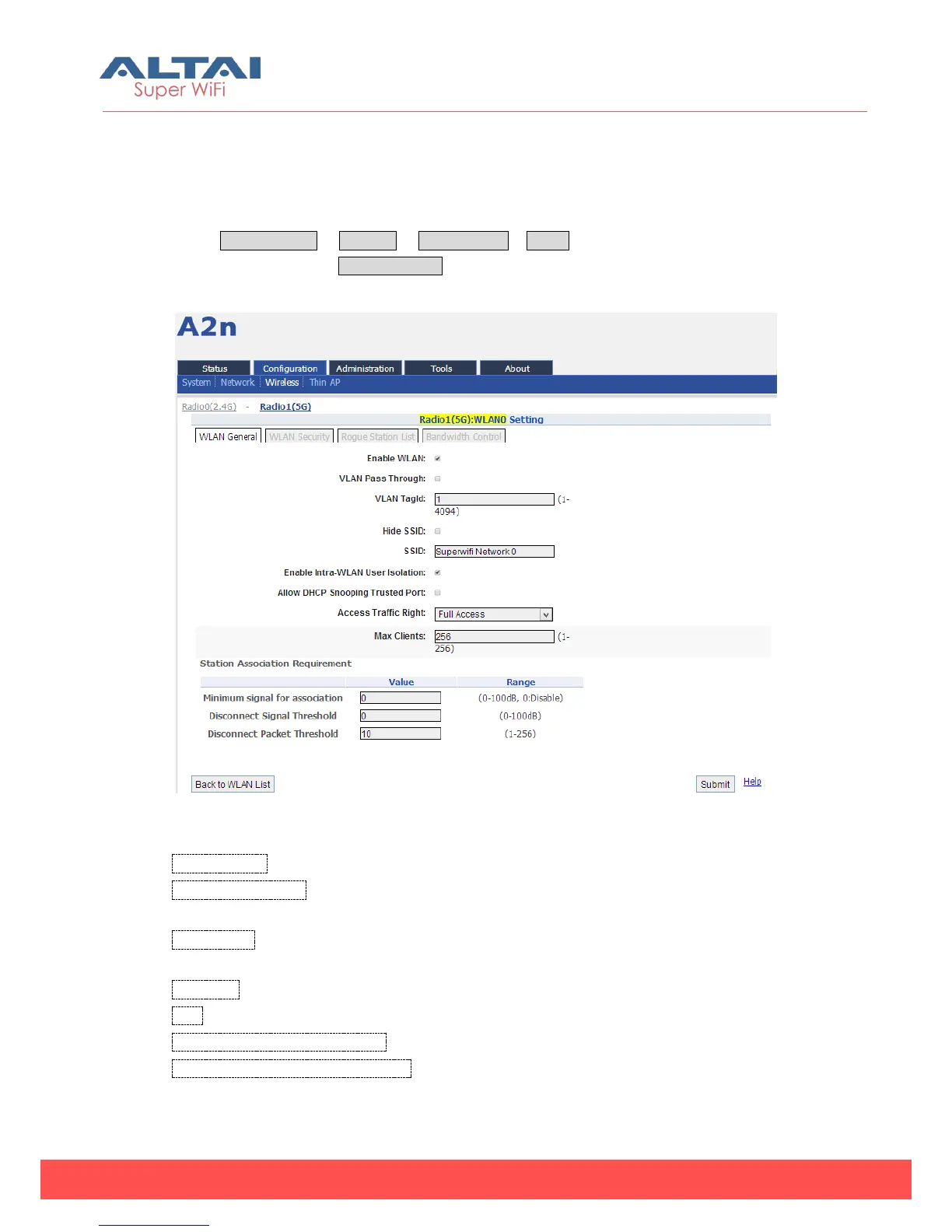
Select Configuration -> Wireless -> Radio1 (5G) -> WLAN to click “More…” behind the
WLAN, and then select WLAN General.
Figure 5-51 5G WLAN General setting
Enable WLAN:Enable or disable this WLAN
VLAN Pass Through:VLAN pass through this WLAN. (This option is available when the
VLAN enable in the network web page.)
VLAN TagId:Set VLAN ID. (This option is available when the VLAN enable in the
network web page.)
Hide SSID:Hide this SSID or not
SSID:Set SSID
Enable Intra-WLAN Forwarding:Allow or block inter-WLAN communication
Allow DHCP Snooping Trusted Port:DHCP snooping prevents illegal DHCP servers
from offering IP address on untrusted wireless port.



 To Next Page