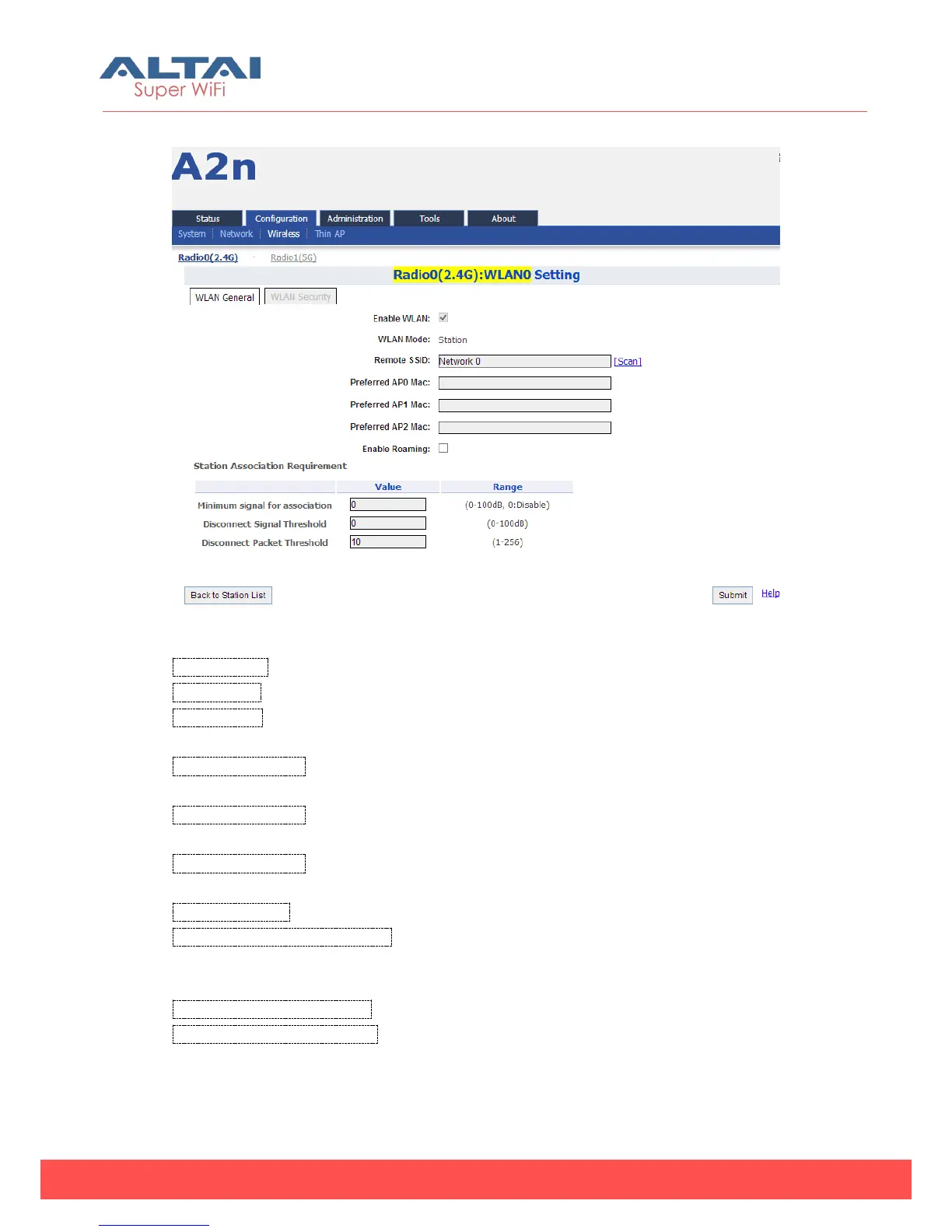
Figure 5-43 Radio (2.4G): WLAN0 Setting
Enable WLAN: The default is enabled.
WLAN Mode: The default is "Station".
Remote SSID: The station shall be able to input the remote SSID with string [0...32]. The
remote SSID is the SSID originated by the AP in WDS mode.
Preferred AP0 Mac: The station shall be able to input the 3 preferred AP (WDS) MAC
Addresses, in the order of priority.
Preferred AP1 Mac: The station shall be able to input the 3 preferred AP (WDS) MAC
Addresses, in the order of priority.
Preferred AP2 Mac: The station shall be able to input the 3 preferred AP (WDS) MAC
Addresses, in the order of priority.
Enable Roaming: Enabled or disabled roaming.
Minimum signal for association: By default, it is 0dB, and if an associated station UL
SNR drops below X by Y dB, for a consecutive number of Z packets, this station shall
be disassociated by the AP.
Disconnect Signal Threshold: By default, it is 0dB.
Disconnect Packet Threshold: By default, it is 10 packets.
5.3.1.5.2. Station Security



 To Next Page