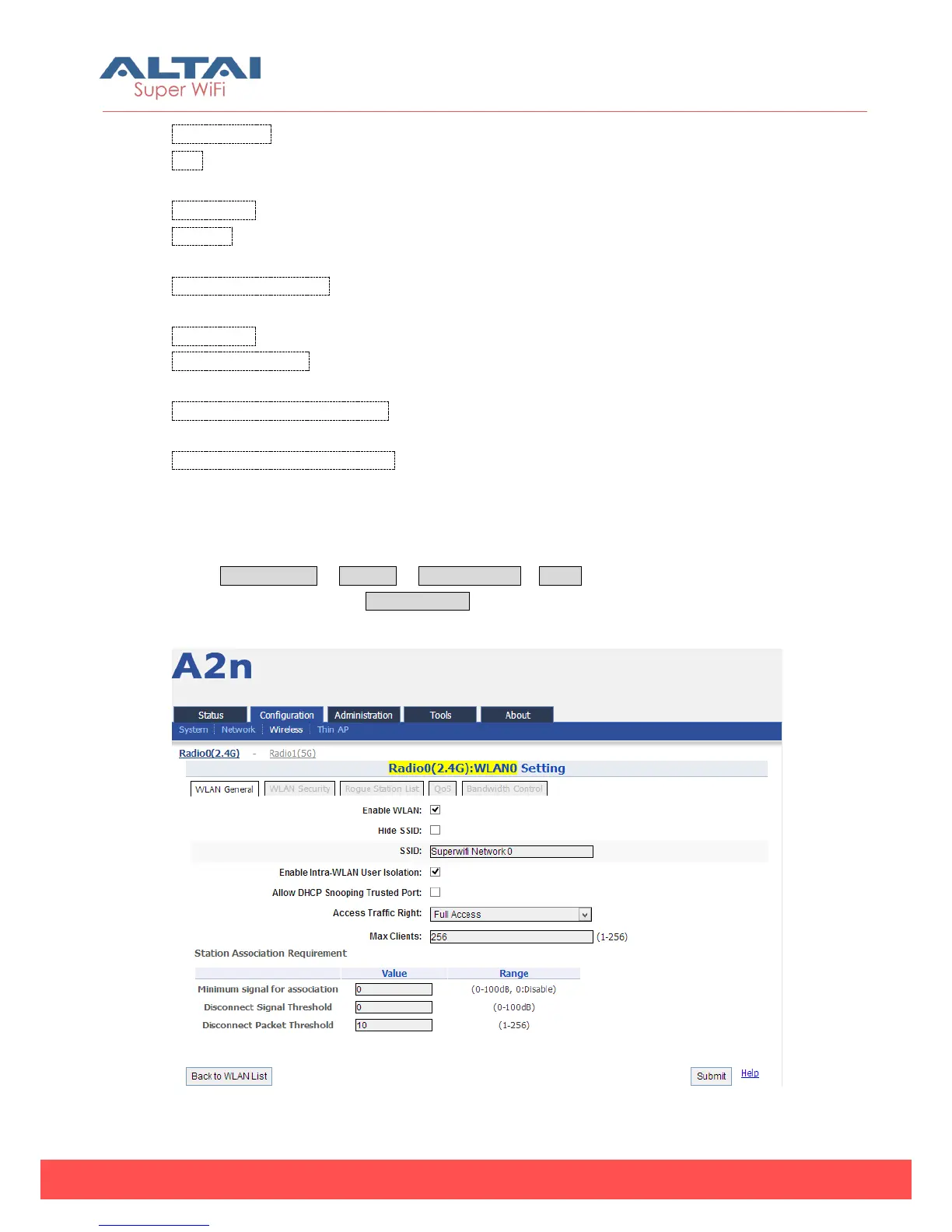
Enable WLAN :Enable or Disable WLAN from 0-15.
SSID:Support maximum 32 characters, default SSID is:Superwifi Network X, X is
WLAN number.
Max Clients:Max. Associated clients
Isolation: Enable or Disable inter-WLAN communication isolation. By default, it is
enable.
VLAN Pass-Through/ID: Set VLAN pass through or VLAN TagID this WLAN (This option
appear when the VLAN enable)
Auth Mode: The authentication mode set for WLAN.
Access Traffic Right:Access traffic right controls associated stations the ability to
permit or deny AP management.
WLAN Uplink/Downlink Control: This option control the uplink and downlink speed for
this WLAN.
Station Uplink/Downlink Control: This option control the uplink and downlink speed
for the stations which associate to this WLAN.
5.3.1.2.1. WLAN X (0-15) General Configuration
Select Configuration -> Wireless -> Radio0 (2.4G) -> WLAN to click “More…” behind
the WLAN, and then select WLAN General.
Figure 5-25 WLAN general setting



 To Next Page