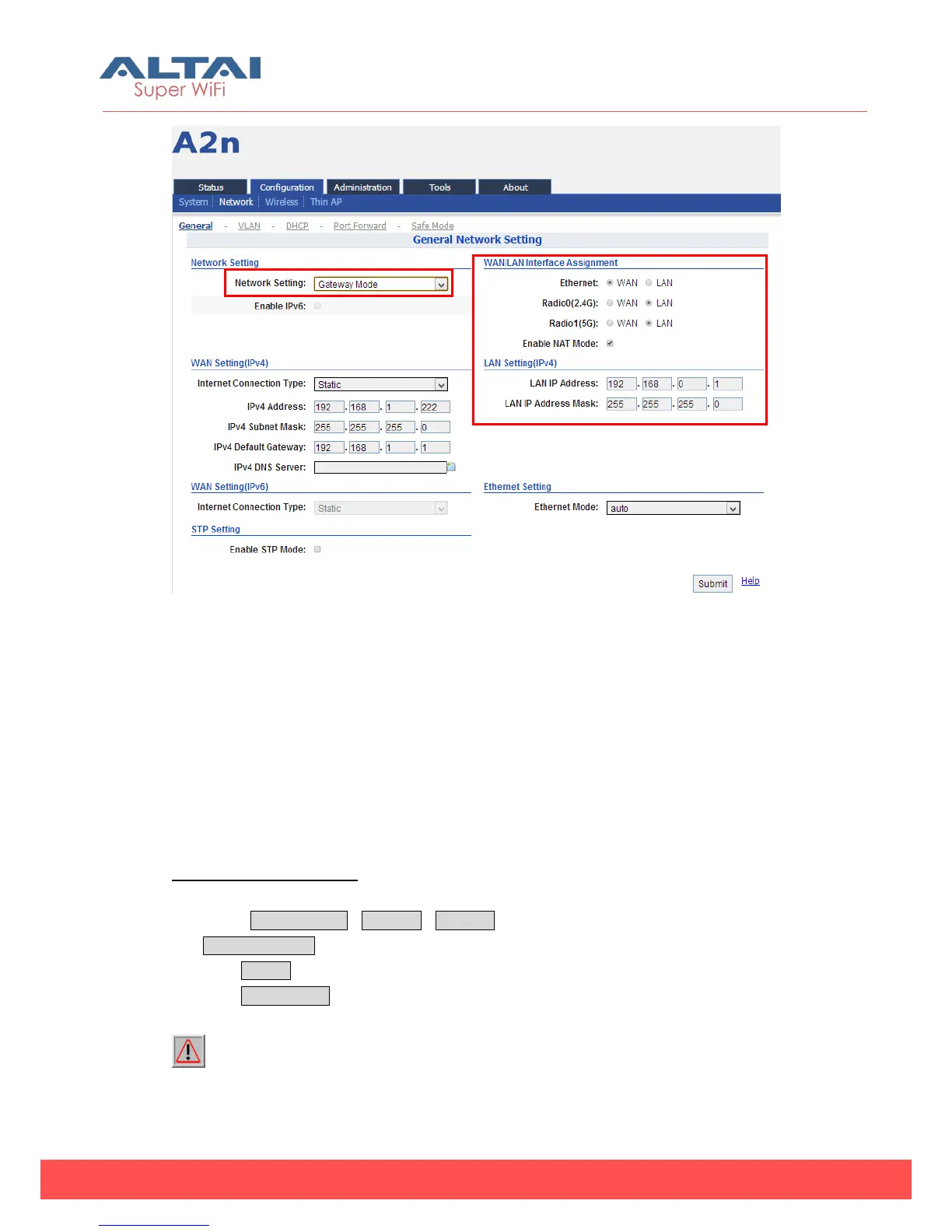
Figure 5-9 Network Gateway Mode
In Gateway mode, the A2n Access Point acts as a gateway. The Local IP Address
and Local IP Address Mask information must be provided to specify the IP address
used to communicate to the wireless client locally (i.e. IP address for 2.4GHz radio
interface). The A2n would use another IP address to communicate to the outside
network (i.e. IP address for Ethernet interface). If a wireless client sends a packet to
the outside network, the packet would send to the A2n Access Point with its local IP
address in the local network. Then, the A2n Access Point will pass this packet to the
outside network (Ethernet) using its remote IP address.
Configuration procedures:
1. Select Configuration->Network->General to go to configuration page.
2. Network Setting: Gateway Mode.
3. Click Submit.
4. Click Save&Apply to apply changes.
Warnings: When the Network mode as Gateway mode the VLAN will not be used
and it would not be used for the 5G Radio.



 To Next Page