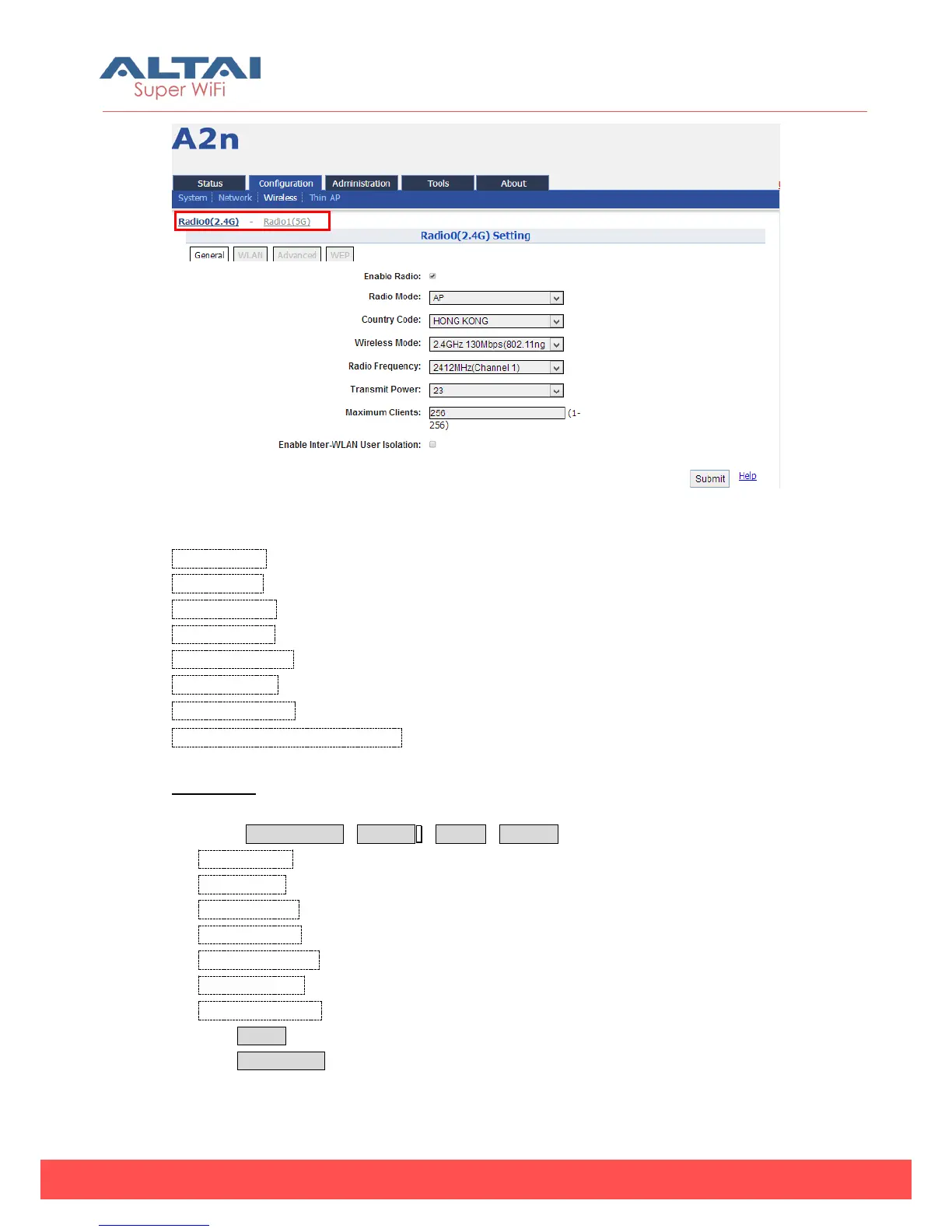
Figure 5-23 2.4G radio parameters
Enable Radio: Enable or disable 2.4G radio, by default it is enabled.
Radio Mode: AP, Station and Repeater mode.
Country Code: HongKong is default setting.
Wireless Mode: By default, it is 2.4GHz 130Mbps (802.11ng HT20).
Radio Frequency: By default, it is 2412MHz (Channel 1).
Transmit Power:By default, it is 23.
Maximum Clients:By default, it is 256.
Enable Inter-WLAN User Isolation:By default, it is disable.
Procedures:
1. Select Configuration->Wireless ->Radio0->General
2. Enable Radio: Select to enable 2.4G Radio
3. Radio Mode: Select to AP mode
4. Country Code: Select your country code
5. Wireless Mode Select wireless mode
6. Radio Frequency Select the radio frequency
7. Transmit Power Set transmit power
8. Maximum Clients Set 2.4G maximum clients
9. Click Submit
10. Click Save&Apply to apply



 To Next Page