Chapter 2: Getting Started 2–7
MegaWizard Plug-In Manager Design Flow
November 2011 Altera Corporation Cyclone V Hard IP for PCI Express
User Guide
Figure 2–2 illustrates this directory structure.
Follow these steps to generate the chaining DMA testbench from the Qsys system
design example.
1. On the Quartus II File menu, click Open.
2. Navigate to the Qsys system in the altera_pcie_sv_hip_ast subdirectory.
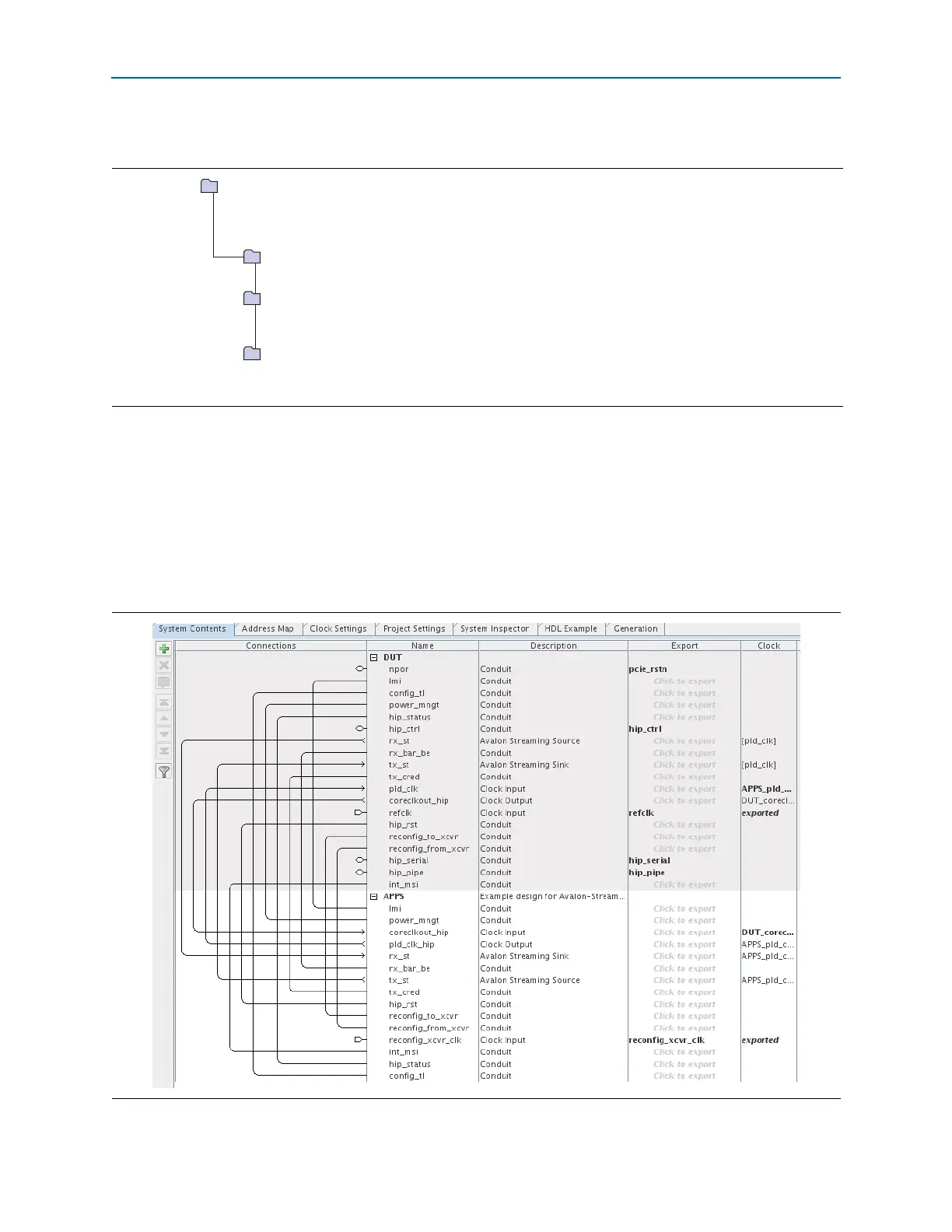
3. Click pcie_de_gen1_x4_ast64.qsys to bring up the Qsys design. Figure 2–3
illustrates this Qsys system.
Figure 2–2. Directory Structure for Cyclone V Hard IP for PCI Express IP Simulation Model and Design Example
<working_dir>
<working_dir>/<variant_name> = example_design/gen1_x4
includes Verilog HDL and SystemVerilog design files for synthesis
<variant_name>.v or .vhd = gen1_x4.v, the parameterized endpoint
<variant_name>.qip = lists all files used in the Gen1 x4 endpoint
<variant_name>.bsf = gen1_x4.bsf, a block symbol file for the parameterized endpoint
<working_dir> <variant_name>_sim/altpcie_pcie_<device>_hip_ast
= example_design/gen1_x4 _sim/altera_pcie_<device>_hip_ast
includes plain text Verilog HDL and SystemVerilog design files for simulation
<working_dir> <variant_name>_example_design/altpcie_pcie_<device>_hip_ast
= example_design/gen1_x4 _example_design/altera_pcie_<device>_hip_ast
includes a Qsys testbench connecting the endpoint (DUT) to the chaining DMA application (APPS)
Figure 2–3. Qsys System Connecting the Endpoint Variant and Chaining DMA Testbench



 To Next Page