2–14 Chapter 2: Getting Started
Qsys Design Flow
Cyclone V Hard IP for PCI Express November 2011 Altera Corporation
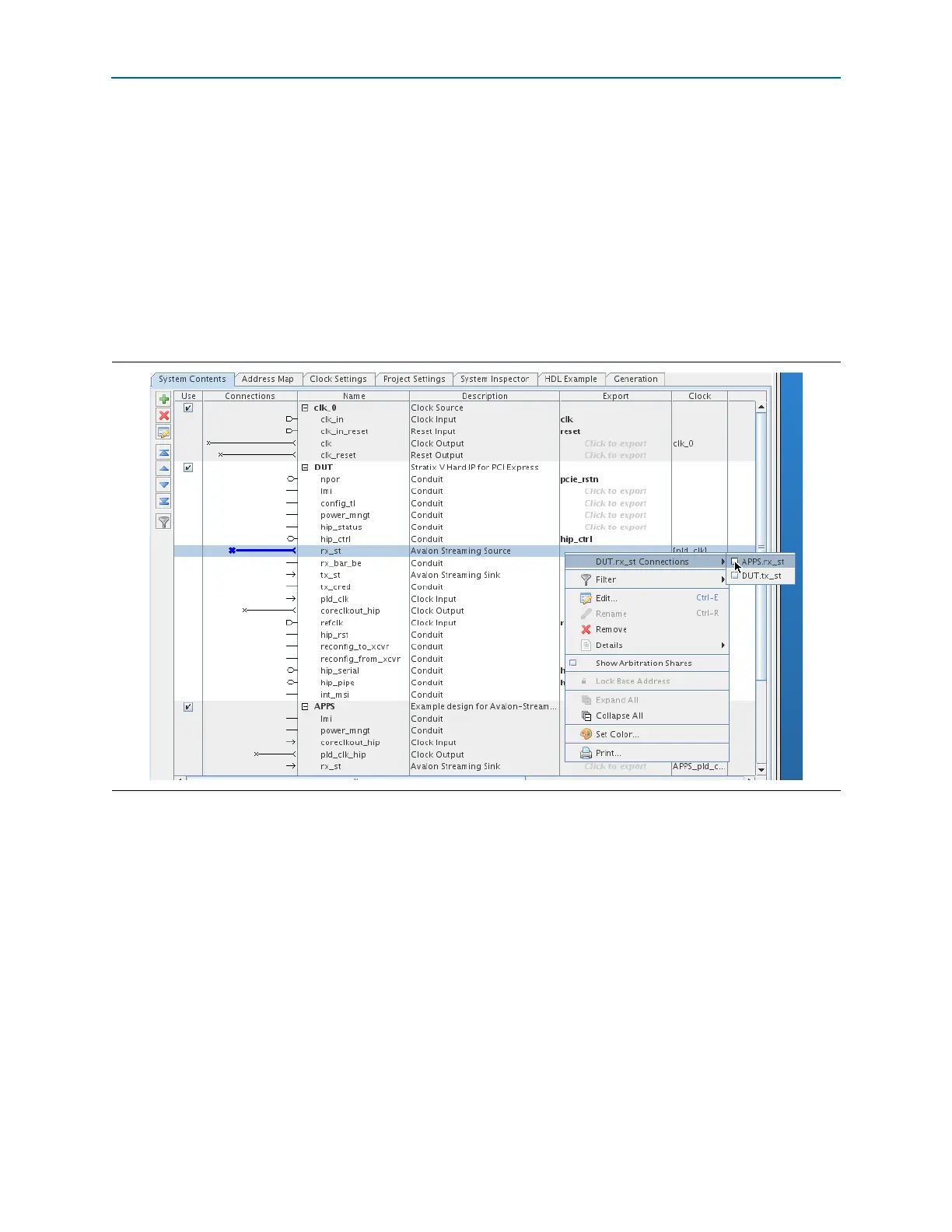
In this example design the Avalon-ST source interface of the DUT connects to the
Avalon-ST sink interface of the APPS component, and the Avalon-ST sink interface of
the DUT, connects to the Avalon-ST source interface of the APPS component. Follow
these steps to connect the Avalon-ST source and sink interfaces of these two
components:
1. To connect the Avalon-ST
rx_st
source interface of the DUT component to the
Avalon-ST
rx_st
sink interface of the APPS, in the Name column, right-click on
the
rx_st
interface and select and select Apps.rx_st from the DUT.rx_st
Connections list.
Figure 2–5 illustrates this procedure.
2. To connect the Avalon-ST
tx_st
source interface of the APPS component to the
tx_st
sink interface of the DUT component, repeat the technique explained in
Step 1.
For conduit interface types, the APPS component interfaces connect to the DUT
interfaces with matching names.
1 The Avalon Conduit interface type is a point-to-point interface type that
accommodates individual signals or groups of signals that do not fit into any of the
other Avalon types. You can connect conduit interfaces to each other inside a Qsys
system or export them to make connections to other modules in the design or to
FPGA pins.
Figure 2–5. Connecting Signals Using the Right-Mouse Connections Menu



 To Next Page