Administrator’s Handbook
30
Link: Access Code
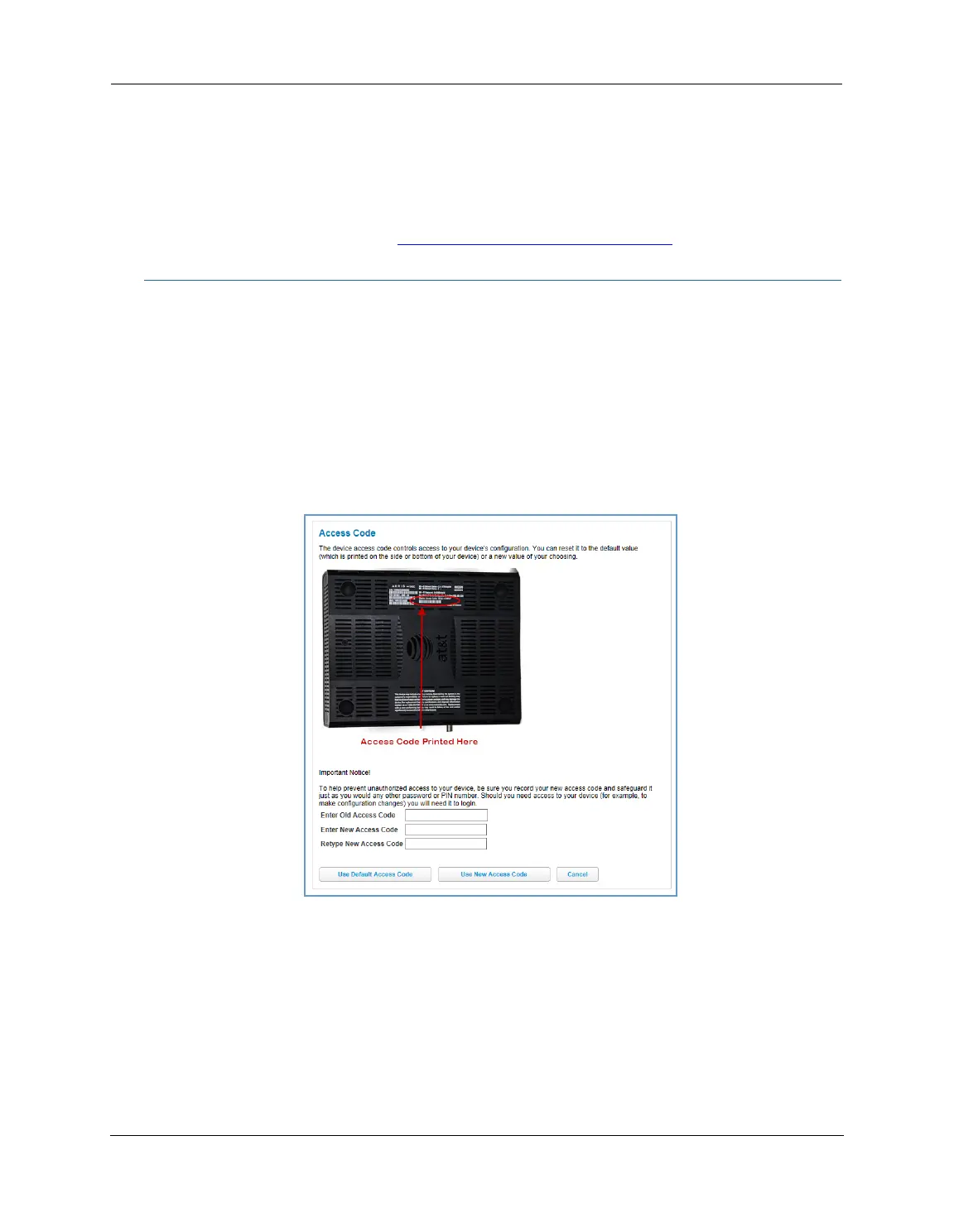
When you click the Access Code link, the Access Code page appears and allows changes to the code that
controls access to your device’s configuration. Access to your NVG599 device is controlled through an account
named Admin. The default Admin password for your device is the unique access code printed on the label on
the side of your device.
As the Admin, you can change this password to one of your own choosing between 8 and 20 characters long.
The new password must include two characters from any these categories: alpha, number, and special
characters.
Example: “fru1tfl13s_likeabanana”
Enter your old access code, your new access code, and click the
Use New Access Code button. The new access
code takes effect immediately.
You can always return to the original default password by clicking the
Use Default Access Code button.
First Use Date Date and time the NVG599 device is first used. This field changes to the current date
and time after a reset to factory defaults.
Time Since Last Reboot Elapsed time since last reboot of the device in days:hr:min:sec.
Current Date/Time Current system date and time in days:hr:min:sec.
Datapump Version Underlying operating system software datapump version.
Legal Disclaimer Clicking the Licenses link displays a listing of software copyright attributions, also
shown in
“Copyright Acknowledgments” on page 189.















 To Next Page