AS64 series AC servo drive Fault handling
-268-
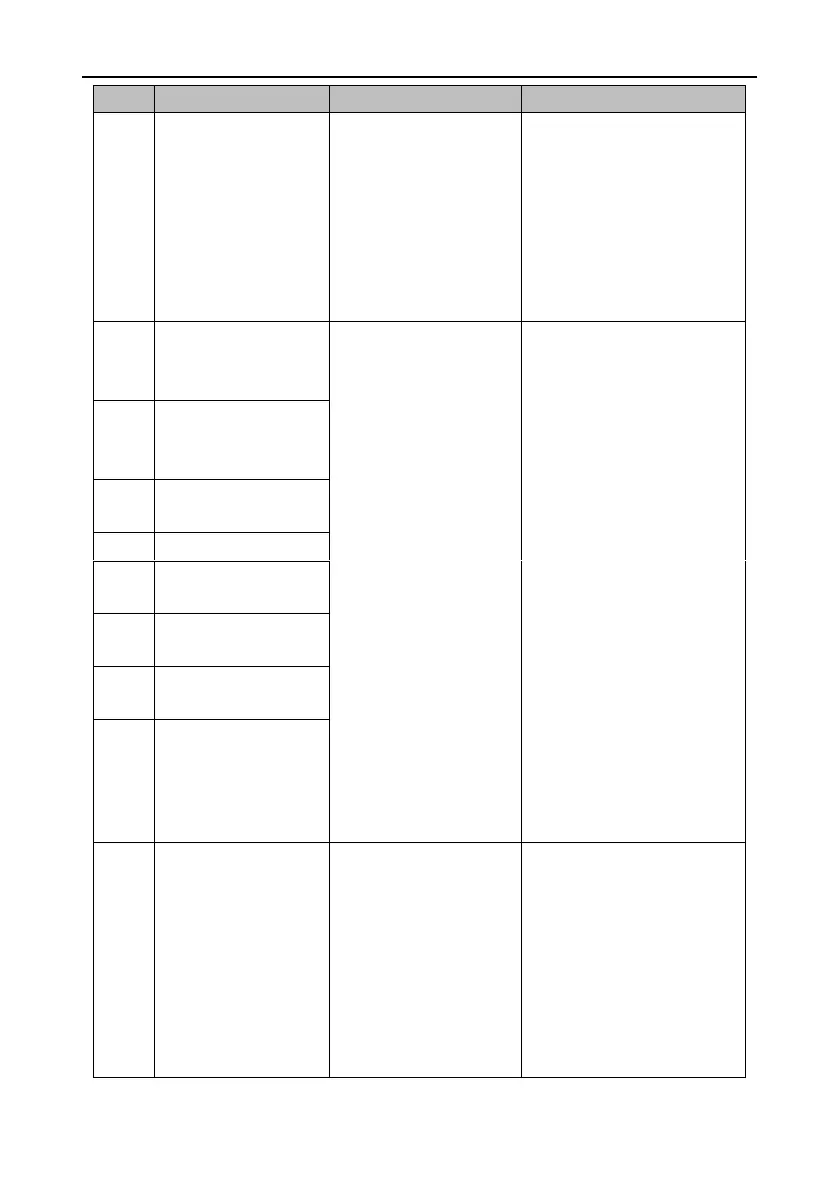
5. Improper parameter
settings cause system
divergence.
6. The ACC/DEC time in the
start or stop process is too
short.
7. Instantaneous load is too
heavy.
Encoder fault–Encoder
communication
exception
1. The encoder is not
connected.
2. The encoder plug contact
is loose.
3. One of encoder signal
cables U, V, W, A, B, and Z
is disconnected.
4. Encoder phases A and B
are reverse.
5. Noise causes
communication interruption
or data exceptions.
6. Encoder communicates
properly but with data
exceptions.
7. The FPGA that
communicates with the
encoder reports timeout.
8. The drive does not
support the encoder type.
1. Connect the encoder
according to the correct wiring
method.
2. Ensure the encoder plug
contact is proper.
3. Replace the encoder cable.
4. Ensure the encoder power
voltage is proper.
5. Eliminate the conditions that
disturb encoder cables. Route
encoder cables and motor cables
separately.
6. Connect the shielded cables
for the encoder to the FG.
7. If an encoder disconnection
fault is reported during power-on,
check the setting of P0.01 and
then ensure the encoder type
supported by the drive is the
same as the actual encoder type.
Encoder fault–Encoder
feedback deviation too
large
Encoder fault– Parity
error
Encoder fault–Frame
error
Encoder fault–Short
frame error
Encoder fault–Encoder
exception
Encoder fault–Second-
encoder timeout
Encoder fault–Encoder
battery low-voltage alarm
When the multiturn absolute
encoder is used, the
external battery voltage of
the encoder is between
3.0V–3.2V.
1. Ensure the encoder battery
cable is connected properly.
2.Use the multimeter to check
whether the external battery
voltage is less than 3.2V. If yes,
replace the battery.
3. Replace the battery when the
drive power is on. Otherwise,
encoder data may be lost.


 To Next Page