AS64 series AC servo drive Operating and running
-72-
5.2.3 Monitoring mode
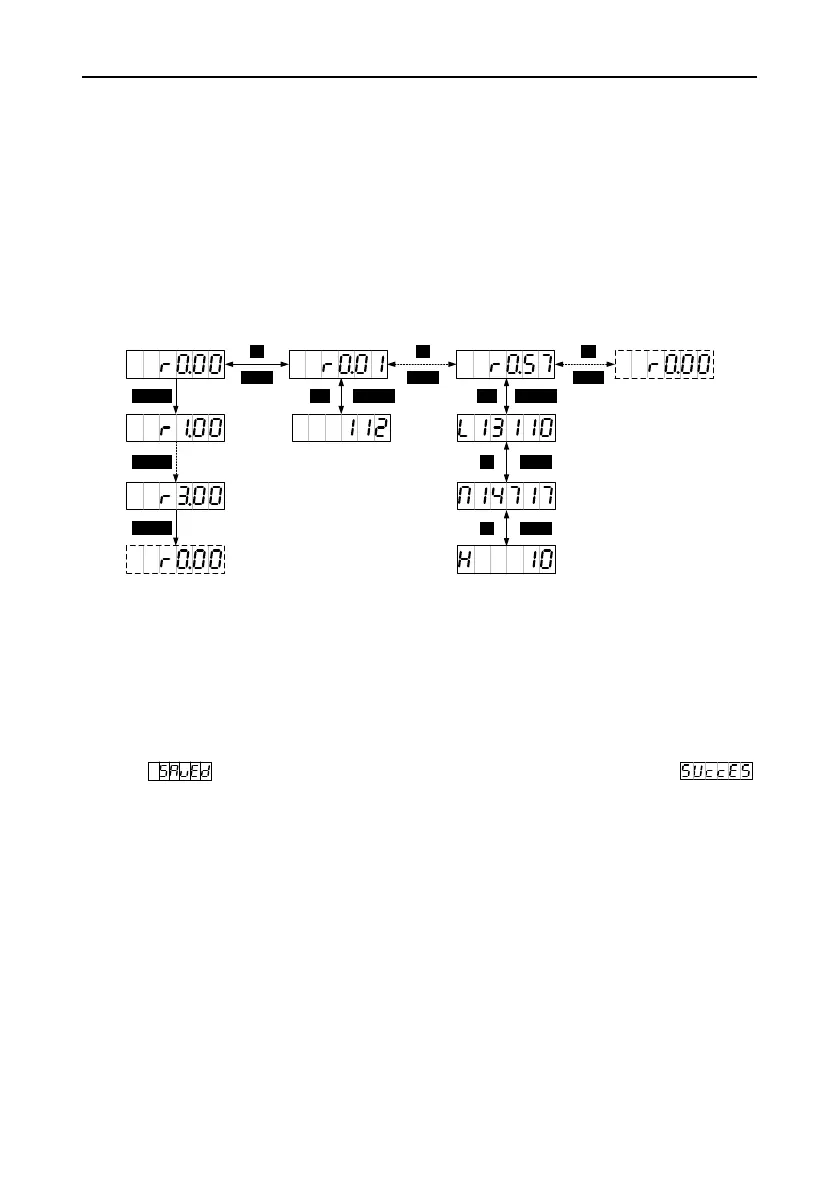
You can press MODE to switch to the monitoring mode. You can press SHIFT to select group codes
for monitoring parameters circularly in on way. You can press UP/DOWN to select codes for
parameters in a group or press and hold UP/DOWN for quick selection. After locating a target
parameter, you can press SET to check the current value and then press MODE to switch to the
parameter code display screen. If no operation is performed on an R3 menu screen in 20 seconds,
the common monitoring parameter screen is displayed. If no operation is performed on an R0 or R1
menu screen in 20 seconds, the current parameter display screen is hold.
Operation flowchart
5.2.4 Parameter setting mode
You can press MODE to switch to the parameter setting mode. You can press SHIFT to select group
codes for parameters circularly in on way. You can press UP/DOWN to select codes for parameters in
a group or press and hold UP/DOWN for quick selection. After locating a target parameter, you can
press SET to enter the current parameter value display screen and then press SHIFT to enter the
parameter setting screen where the LSB of the parameter blinks). After parameters are set, the LED
displays (if the parameters are storage parameters and P0.17 is set to 0) or
(if the parameters are non-storage parameters or P0.17 is set to 1). Then the parameter mode is
switched back automatically.


 To Next Page