AS64 series AC servo drive Operating and running
-71-
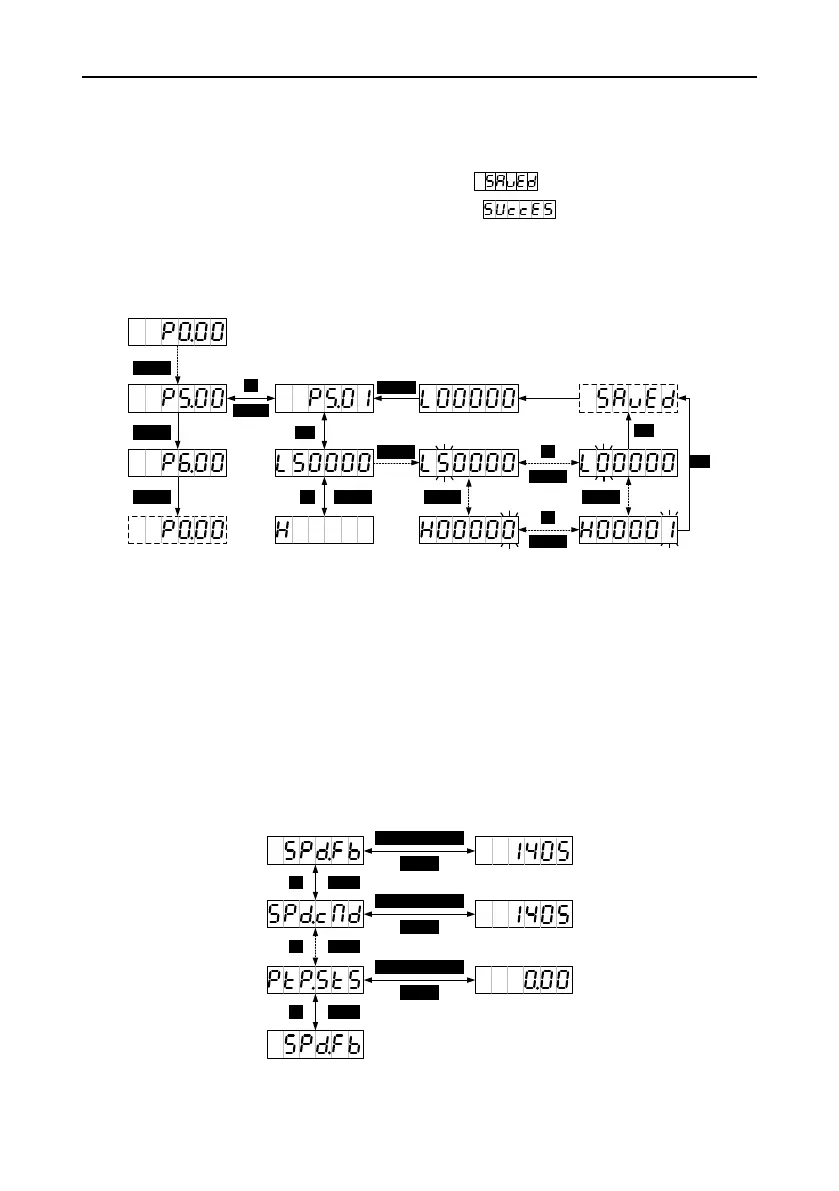
5. In parameter setting mode, press SHIFT to move the cursor left and then press UP/DOWN to
change the setting for the MSB.
6. After parameters are set, press SET to save the parameter settings or execute commands.
7. After parameters are set, the LED panel displays (if the parameters are storage
parameters and P0.17 is set to 0 [Individually]) or (if the parameters are non-
storage parameters or P0.17 is set to 1 [In batches]). Then the parameter mode is switched back
automatically.
8. Set long parameters (with 6 digits at least).
5.2.2 Common monitoring mode
After the drive is powered on, the LED panel enters the common monitoring mode by default. It
displays the names of monitoring parameters for 2.5 seconds, and then the values. You can press
MODE to return to the parameter name display screen. Then you can press UP/DOWN to switch
between monitoring parameters. For details, see section 10.3 "Common monitoring parameters". The
monitoring parameters that are displayed by default can be set by P0.15. If no operation is performed
on the non parameter value display screen in 20 seconds, the common monitoring parameter screen
is displayed.
Operation flowchart


 To Next Page