Used to select parameter upwards or increase values. For a parameter
displayed in multiple segments, it can be used to switch between the most
significant bit (MSB), middle, and least significant bit (LSB) segments.
Used to select parameter downwards or decrease values. For a parameter
displayed in multiple segments, it can be used to switch between the MSB,
middle bit, and LSB segments.
Hold this key (about 0.6s) = SET
Used to enter a sub-level menu in parameter mode or to set parameters in
editing mode.
Press this key = SHIFT
Used to change a group code in parameter mode or to enter a position
where the digit needs to change in editing mode.
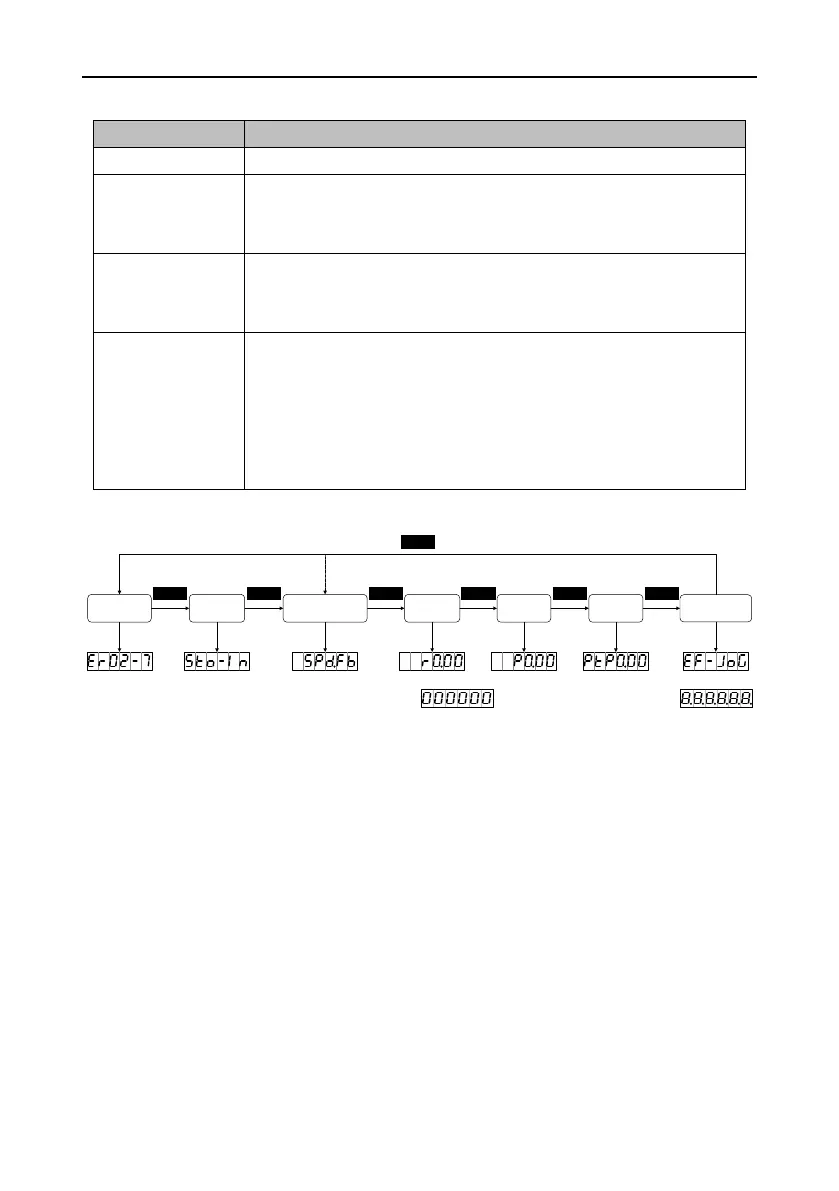
After the drive is powered on, the panel displays about 1 second and then
about 1 second. After that, the common monitoring mode is entered.
1. Press MODE to circularly switch between different modes in the sequence of "Common
monitoring mode" → "Monitoring mode" → "Parameter mode" → "PTP mode" → "Auxiliary
function mode" → "Fault mode" → "STO mode". If there is no fault or no STO input, the fault
mode and STO mode can be skipped.
2. If a new fault occurs, the fault mode is entered automatically, but you can press MODE to switch
to another mode. If no key is pressed in 20 seconds, the fault mode is switched back
automatically.
3. In common monitoring mode, UP/DOWN can be used to switch between monitoring parameters.
Parameter names are displayed for 2.5 seconds, and then the values are displayed.
4. In parameter mode, SHIFT can be used to switch between group codes, and UP/DOWN can be
used to select codes for parameters in a group.


 To Next Page