AS64 series AC servo drive Fault handling
-273-
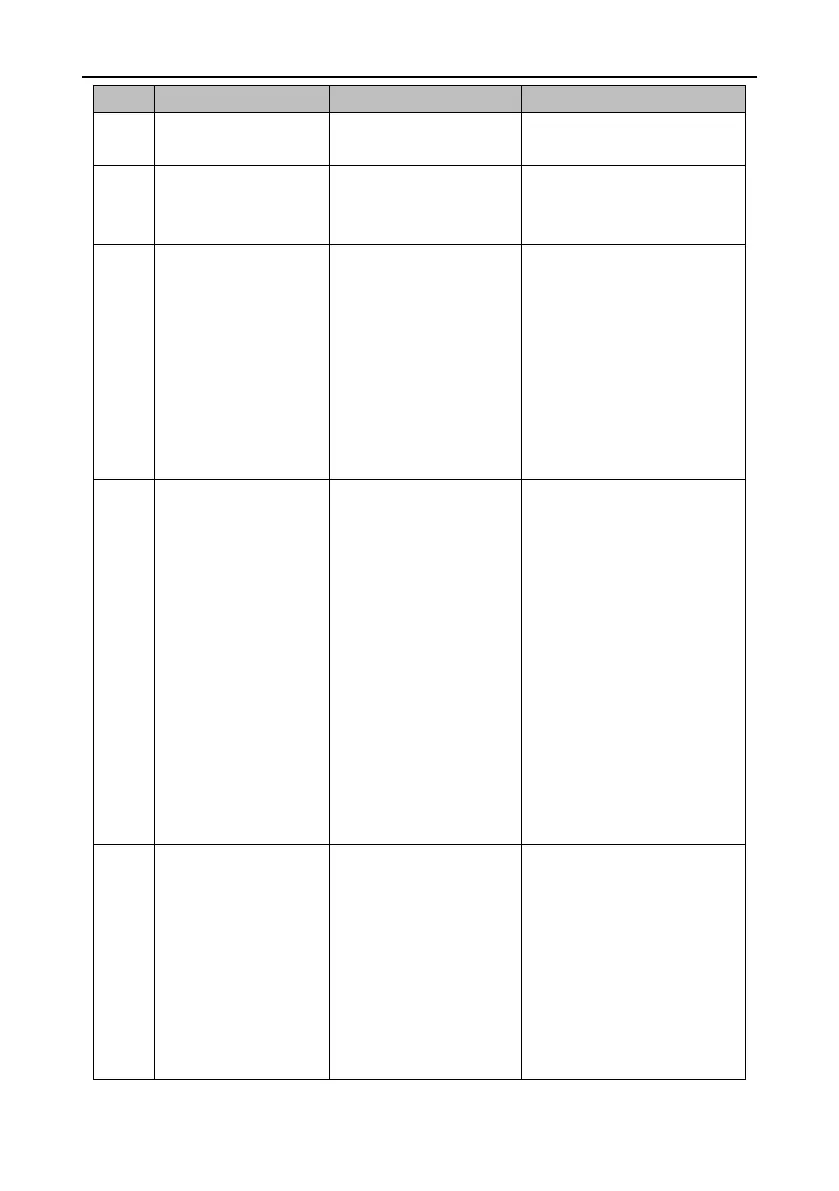
Software fault–Illegal
operation
I/O fault–Duplicate digital
input assignment
Two or more digital inputs
are configured with the
same function.
Set P3.00–P3.07 and ensure
each setting is unique.
I/O fault–Pulse input
frequency too high
The pulse input frequency
detected by the drive is
higher than the specified
frequency.
1. External input pulse
signal frequency is too high.
2. There is damage to the
internal pulse frequency
detection circuit of the drive.
1. Reduce the external input
pulse signal frequency.
2. If the fault persists though the
external input signal is normal,
replace the drive.
The DC voltage of the drive
main circuit is higher than
the specified voltage.
1. The grid voltage is too
high.
2. No brake resistor or pipe
is connected during braking
or the brake resistor is
damaged.
3. The DEC time in the stop
process is too short.
4. The internal DC voltage
detection circuit of the drive
is damaged.
1. Ensure the grid input voltage is
within the allowed range.
2. Ensure the internal brake
resistor is not loose or damaged.
Ensure the external brake
resistor is not damaged.
3. Increase the DEC time.
4. Check R0.07 when the drive is
disabled. If it is abnormal and
does not match the grid input
voltage, replace the drive.
Main circuit undervoltage
The DC voltage of the drive
main circuit is higher than
the specified voltage.
1. The grid voltage is too
low.
2. The buffer relay is not
closed.
3. The drive output power is
too high.
1. Ensure the grid input voltage is
within the allowed range.
2. Repower on the drive. Ensure
the buffer relay is closed. If the
buffer relay is closed, there is a
sound indicating actuation.
3. Check R0.07 when the drive is
disabled. If it is abnormal and


 To Next Page