105
Appendix C Resetting to the Factory Default State
If for any reason the current activated configuration fails, or you have repeated errors that you cannot fix,
Sequoia 4K60 provides two methods for you can clear all memorized settings and restore the Sequoia
4K60 to the factory default configuration.
C.1 Using Web Browser-based GUI
To restore the Sequoia 4K60 to the factory default configuration, perform the following steps:
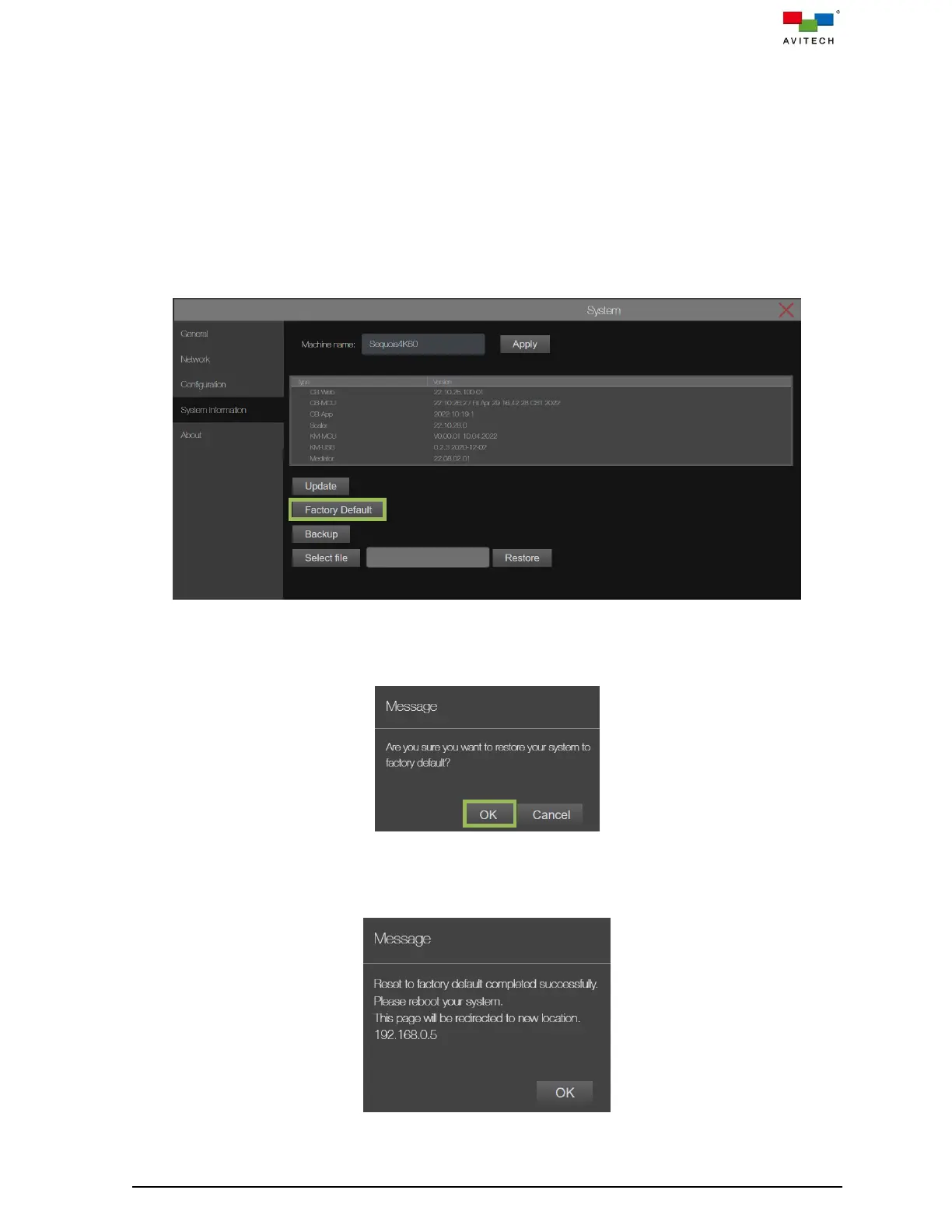
Step 1. Click Factory Default to start the reset process.
Figure C.1.1 System Page: System Information Factory Default
Step 2. When prompt appears onscreen warning message window, click OK to complete the process of
resetting to its factory default state.
Figure C.1.2 Warning Message Window to Confirm the Factory Default Process
Step 3. Reboot Sequoia 4K60 (power OFF, and then power ON) when the prompt appears onscreen to
complete the process of resetting to its factory default state.
Figure C.1.3 Reboot to Complete Reset to Factory Default Process



 To Next Page