97
A.2 “Surfer” Feature on Non-uniform Quad Layout
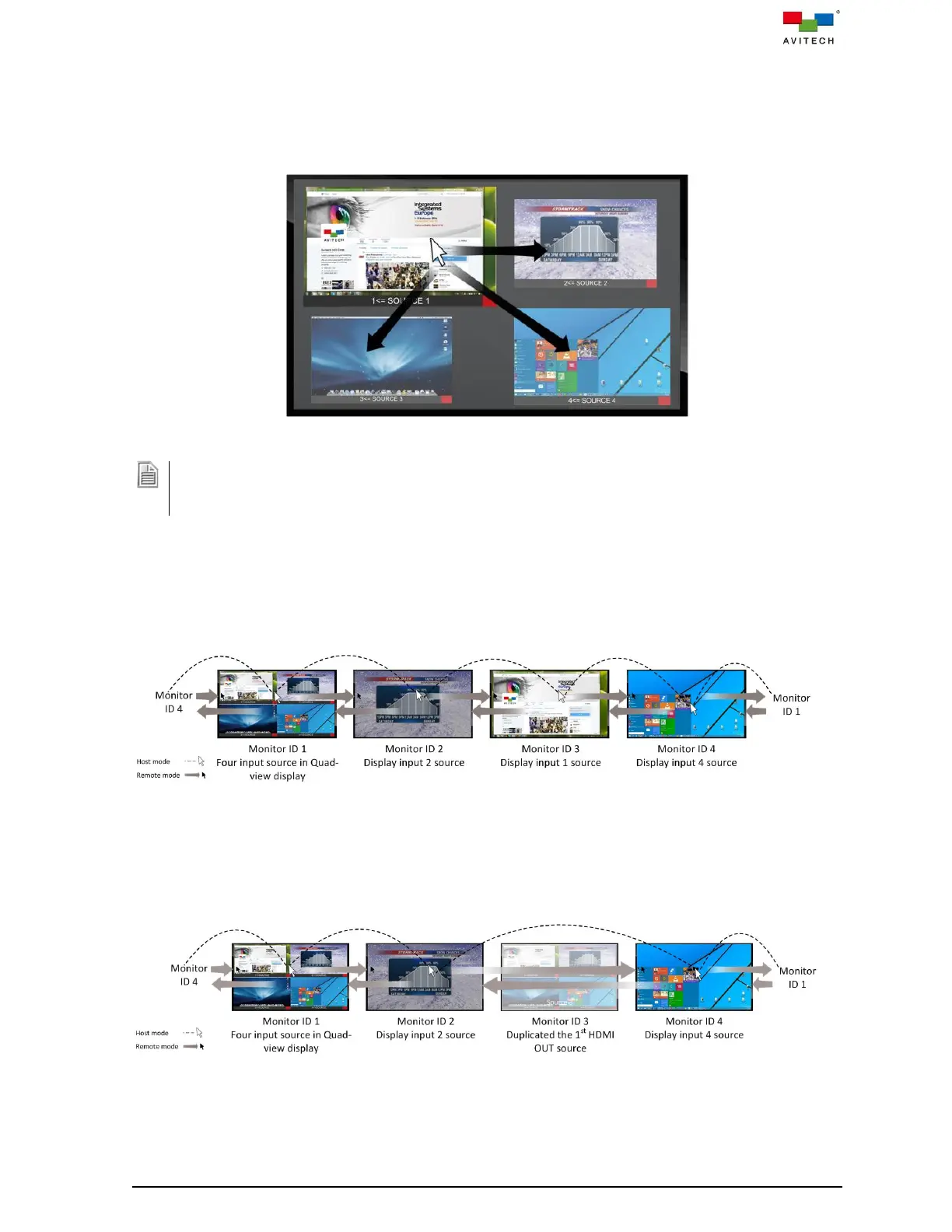
Below figure shows possible “Source” window control switching actions. By moving the mouse from one
“Source” window to the other transfers control from the former window to the target window. No
“Source” window control switching action will occur upon moving the mouse to the window sides without
arrow and shaded area indicators.
Figure A.2.1 “Surfer” Feature on Non-uniform Quad Layout
Scenario:
In case of overlaying “Source” windows, switching of control will occur when the mouse cursor has left the
area where the 2 “Source” windows overlay.
A.3 “Surfer” Feature on Workstation Operation
Below figure shows possible “Source” window control switching action upon moving the mouse to the
sides of the window/monitor. Move the mouse from one “Source” window to the next transfers control
from the former window/monitor to the latter one.
Figure A.3.1 “Surfer” Feature on Workstation Operation
A.4 “Surfer” Feature on Routed Duplicated Source in Workstation Operation
Below figure shows possible control switching action when the monitor is displaying a duplicated
multiview layout of the HDMI OUT 1, the K/M control will be skipping and switching to next monitor.
Figure A.4.1 “Surfer” Feature on Duplicated Source at Workstation Operation



 To Next Page