13
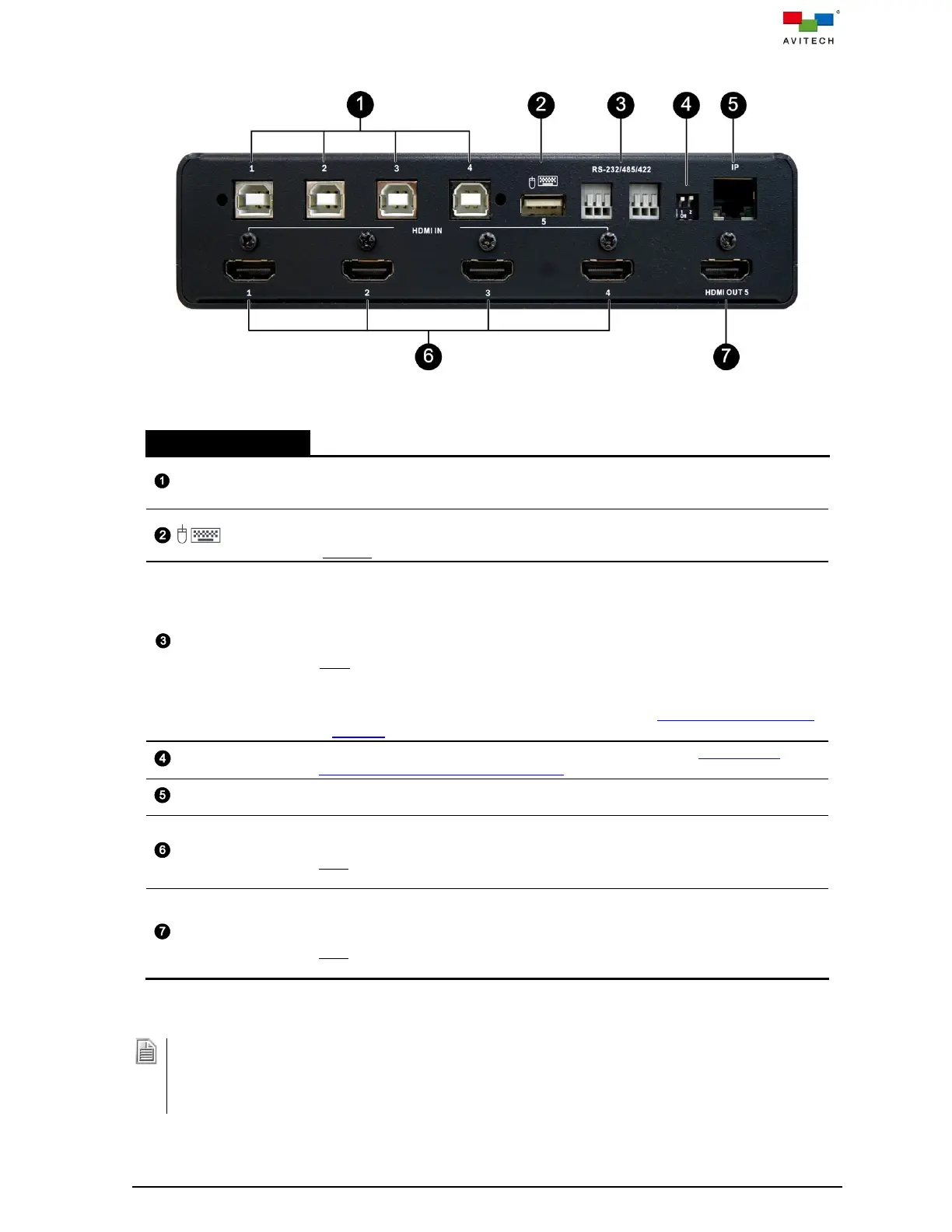
Figure 1.4.2 Sequoia 4K60 Rear Panel Components
Four USB Type-B connectors for connecting the respective computers’ USB
Type-A ports via standard USB A/B cables; and transmission of keyboard/mouse
control signals to source computers.
USB Type-A connector for connecting mouse/keyboard (multiple USB devices
can be connected with a USB hub) and controlling the display computer system
(Remote mode) on the monitor connected to HDMI OUT 5.
RS-232/485/422
(3-pin terminal block)
Reserved for future functions:
Serial ports communication protocol support RS-232, RS-485 or RS-422.
RS-232: for using Avitech’s ASCII commands or using third-party controller to
control the Sequoia 4K60.
RS-485/RS-422: for using third-party controller to control Sequoia 4K60.
Note:
1. For RS-485 and RS-422 protocol can only support either RS-485 or RS-422 in a
time.
2. For the pin assignment for RS-232/485/422, refer to Appendix (D) “Serial Port
Pin Out” for more details.
Resets the Sequoia 4K60 to factory default settings. Refer to Appendix (C)
“Resetting to the Factory Default State” for more details.
For connecting to the Web browser-based GUI and control using ASCII/Https
commands via a network connection (Protocol: TCP/IP, UDP)
Four HDMI Type-A connectors for HDMI / DVI-D input sources (DVI to HDMI
adapters may be needed).
Note: Transmission of audio signal is not included when using the DVI to HDMI
adapter.
HDMI Type-A connector for routing HDMI IN 1 – 4 source signal in single-view
fullscreen display on the connected monitor (HDMI to DVI adapters may be
needed).
Note: Transmission of audio signal is not included when using the DVI to HDMI
adapter to connect to monitor.
Table 1.4.2 Sequoia 4K60 Rear Panel Components Description
1. Non-standard keyboards i.e. keyboards require manually installation of drivers are not supported.
2. Compatibility between the computer and the Sequoia 4K60 may depend on the computer’s BIOS Setup.
Refer to the computer’s BIOS Setup and make sure “USB port” is enabled if this item exists in the
computer’s BIOS Setup (typically found in the “Advanced” or “Onboard Device Configuration” menu).



 To Next Page