Using the Configuration Editor
Operator Manual for the Baxter ExactaMix 2400 Compounder
Page 134 53007410 Rev. C
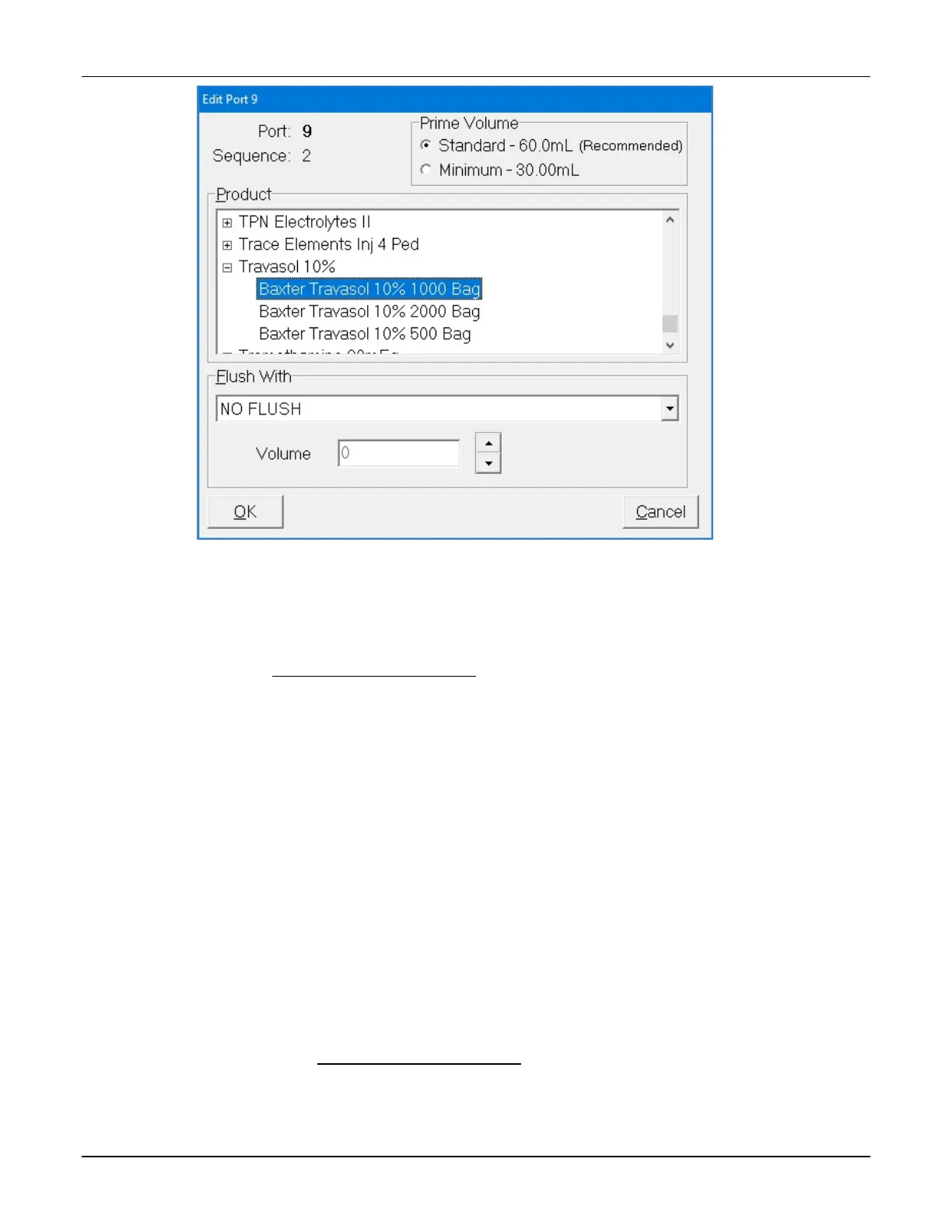
Edit Port <number> window
4. At the Edit Port <number> window:
a. Select the Product to associate with the port.
NOTE: For a product to appear in the list, it must first be in the formulary. Refer
to Using the Formulary Editor on Page 139.
b. Select the Prime Volume. You can leave the standard volume that is
automatically selected, or select the minimum volume.
Tip! Baxter recommends using the standard prime volume to ensure that the
inlets are primed and any bubbles are removed.
NOTE: The prime volume is used during setup of the compounder. This volume
must be set for each product that is in each configuration. Auto-addition
ingredients are always primed with the standard volume.
c. If the selected product requires an ingredient flush after it is delivered, select the
flush ingredient in the Flush With list and set the flush volume in the Volume
field.
NOTE: For example, to force a flush when lipids are pumped in a 3-in-1 bag, set
the port with the appropriate flush ingredient and volume. Typically, the flush
ingredient is the Universal Ingredient, but it can be any ingredient in the
configuration and the formula. For an ingredient to appear in the Flush With list,
it must first be specified as an allowable Universal Ingredient in the formulary.
Refer to Using the Formulary Editor on Page 139.
d. Tap OK.



 To Next Page