Installing the Compounder
Operator Manual for the Baxter ExactaMix 2400 Compounder
Page 24 53007410 Rev. C
NOTE: If the main module is near a wall, there may not be enough space behind the
main module to tip it back. You can move the compounder forward by lifting the front
of the base plate slightly and sliding it toward you.
WARNING
Using the support legs will reduce the possibility of pinching your hands when
you connect the cord and cables.
The power cord must be unplugged from the main AC
you connect or disconnect the display and load cell.
The power cord must be positioned so that the plug is easily accessible.
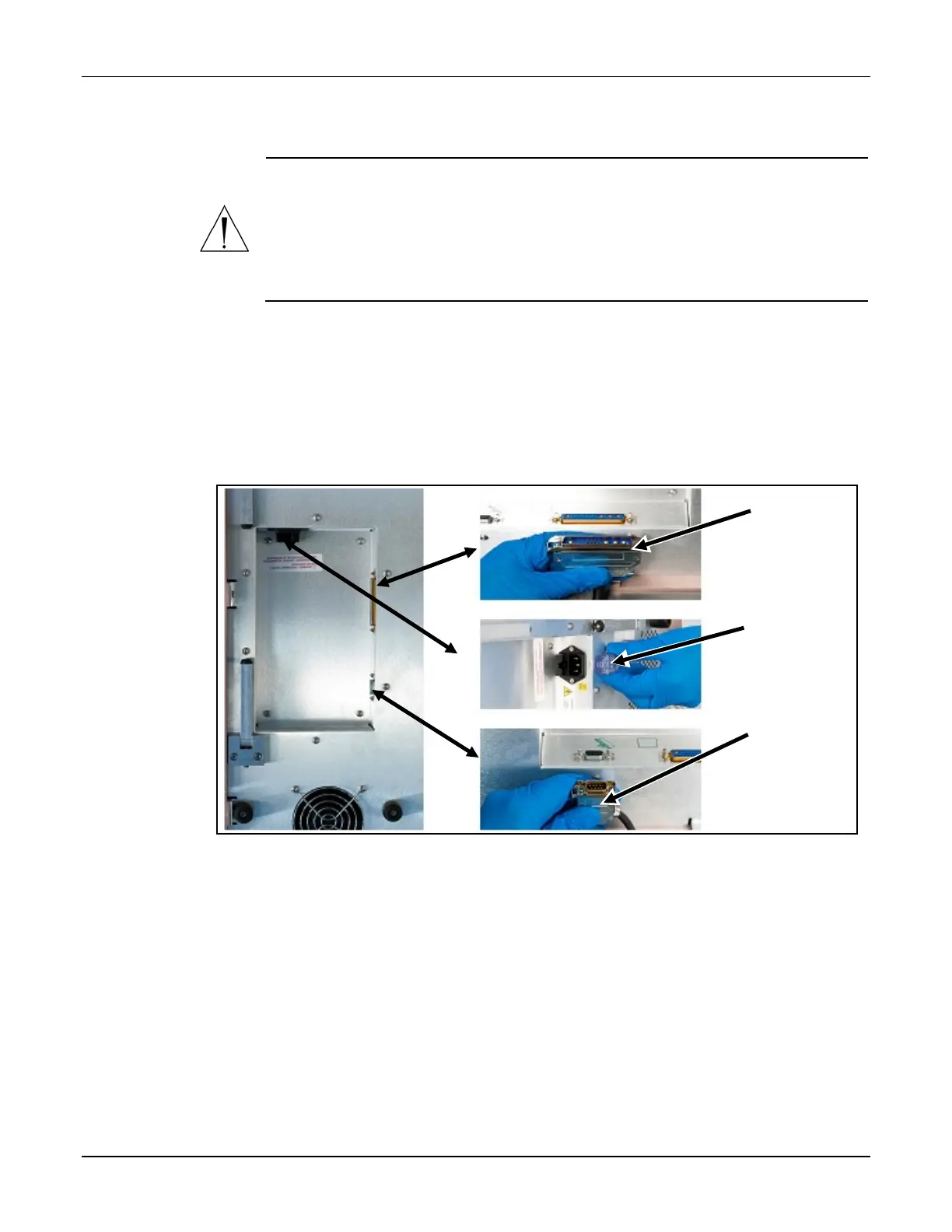
6. Under the main module, connect the following cord and cables. Reach under the main
module with your palm facing up.
a. Connect the power cord.
b. Connect the cable for the display. Squeeze the ends of the connector to unlock it,
connect it, then release to lock it into place.
c. Connect the cable for the load cell. Squeeze the ends of the connector to unlock
it, connect it, then release to lock it into place.
Connecting the cord and cables
NOTE: The above pictures depict ROHS unit plug placement. Plug locations for Non-ROHS units
are slightly different.
Cable for
the display
Power cord
Cable for the
load cell



 To Next Page