BD BACTEC FX40™ Instrument User’s Manual
124
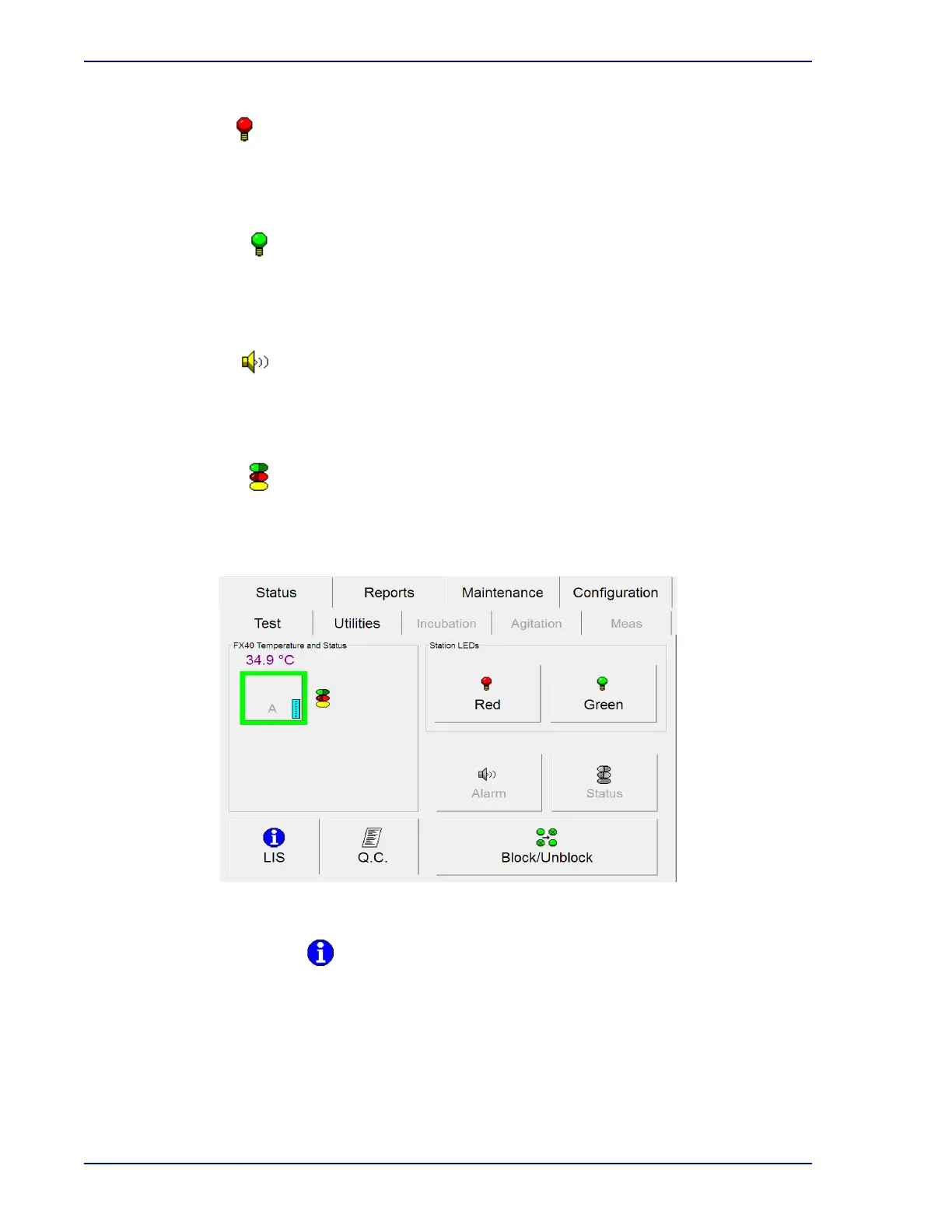
Red button
Select to illuminate all the red station LEDs in the instrument for 5 seconds. If any of the red
LEDs does not illuminate, block the station and note it on your Maintenance QC Report. A
door must be open for this button to be active. Otherwise the button is grayed out.
Green button
Select to illuminate all the green station LEDs in the instrument for 5 seconds. If any of the
green LEDs does not illuminate, block the station and note it on your Maintenance QC Report.
A door must be open for this button to be active. Otherwise the button is grayed out.
Alarm button
Select to sound the audible alarm. All instruments must be closed for this button to be active.
The alarm sounds for 2.5 seconds at the middle volume setting, pauses, and repeats. If the
alarm does not sound, note this in your Maintenance QC Report and contact BD.
Status button
Select to illuminate all the system status indicators for 5 seconds. All instruments must be
closed for this button to be active. If any of the LEDs does not illuminate, note it on your
Maintenance QC Report and contact BD.
Figure 5-29 – Maintenance – Test Display
LIS Host Query button
Select to send a query to the LIS system requesting demographic information for orphan vials
in the instrument.
This button is disabled in a BD EpiCenter™ configuration.











 To Next Page