5 – Reference
99
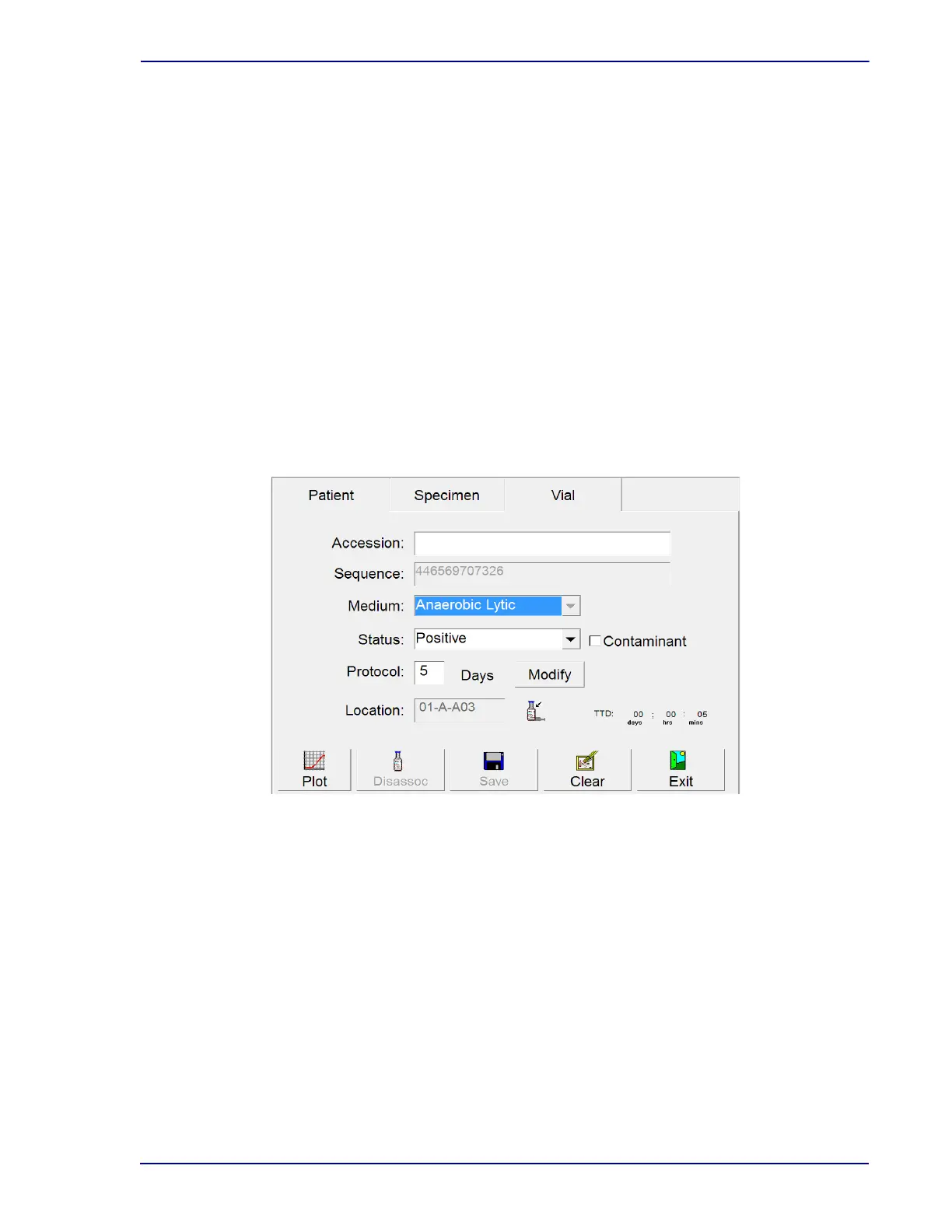
Culture – Vial Display Fields:
Accession
Scan or type in the accession number up to 20 alphanumeric characters, excluding the
following:
* ? [ ] ! # |
Accession number cannot be 12 digits long AND begin with the numbers “44.”
Sequence
Scan or type in the vial barcode sequence number located on the vial label. Sequence number
is a 12-digit number beginning with “44.”
Medium
If the sequence number is scanned or typed in, the medium type is automatically entered in
this field. If a replacement barcode is scanned (medium type 99), the correct medium type can
be selected by selecting the arrow next to the Unknown medium type, and selecting the
correct medium type.
Figure 5-10 – Culture – Vial Display
Status
The current status of the vial. Statuses include: Pending, Ongoing, Positive, Negative. These
statuses are explained in Section 4.2.4. In addition, you can select Manual Positive or Manual
Negative in the drop-down box if you have determined through offline testing that a vial is
positive or negative.
Contaminant checkbox
If the vial status is Positive or Manual Positive and the state is not Anonymous, this checkbox
appears. Check the box to indicate that testing has confirmed that the organism is a
contaminant. The default value is unchecked.
Protocol
The default protocol for the medium type entered is shown. To change this protocol, select
Modify and refer to that information below.











 To Next Page