M (E3.1) 1/2023 page 90/136
The waiting icon shows how much time there is left to touch the currently activated box. If the
box is not touched withing this period, calibration is aborted and the display changes to
Normal display.
After completing the calibration, i.e., touching all four boxes, the display changes to Normal display.
15.5 Network and communication
For these settings at least the “Admin” authorization level is required.
15.5.1 Ethernet
15.5.1.1 Configuration
Path: Main menu > Settings > Ethernet
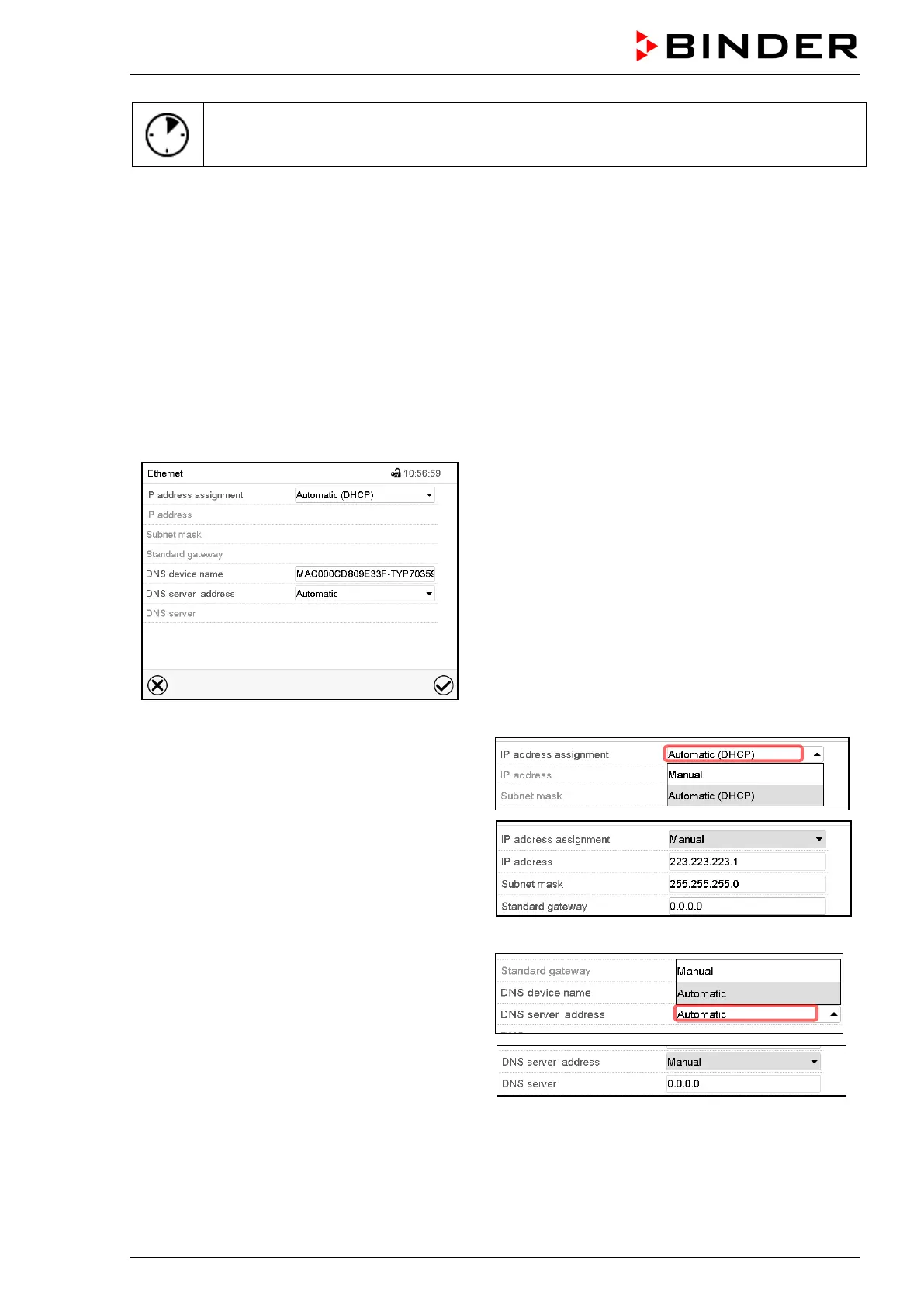
“Ethernet” submenu.
• In the field “IP address assignment” select the
desired setting “Automatic (DHCP)” or “Man-
ual”.
With selection “Manual” you can enter the IP-
address, the subnet mask and the standard
gateway manually.
• Select “DNS device name” and enter the DNS device name. Confirm entry with Confirm icon.
• In the field “DNS server address” select the de-
sired setting “Automatic” or “Manual”.
With selection “Manual” you can enter the DNS
server address manually.
After completing the settings, press the Confirm icon to take over the entries and exit the menu, or press
the Close icon to exit the menu without taking over the entries.



 To Next Page