M (E3.1) 1/2023 page 110/136
We recommend taking out a maintenance agreement. Please consult BINDER Service.
BINDER telephone hotline: +49 (0) 7462 2005 555
BINDER fax hotline: +49 (0) 7462 2005 93555
BINDER service hotline USA: +1 866 885 9794 or +1 631 224 4340 x3 (toll-free in the USA)
BINDER service hotline Asia Pacific: +852 390 705 04 or +852 390 705 03
BINDER Internet website http://www.binder-world.com
BINDER address BINDER GmbH, post office box 102, D-78502 Tuttlingen
International customers, please contact your local BINDER distributor.
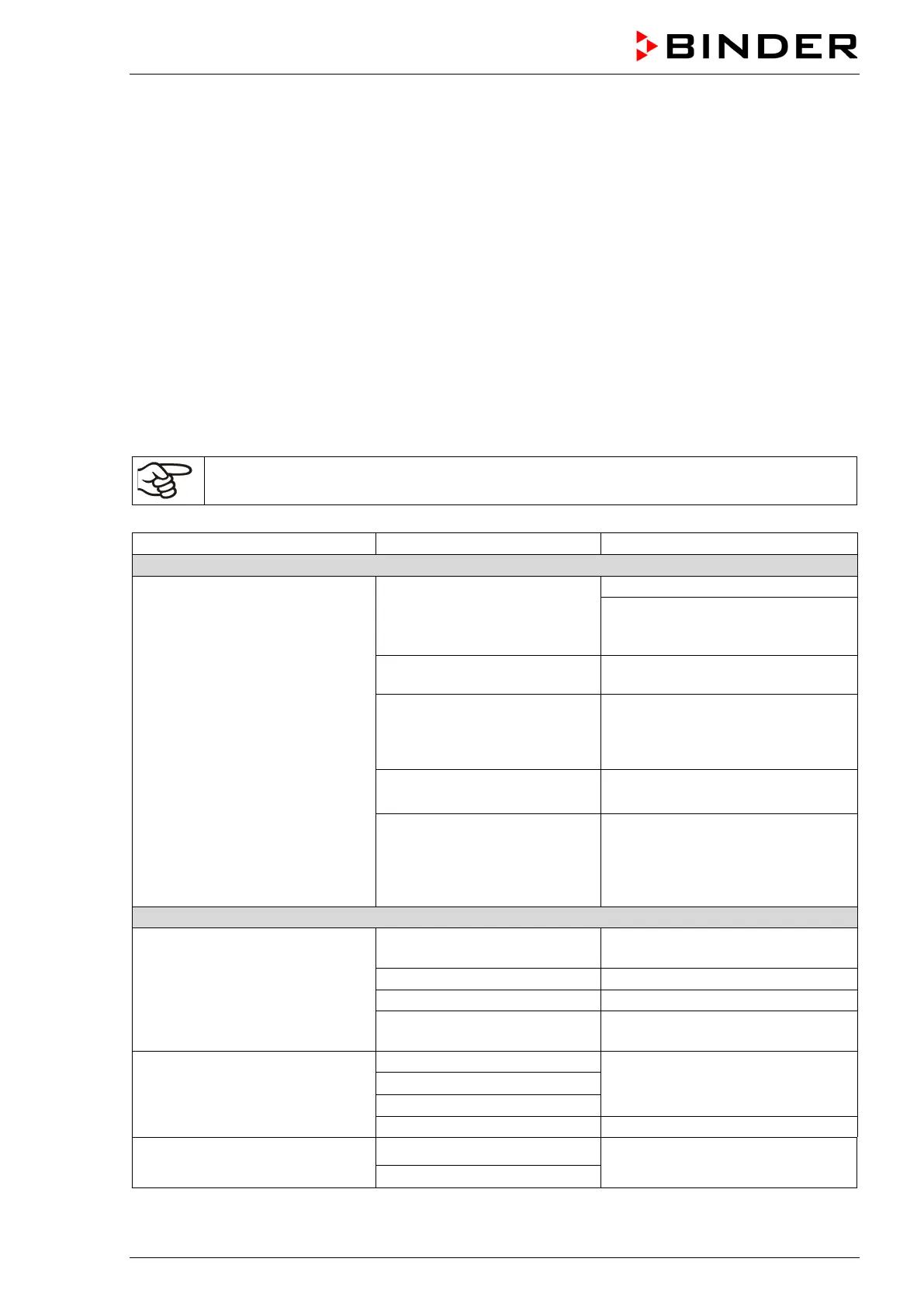
20.3 Simple troubleshooting
Defects and shortcomings can compromise the operational safety of the chamber and can lead to risks and
damage to equipment and persons. If there are is a technical fault or shortcoming, take the chamber out of
operation and inform BINDER Service. If you are not sure whether there is a technical fault, proceed ac-
cording to the following list. If you cannot clearly identify an error or there is a technical fault, please contact
BINDER Service.
Only qualified service personnel authorized by BINDER must perform repair.
Repaired chambers must comply with the BINDER quality standards.
Chamber without function.
No power supply.
Check connection to power supply.
Check whether the chamber is
turned on with the On/Off switch (4)
or main power switch (11).
Wrong voltage.
Check power supply for correct
voltage (chap. 4.1).
Chamber fuse has responded.
Check chamber fuse and replace it
if appropriate (chap. 22.3). If it re-
sponds again, contact BINDER ser-
Defective controller. Contact BINDER service.
Overtemperature protective
device class 1 has turned off
the chamber.
Disconnect the chamber from the
power supply for at least 10 sec-
onds and let it cool down. If the de-
vice responds again, contact
Set-point temperature is not
reached after specified time.
Chamber door not properly
closed.
Completely close chamber door.
Calibrate and adjust controller.
Wrong voltage.
Check the power supply for correct
voltage (chap. 4.1).
Chamber heating permanently,
set-point not held.
Contact BINDER service.
Defective semiconductor relay.
Calibrate and adjust controller.
Chamber doesn’t heat up. Heat-
ing icon is displayed.
Defective heating element.
Contact BINDER service.
Defective semiconductor relay.



 To Next Page