14
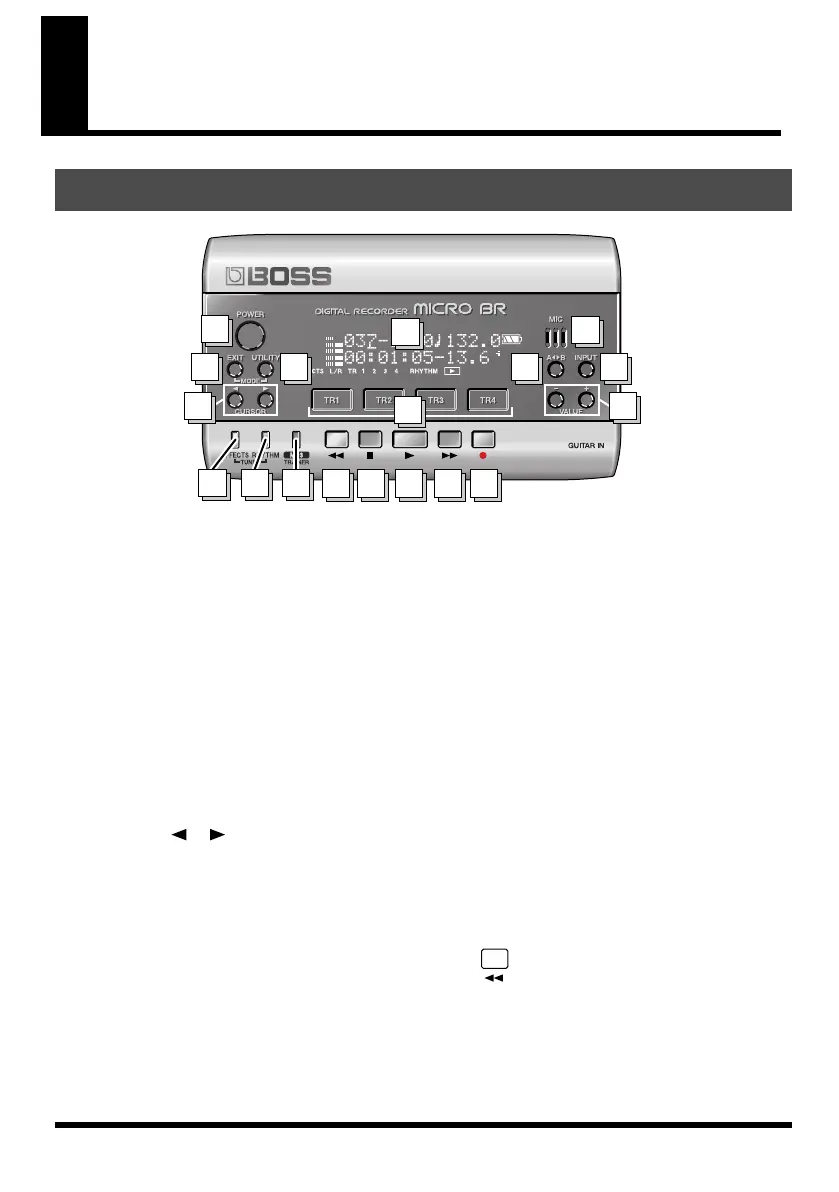
Panel Descriptions
fig.panel-L.eps
1.
[POWER]
This is the power button. It turns the power
on/off.
2.
[EXIT]
Returns you to the previous screen, or
cancels an operation.
3.
[UTILITY]
Accesses a variety of functions, such as
memory card operations and track editing.
MODE
• Hold down [EXIT] and press [UTILITY]
Selects the recording mode.
4.
CURSOR[ ][ ]
Use these buttons to move the cursor or
move between pages.
5.
[EFFECTS]
Turns the effect on/off, and accesses a
screen where you can edit the settings.
6.
[RHYTHM]
Accesses the screen for rhythm various
settings.
TUNER
• Hold down [EFFECT] and press [RHYTHM]
Turns the built-in tuner on/off.
7.
[MP3/TRAINER]
Switches you to a mode in which you can
play or record MP3/WAV data.
In this mode you can also use the Phrase
Trainer function.
8.
[TR1]–[TR4]
Select the track you want to record, or access
a screen where you can control the track
volume. In some screens, these serve as
function buttons, which offer quick access to
a variety of functions.
For example, wherever [TR1] (SNG) appears
in this manual, it means that pressing [TR1]
will select “SNG,” which is shown in the
screen.
9.
(Rewind)
Rewinds the song while you hold down this
button.
Top Panel
8
1
2
3
4
5
67
9 10 11 12
14
13
15
17
18
16
MICRO-BR_e.book 14 ページ 2009年5月28日 木曜日 午後2時26分



 To Next Page