49
Section 1. Recording and playing back
Section 1
8.
Play back the song, and use the INPUT
LEVEL dial to adjust the volume of the
input source.
Listen and compare the input source with
the track to be re-recorded, and adjust the
INPUT LEVEL dial so that there is no
difference in volume.
9.
Move to a location slightly earlier than the
point at which you want to begin re-
recording.
10.
Press to enter the recording
standby condition, and then press
.
Recording will begin automatically at the
point you specified as the punch-in location.
When you reach the punch-out point, you
will automatically return to playback.
11.
When you’ve finished recording, press
to stop.
12.
Return to a time location where you
began recording, and then play back.
Listen to the re-recorded result.
The Repeat function (p. 45) lets you repeatedly
play back a specified region (the loop region).
If you use the Repeat function in conjunction
with auto punch-in/out, the recorded result will
be played back immediately.
If you’re not happy with your recording, you can
continue re-recording simply by pressing .
“Loop recording” refers to the method of using
the Repeat function in conjunction with auto
punch-in/out to record repeatedly.
In the following example, we’ll re-record a
portion of track 1 which you recorded earlier.
For details on how to specify the region to be re-
recorded (the punch-in/out points), refer to the
preceding section “Auto punch-in/out.”
1.
Specify the punch-in and punch-out
points as described in steps 1–2 of
“Playing back repeatedly (Repeat) (p.
45)”.
2.
Press [TR3] (R&A).
The region you specified will be the auto
punch-in/out region. In the display, ,
, and “A.PUNCH” will be lit.
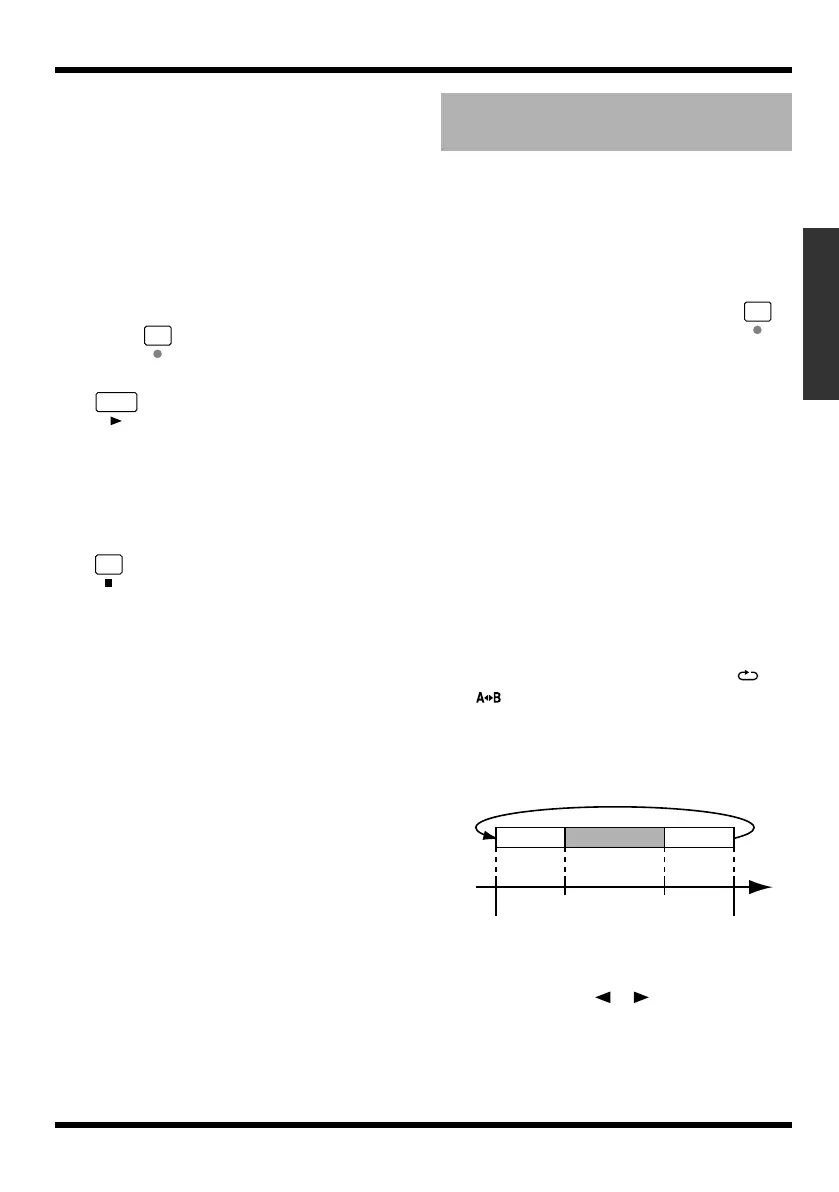
One measure before and after the punch-in/
out region will be automatically specified as
the repeat region.
fig.01-240
3.
Press one of the [TR1]–[TR4] buttons.
4.
Use CURSOR [ ][ ] to access the
Rec Track screen.
Repeatedly recording the
same region (Loop Recording)
PlaybackPlayback
Repeat
Repeat start point
(A)
Punch-In Punch-Out
Repeat end point
(B)
Time
Recording
1 meas.
1 meas.
MICRO-BR_e.book 49 ページ 2009年5月28日 木曜日 午後2時26分



 To Next Page