21
Getting ready to use the MICRO BR
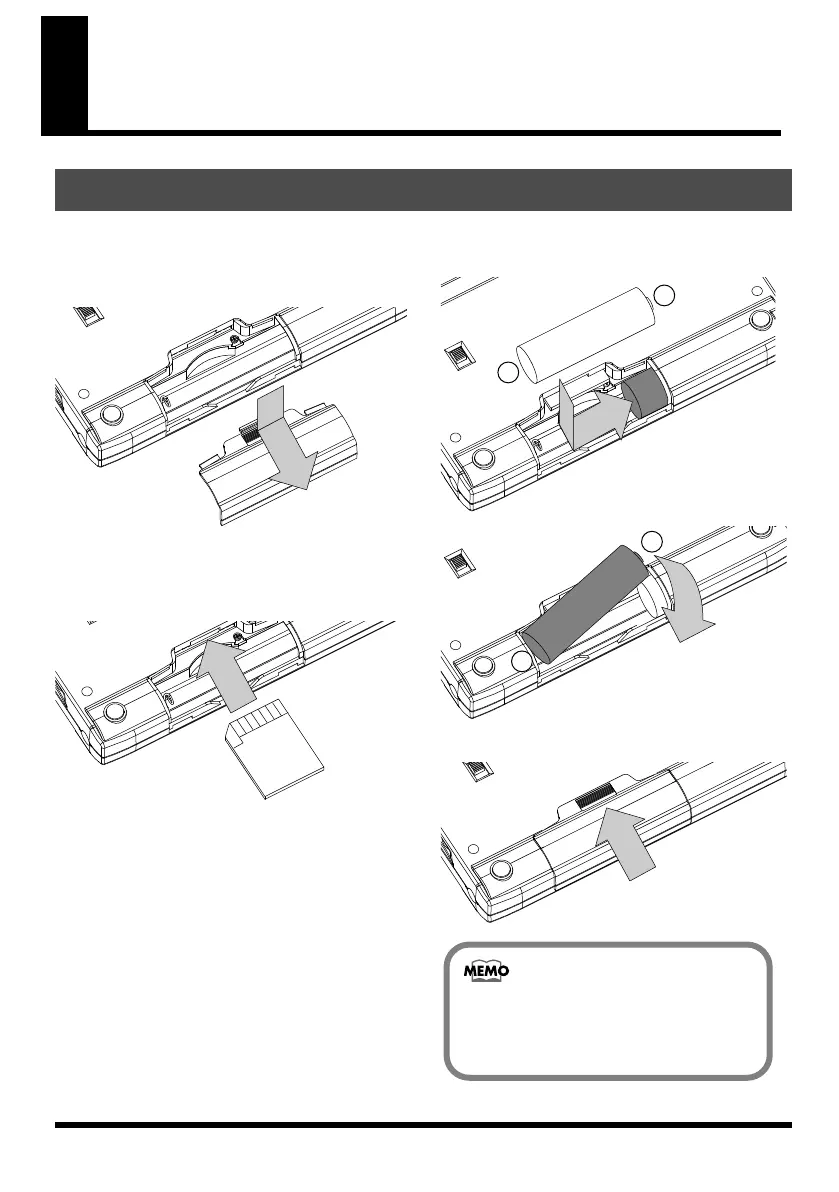
1.
Make sure that power is off.
2.
Slide the battery cover in the direction of
the arrow, and remove it.
fig.batt-cover1.eps
3.
If batteries are already installed, remove
them from the battery compartment.
4.
Push the memory card inward.
fig.batt-cover2.eps
5.
Install two AA batteries, making sure to
observe the correct polarity (+/-).
fig.batt-cover3.eps
fig.batt-cover4.eps
6.
Reattach the battery cover.
fig.batt-cover5.eps
Inserting batteries and a memory card
-
+
-
+
When the MICRO BR is shipped from the
factory, a SD card containing a demo
song is installed.
MICRO-BR_e.book 21 ページ 2009年5月28日 木曜日 午後2時26分



 To Next Page