36
Using the MP3 player
In addition to operating as a multi-track recorder,
the MICRO BR can be switched to “MP3 mode”
and used as an MP3 or WAV file player.
For details, refer to “Section 5. Using MP3 player”
(p. 93).
Here’s how to play back the included demo MP3
file.
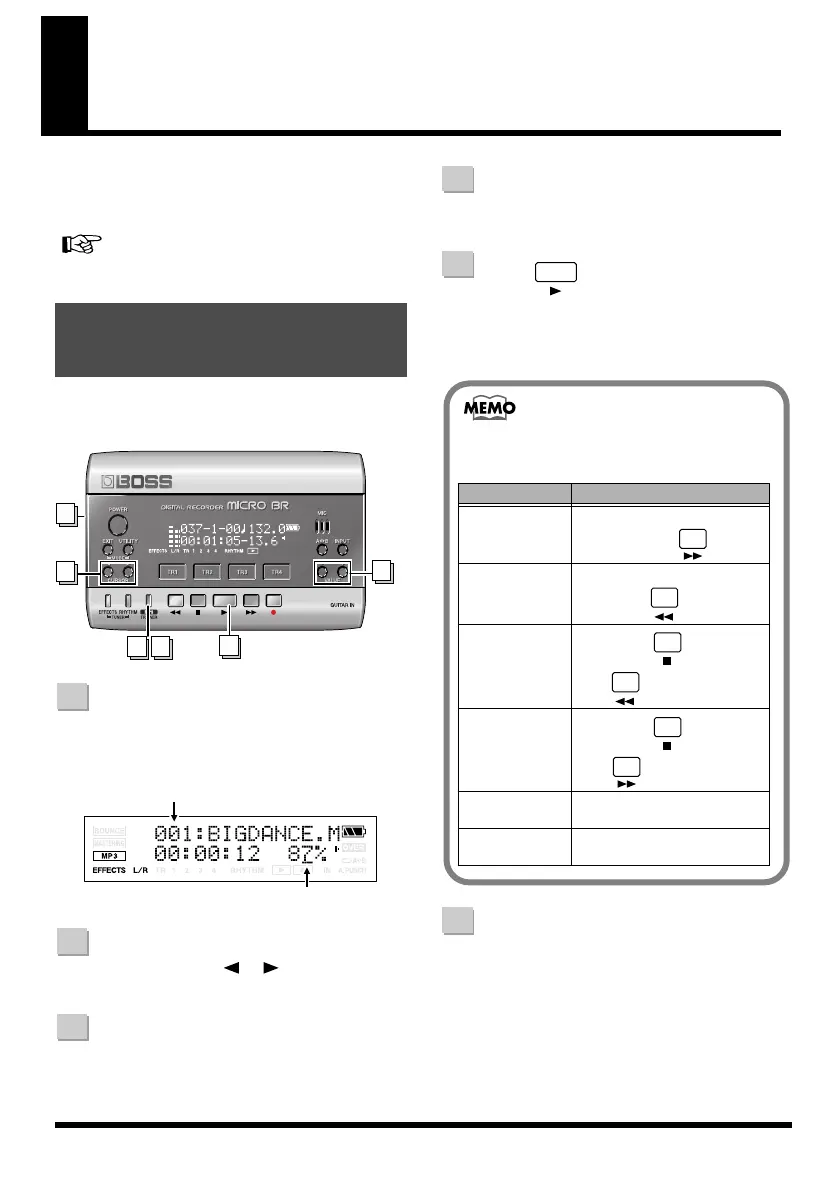
fig.QS-MP3-play.eps
Press [MP3/TRAINER] to switch to
MP3 mode.
The MP3 player screen will appear.
fig.Disp-mp3-mode.eps
Use CURSOR [ ][ ] to move the
cursor to the file number.
Use VALUE [-][+] to select
“001:BigDance”
Turn the VOLUME dial to lower the
volume.
Press .
The MP3 demo file will begin playing.
Slowly turn the VOLUME dial to adjust the
volume.
When you finished MP3 mode, press
[MP3/TRAINER] again.
Playing the demo MP3
file
1 6
5
2
4
3
1
Playback speed
File Number
2
3
4
5
You can use the following operations when
the MP3 mode.
Action Operation
Fast-forward The file will fast-forward while
you hold down .
Rewind The file will rewind while you
hold down .
Move to the
beginning of the
current file
Hold down and
press .
Move to the
ending of the cur-
rent file
Hold down and
press .
Move to the
preceding file
Press [+] when the cursor on
the file number.
Move to the next
file
Press [-] when the cursor on the
file number.
6
MICRO-BR_e.book 36 ページ 2009年5月28日 木曜日 午後2時26分



 To Next Page