Scan Using Your Computer
100
5
TWAIN Driver Settings 5
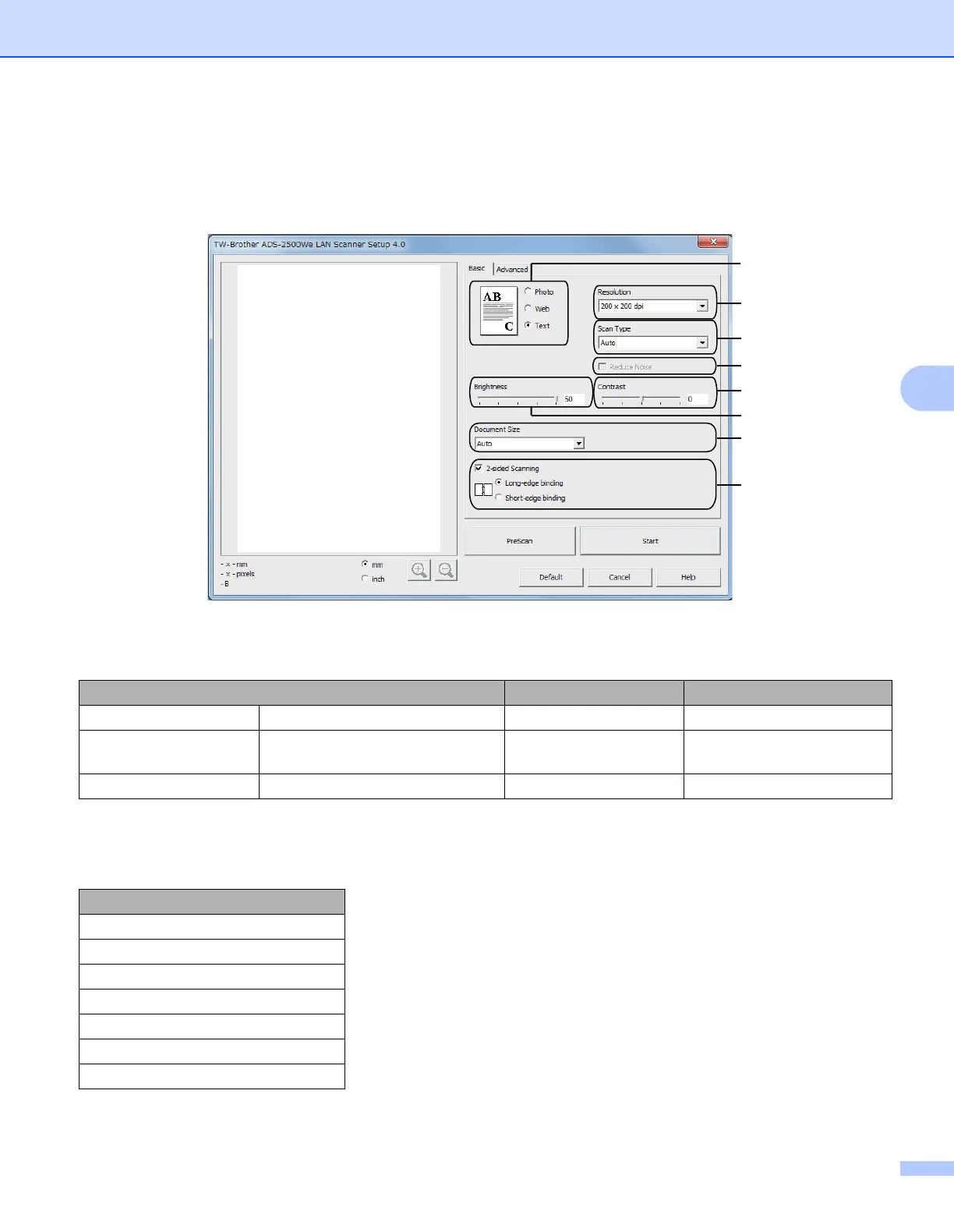
Click either the Basic tab or the Advanced tab for TWAIN driver settings.
Basic tab
1 Scan (Image Type)
Select Photo, Web, or Text.
2 Resolution
Select a scanning resolution from the Resolution drop-down list. Higher resolutions take more memory
and transfer time, but produce a finer scanned image.
Scan (Image Type) Resolution Scan Type
Photo Use for scanning photo images 300 x 300 dpi 24bit Color
Web Use for attaching the scanned
image to web pages
100 x 100 dpi 24bit Color
Text Use for scanning text documents 200 x 200 dpi Black & White
Resolution
100 x 100 dpi
150 x 150 dpi
200 x 200 dpi
300 x 300 dpi
400 x 400 dpi
600 x 600 dpi
1,200 x 1,200 dpi
1
3
4
6
5
8
7
2





 To Next Page