Scan Using Your Computer
111
5
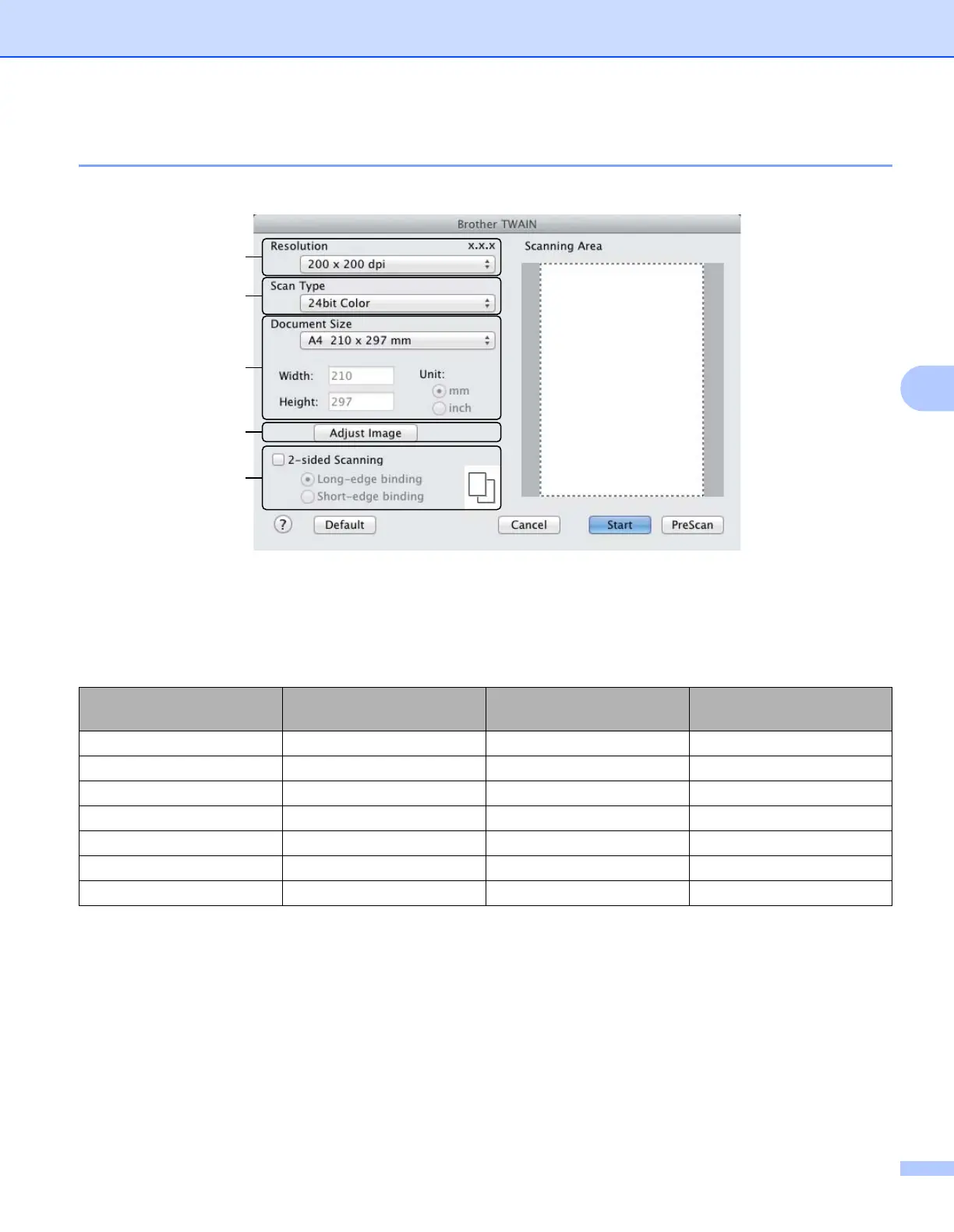
TWAIN Driver Settings 5
1 Resolution
Select a scanning resolution from the Resolution pop-up menu. Higher resolutions take more memory
and transfer time, but produce a finer scanned image.
2 Scan Type
Select one of the following:
Black & White
Use for text or line art images.
Gray (Error Diffusion)
Use for photographic images or graphics. (Error Diffusion is a method for creating simulated gray
images without using true gray dots. Black dots are put in a specific pattern to give a gray appearance.)
(The Brother TWAIN screen supports languages specified in Presto! PageManager.)
Resolution Black & White/Gray (Error
Diffusion)
256 Color True Gray/24bit Color
100 x 100 dpi Yes Yes Yes
150 x 150 dpi Yes Yes Yes
200 x 200 dpi Yes Yes Yes
300 x 300 dpi Yes Yes Yes
400 x 400 dpi Yes Yes Yes
600 x 600 dpi Yes Yes Yes
1,200 x 1,200 dpi Yes No Yes
1
2
5
4
3











 To Next Page