131
9
9
Starting Cable Label Tool 9
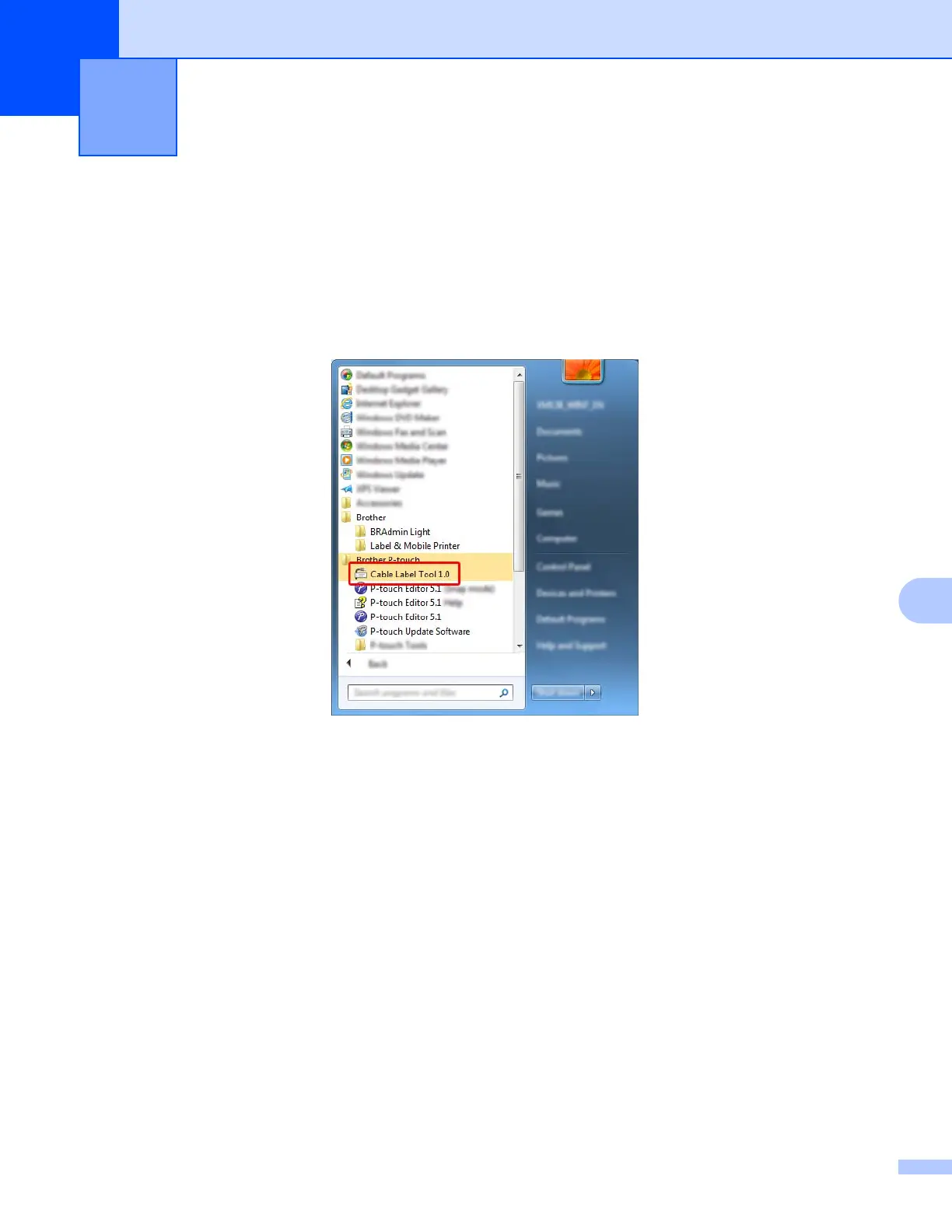
a Start the Cable Label Tool.
For Windows Vista
®
/ Windows
®
7 / Windows Server
®
2008 / Windows Server
®
2008 R2:
From the Start button, click [All Programs] - [Brother P-touch] - [Cable Label Tool 1.0], or
double-click [Cable Label Tool 1.0] shortcut icon on the desktop.
For Windows
®
8 / Windows
®
8.1 / Windows Server
®
2012 / Windows Server
®
2012 R2:
Click [Cable Label Tool 1.0] on the [Apps] screen or double-click [Cable Label Tool 1.0] on the
desktop.
For Windows
®
10:
From the Start button, select [All apps] and click [Cable Label Tool 1.0] under [Brother P-touch],
or double-click [Cable Label Tool 1.0] on the desktop.
How to Use Cable Label Tool 9





 To Next Page